You are evaluating Jobber at nine o’clock on a Sunday because something in your gut says “this is not quite built for what we do.” That feeling is real, and it is not because Jobber is a bad product. Jobber is an excellent product. It is a product that was built to serve fifty-plus home service trades, and junk removal is one of them, not the one it was built around.
This post compares Jobber with the four alternatives a junk removal owner actually considers in 2026: Housecall Pro, Workiz, FieldPulse, and Service Anchor. Our goal is to give you the same kind of honest walk-through a friend who has lived inside each product would give you. We build Service Anchor, so we have a dog in this fight, and we will be transparent where we think we win and where we think a competitor wins. (If you have already narrowed your shortlist to Jobber and Housecall Pro specifically, our head-to-head Jobber vs Housecall Pro comparison for junk removal goes deeper on just those two.)
- If you run a general contracting business with five to ten trades, Jobber is probably still the right call. Do not over-optimize.
- If you are losing deals to missed calls, Housecall Pro’s AI receptionist is the best in the category. Price it against the revenue you are leaking.
- If you want a platform built specifically around junk removal, garage doors, or locksmithing, Workiz has earned the spot. Be ready to pay.
- If you have outgrown Jobber and want deeper customization with US-based support, FieldPulse is the upgrade path.
- If you want the pipeline pre-configured for junk removal in ninety seconds, flat pricing transparency, and founders who pick up the phone, Service Anchor is worth a thirty-day test. Founding pricing is $29 a month, locked for life for the first 25 operators.
The three questions to ask before you pick a CRM
Every comparison article you read will list features. Feature lists lie. A feature you never use is a tax, not a benefit. Before you read any further, answer these three questions honestly.
1. Does the software match how your day actually works? Walk through a normal Tuesday in your head. The first call comes in at 7:15. You quote a garage cleanout, schedule the crew, send the on-my-way text, collect payment, ask for the review. Where does the software help, and where does the software make you do data entry that has nothing to do with the job? If the answer is “mostly data entry,” you have the wrong tool, no matter how many features it ships with.
2. How long from signup to your first real job on the board? If you are a one-to-three truck shop, you cannot afford a two-hour setup sprint followed by a week of “figuring it out.” You need to be running jobs on day one. Most CRMs built for broad home service assume you will invest hours configuring a price book, stage names, invoice templates, SMS templates, and integration plumbing. Some will. Most will not.
3. Will it grow with you without getting in your way? The opposite trap is a tool so lightweight you outgrow it in six months. You want enough room to add a second truck, a dispatcher, route optimization, and a real pipeline without a platform swap. That means the underlying architecture has to bend, not just the feature list.
Keep those three questions in your head as you read the sections below. Every one of these platforms wins on one of them and loses on another. The right answer for you depends on which trade-off you can live with.
The candidates at a glance
Pricing verified April 2026 against each vendor’s public pricing page. We removed annual-billing discounts from the primary column so you are comparing apples to apples on monthly cost. Add-ons noted where they are material to the comparison.
| Platform | Entry price (monthly) | Top tier (monthly) | Setup time | Junk-specific features | A2P SMS onboarding |
|---|---|---|---|---|---|
| Jobber | $49 (Core, 1 user) | $699 (Plus, 15 users) | 2 to 3 hours | General template | Self-serve |
| Housecall Pro | $59 (Basic, 1 user) | $329 (MAX, monthly billing) | 2 to 4 hours | General template | Self-serve |
| Workiz | $0 (Lite, 2 users) | $325 (Pro) | 1 to 2 hours | Trade-specific | Self-serve |
| FieldPulse | $65/user (Essentials) | $115/user (Premium) | 2 to 4 hours | General template | Self-serve |
| Service Anchor | $29 (Founding, first 25) | $79 (List) | ~90 seconds | Trade-specific | Automatic (ISV) |
A few notes before we go deeper. Jobber’s AI Receptionist runs $29 per month as an add-on. Workiz’s phone system and Genius Answering AI run roughly $100 and $200 per month respectively on top of the base plan. FieldPulse charges per user, which means a four-truck shop with a dispatcher on the Professional plan is $450 per month before any add-ons. Published prices are rarely the final price in this category.
If you are evaluating these vendors specifically for a dumpster rental operation rather than junk removal, the dumpster rental version of this comparison ranks them by box volume and breaks out the dumpster-native options (Docket, Dumpster Rental Systems) that do not appear here. And if you want the full category ranking rather than a Jobber-specific one, the best junk removal software in 2026 ranks every real option for a 1-to-5-truck shop, Service Anchor included, with current prices.
Jobber: best for broad general contractors
What Jobber nails
Jobber is the broadest and most polished field service platform in home services. The Jobber Academy is a content machine with thousands of how-to articles, template libraries, and grant programs. Jobber has forty-plus native integrations including QuickBooks Online, Stripe, Mailchimp, and CompanyCam. The mobile app is the best in the category after twelve years of iteration. Jobber AI ships working pricing hints and upsell suggestions. Jobber has 350,000-plus users and 13,000-plus App Store reviews. That density of social proof is real and takes years to build.
If you run a cleaning business, a landscaping crew, and a holiday lights operation out of the same truck, Jobber handles all three without a second thought. That breadth is the product.
Where Jobber falls short for junk removal
The same breadth that makes Jobber powerful makes it generic. Jobber’s price book ships empty. You add the line items yourself. For a junk removal operator, that means manually entering your truck load tiers, your disposal fees, your mattress upcharge, your recycling processing fees, your drive-time adjustments. Most operators budget an hour for the price book and end up spending three.
Jobber’s pipeline is a module. Leads are a CRM view. Quotes live on their own screen. Jobs are another screen. Invoices are another. The work of promoting a lead through to paid is yours, not the software’s. For a junk removal owner who does ten quotes a day, that small friction compounds into hours per week of clicking between modules.
Pricing at the small-shop level is another consideration. The $49 Core plan works for a solo owner but caps at a single user. Most two-truck shops with a dispatcher need the Connect tier at $119 per month for a single user or $169 per month for five. Over a year, Jobber plus the AI Receptionist add-on and a couple of extra seats clears $3,000, which is fine if the platform is saving you that much in time, and painful if it is not.
Finally, A2P 10DLC text messaging. If you want to send on-my-way texts from Jobber’s own number, you register your business brand and campaign yourself through The Campaign Registry. That process takes one to three weeks and trips up many owners who are not comfortable reading carrier compliance documentation. Jobber is not unique here. Every CRM in this comparison except Service Anchor has the same self-serve model.
Housecall Pro: best if missed calls cost you real money
What Housecall Pro nails
Housecall Pro’s CSR AI (branded as “AI Team” in their marketing) is the most established AI receptionist in home service software. It answers missed calls twenty-four seven, asks qualifying questions, and books jobs into your calendar. For a junk removal operator who is in the back of a truck and cannot answer the phone at 10 AM, this is not a gimmick. It is a measurable revenue capture tool. If you miss even one $400 job per week because you were on-site, the $99 per month Housecall Pro charges for the AI Team is paid back thirty-to-one.
Housecall Pro’s payments stack is deep. Tap-to-pay works. The card processor is tightly integrated. Their trade verticalization is strongest in HVAC and plumbing, and their “HVAC software” page holds position two on Google for a search term with a $116 cost per click. They committed content to those verticals, and it shows.
Where Housecall Pro falls short for junk removal
Housecall Pro is not built around junk removal. It was built around recurring-service contract businesses: HVAC maintenance agreements, plumbing service plans, pest control routes. Junk removal operators who switch to Housecall Pro often describe having to rebuild their workflow to fit the software’s assumptions about recurring revenue. That is a real friction.
The pricing is also the highest in this comparison once you pass the entry tier. The Basic plan at $59 per month works for a solo owner, but the Essentials plan at $189 per month on monthly billing (or $149 on annual) is where most of the features you want live. The MAX plan runs $329 per month on monthly billing or $299 on annual.
Housecall Pro’s UI has been described as menu-dense by owners who have used it. If you came from a notebook-and-whiteboard operation, the step up to Housecall Pro is a cliff. This is not a deal-breaker, but plan for a week of your team cursing at the app before they stop.
The same A2P 10DLC self-serve requirement applies. Same module-silo pipeline architecture as Jobber.
Workiz: best if you want software built for your trade
What Workiz nails
Workiz is the closest competitor to Service Anchor on the trade specialization axis. Workiz is built for junk removal, garage doors, locksmiths, appliance repair, and HVAC. Not fifty trades. Seven or eight. That narrowness is their wedge, and they have leaned into it harder than anyone.
Workiz’s “Landfill Near Me” page is a masterclass in SEO. It ranks number one for “dump near me” (135,000 searches per month) and a constellation of related terms. Walk into any Facebook group for junk removal operators and ask what CRM people use, and Workiz will be in every other reply. They earned that position.
Workiz also ships the “Genius” AI suite: Genius Answering (AI phone), Genius Leads (email-to-lead parsing), and smart messaging. Less prominent than Housecall Pro’s AI but real, shipped, and improving. The built-in phone system with call recording is more integrated than Jobber or Housecall Pro’s phone offerings.
Where Workiz falls short
Workiz’s pricing is now public, which is a welcome change from their older demo-gated model. The numbers are steep. The Lite plan is free for up to two users but strips out most of the features you actually want. Kickstart runs $225 per month. Standard is $275. Pro is $325. Ultimate is custom pricing. On top of the base plan, the phone system runs roughly $100 per month and Genius Answering runs roughly $200 per month. A two-truck shop that wants the phone system and AI is looking at $625 per month on the Kickstart tier before any additional users. Additional users run $46 to $54 each.
Workiz is also sales-motion led. Even with published pricing, signing up still funnels you through a demo and a sales call before you get real product access. Operators in r/JunkRemoval have described the follow-up sales pressure as aggressive. If you value self-serve, Workiz is friction.
The content library is smaller than Jobber’s or Housecall Pro’s. The Landfill Near Me tool is brilliant, but the day-to-day help content and how-to library is thinner. If you like to self-educate by reading product guides at night, this matters.
Same module-silo architecture. Same A2P 10DLC self-serve.
FieldPulse: best for growing teams who outgrew Jobber
What FieldPulse nails
FieldPulse’s wedge is “for those who need more.” They target the operator who tried Jobber or Housecall Pro, grew past the simple-tool stage, and now wants deeper customization. US-based support is a real differentiator. Their G2 rating sits at 4.8 out of 5 with 2,500-plus reviews. The “ClearPath” workflow automation tells techs exactly what to do at each job stage, which reduces mistakes in the field.
FieldPulse’s long-tail SEO strategy is sharp. Their electrician salary page ranks top three for a 33,000-per-month search term. Their content team is disciplined.
Where FieldPulse falls short for junk removal
FieldPulse is priced per user, which changes the math. Essentials at $65 per user per month means a four-truck operation with a dispatcher pays $325 per month on the cheapest plan, before any add-ons. The Professional plan at $90 per user runs the same team $450 per month. The Premium plan at $115 per user runs $575. Add their Engage VoIP phone system, fleet tracking at $30 per vehicle per month, or AI features, and you clear $500 per month without trying.
FieldPulse’s trade coverage is broad, not deep. They cover junk removal, but the product was not built around it. When junk removal operators in Facebook groups discuss CRMs, FieldPulse rarely comes up as a first option. It is often considered as an “upgrade” after a year or two on Jobber.
If you are a one-to-three truck junk removal shop looking for your first CRM, FieldPulse is almost certainly overkill and overpriced. It is genuinely better suited to five-plus trucks with dispatchers, office managers, and recurring administrative workflow.
Same module-silo. Same self-serve A2P.
Service Anchor: built for junk removal from day one
This is our product, so we want to be especially careful about over-claiming. Read this section with a skeptical eye and then go try Jobber too. The best way to know if Service Anchor is for you is to run both for a week.
What we built specifically for junk removal
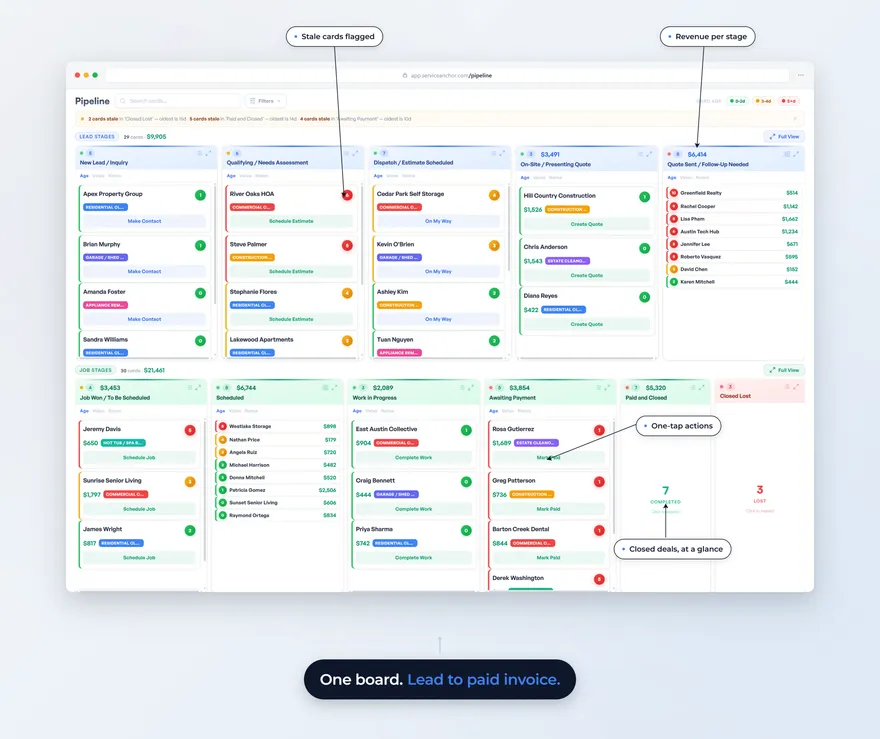
Service Anchor ships with a pre-configured junk removal pipeline and a pre-loaded price book with the line items actual junk removal operators use. Service call fee, standard labor rate, truck-load pricing tiers, disposal fee pass-through, mattress upcharge, recycling processing, drive-time adjustments. The full set of categories and starting numbers is on our junk removal price sheet. Edit the numbers to match your market, and your crew can quote from it on-site. Setup runs about ninety seconds because there is almost nothing to configure.
The deeper bet is architectural. Our entire CRM is organized around a single state machine. When a quote gets accepted, the job creates itself. When the job is marked complete, the invoice creates itself. When the invoice is paid, the thank-you text and review request fire automatically. There are no manual “promote this lead to a quote” clicks. The pipeline advances itself based on what you do in the business. The rest of this comparison runs on module-silo architectures where you click between leads, quotes, jobs, and invoices. We don’t.
We also register your A2P 10DLC brand and campaign for you. No navigating The Campaign Registry, no Twilio form-filling. Twenty-four to seventy-two hour approval. Sole-prop and EIN paths both supported.
Pricing honesty
Service Anchor’s founding cohort (the first 25 operators; a spot is reserved when your trial starts and confirmed at your first charge) locks in $29 a month for life, everything included, up to 5 users. The next tiers step to $49 and $59, and the list price is $79 a month. Flat pricing, published on the pricing page, no demo required to see it. Every account starts with a free 14-day trial, card on file, nothing charged until day 14, and there is a 30-day money-back guarantee after your first charge. No contract traps.
What we do not have (be honest about gaps)
We have not shipped an AI receptionist. If you are losing calls to missed phone rings, Housecall Pro’s AI Team or Workiz’s Genius Answering are your better options today. We can build toward it, and we will say so when it ships.
Our integration surface is narrower than Jobber’s. We have Stripe, Twilio, and OpenRouteService native. If your operation depends on a specific existing Zapier flow or a QuickBooks Online sync at a level of detail we do not match yet, you will feel that gap.
We are a new brand. A handful of live blog posts at the time of this writing. No G2 profile yet. No thousands of reviews. If you make software decisions by counting Capterra stars, we lose that comparison today. That trade is fair. If you make software decisions by trying the product for a week and deciding whether it fits your work, we think we hold up.
Our team is small. Matt answers support personally. That is either a feature (real founder access) or a bug (we cannot respond at 3 AM). Pick your trade-off.
How to choose: a decision tree
Work through these in order. Stop at the first “yes.”
Do you lose money to missed phone calls? If yes, Housecall Pro. The AI Team pays back at one missed job per week.
Do you run five or more trucks with dispatchers and office staff? If yes, FieldPulse or Jobber’s Grow plan. You need the customization and the role-based workflows.
Are you running a five-to-ten trade general contracting operation? If yes, Jobber. Their breadth is the point.
Are you specifically in junk removal, dumpster rental, or moving, and want trade-specific pre-configuration? If yes, the real choice is Workiz or Service Anchor. If you’re specifically running a moving operation, our moving company software comparison walks through Movegistics, MoverBase, and the rest of the moving-software field by shop size. Read the next two lines.
Do you want self-serve signup, founding pricing from $29 a month, and a pipeline-first architecture? If yes, Service Anchor. You can have the product running in ninety seconds.
Do you want the incumbent trade-specialized platform with a phone system built in and do not mind the demo-to-pricing path? If yes, Workiz.
What to do next
If you are still on the fence, run two of these side by side for thirty days. Most operators never actually test two options. They read a comparison blog, pick one, and find out six months in whether it was the right call. That is backwards.
Service Anchor is free for 14 days, card on file and nothing charged until day 14, so our side of the test costs you nothing. Set up Jobber on a Tuesday and Service Anchor on the Wednesday. Run both for two weeks, side by side, with real jobs. The one that is out of your way the fastest is the one. If that is Jobber, we will not be offended.
If you want to learn about the broader business mechanics while you evaluate, the junk removal pricing framework post covers how your pricing model interacts with every CRM in this comparison, and the on-my-way text templates post gives you the customer communication playbook that any of these platforms can be configured to run.
One way or another, get your quotes, jobs, and invoices on a single board. The hours you buy back are the real product.
Last updated May 8, 2026.