
Skip to content
Everything included·$29/mo founding spot·locked for life·Claim →$29/mo founding spot →
EVERYTHING INCLUDED·18 SPOTS REMAINING·$29/MO FOR LIFE

Every crew's day.
Self-organizing.

Drag a job to a crew. Routes optimize. ETAs text automatically. You focus on the calls, not the whiteboard.
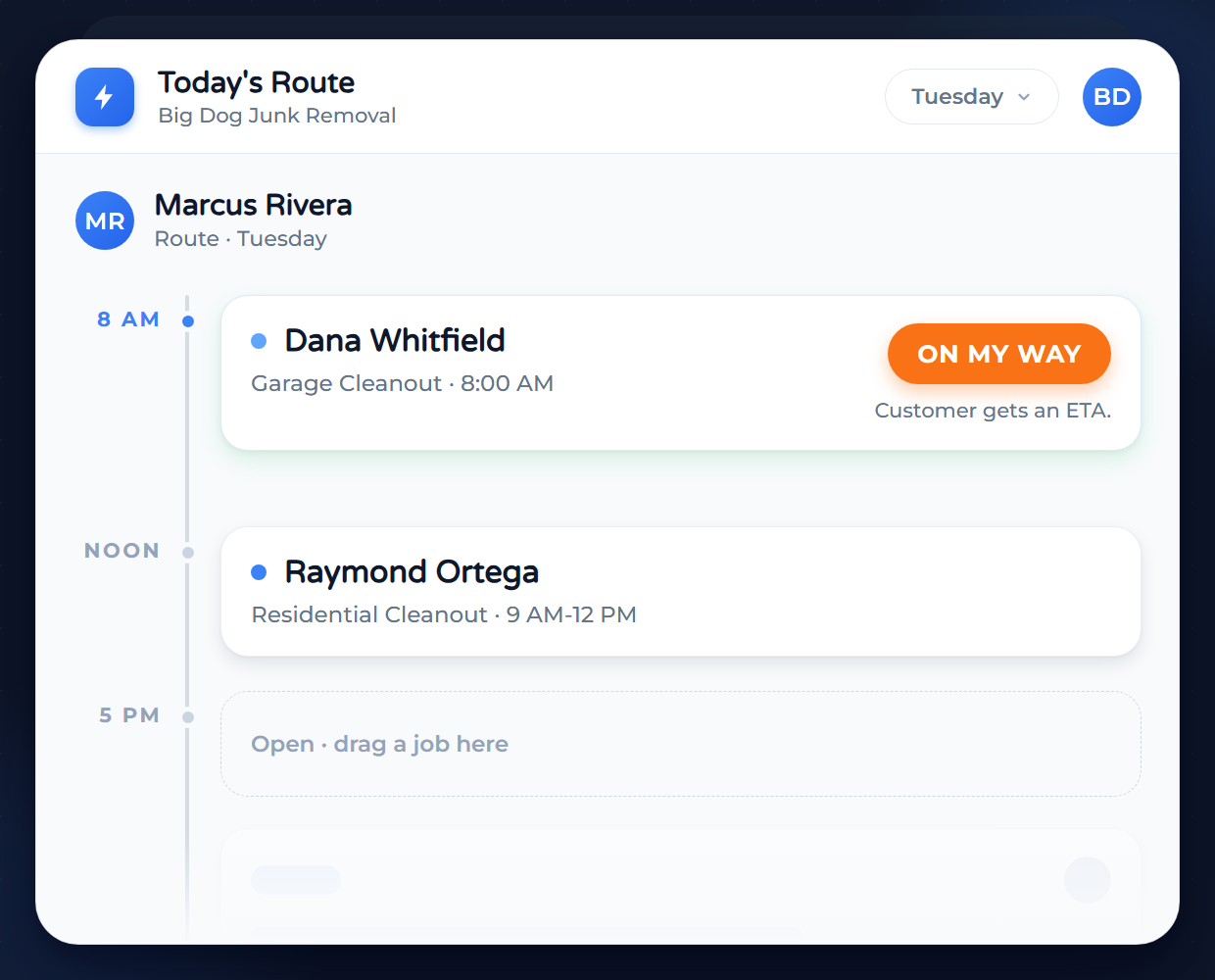
Tech taps ON MY WAY. Customer gets an ETA. Your phone stops ringing.
Marcus Rivera's Tuesday schedule with both jobs placed, Raymond Ortega and Dana Whitfield, and an ON MY WAY chip fired beside the 8 AM slot
The Dispatch Problem

Your crews can't read your mind.

If you rely on text messages and spreadsheets to manage your crews, you are guessing, not managing.

Inefficient routes

Your techs should be working, not driving. Sending crews back and forth across town burns fuel and wastes billable hours.

Constant phone tag

If your techs have to call the office just to get the gate code or confirm the customer's address, you are bottlenecking your own operation. Your dispatcher shouldn't be a call center.

Idle crews

You can't fill a gap in the schedule if you don't know a tech is free. Your crew sits idle. Money you could have billed walks out the door.

Founding Member Offer

Everything included.
$29/month for life for founders.

The first 25 founders lock $29/month for life, everything included. The next wave pays $49, and the list price is $79.

No contracts. Cancel anytime.
Smart Scheduling

The Dispatch Board You’ve Always Wanted.

Stop flipping between calendar pages or scrolling through spreadsheets. Service Anchor gives you a bird’s-eye view of your entire operation. Instantly see where every tech is, what they are working on, and where you have gaps to fill. Whether you need to move a job to next week or assign an emergency repair to the closest crew, you can do it all with a single click.
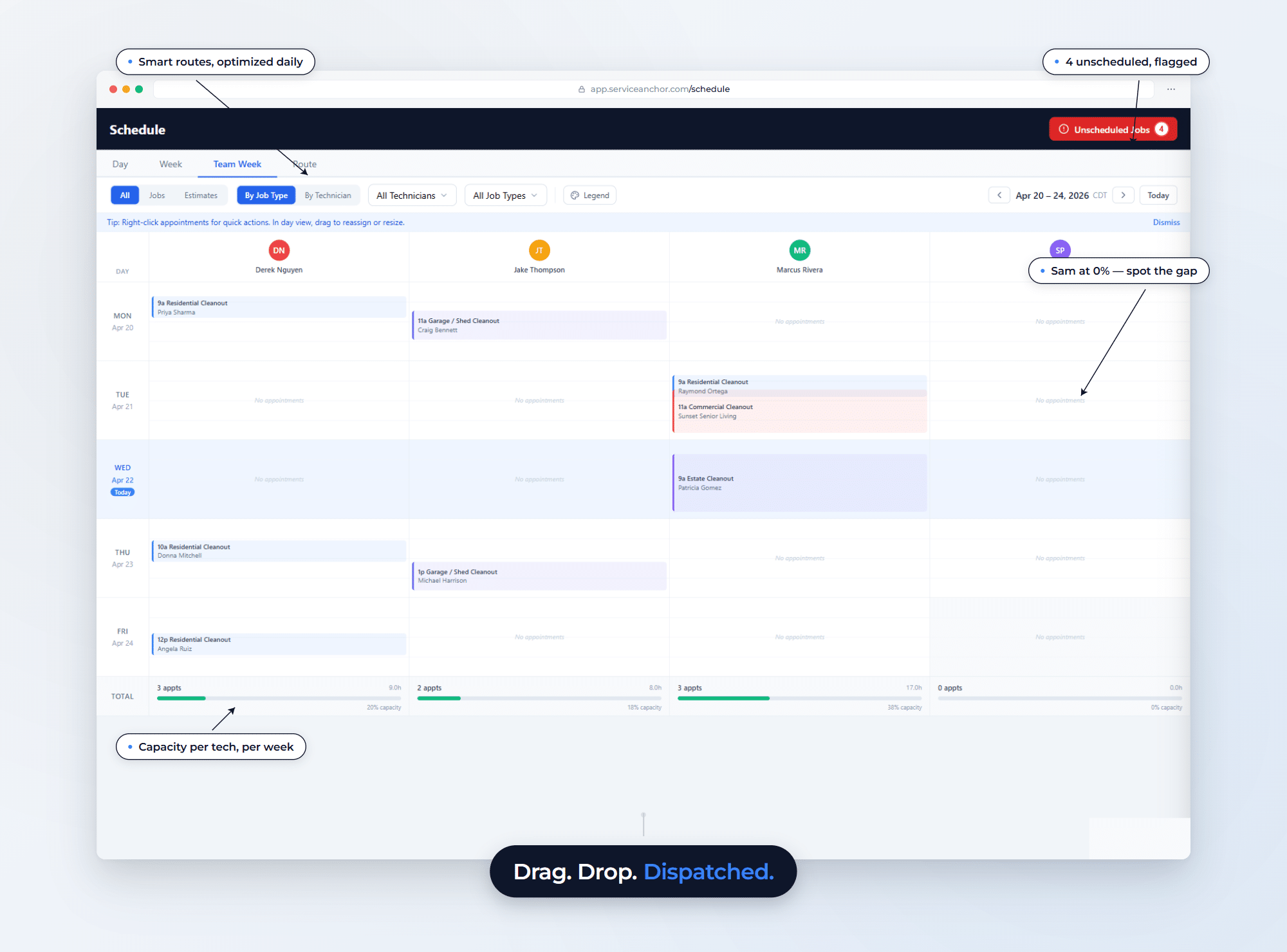
Service Anchor Team Week dispatch board showing 4 technicians across 5 days with 8 jobs color-coded by type, a red Unscheduled Jobs 4 flag top-right, and per-tech capacity totals (Derek 20 percent, Jake 18 percent, Marcus 38 percent, Sam 0 percent). Four annotations highlight the Route tab for smart routing, the unscheduled flag, Sam capacity gap, and per-tech capacity. Hero callout: Drag. Drop. Dispatched.
Color-Coded Clarity: Spot jobs instantly by color to distinguish repairs, installs, or maintenance.
Jobs vs. Estimates: Clearly separate paid work from estimates to balance your revenue activities.
Route Optimization: Multi-stop planning reorders the day by drive time. Map-based, powered by OpenRouteService. Fewer miles, more jobs.
Flexible Views: Day, week, team week, or route view. Pick the zoom that matches the decision you are making.
Smart Technician Assignment: Auto-match jobs to techs by availability, location, skill, and workload. Rule-based, no guessing.
Instant Field Sync: Schedule changes update immediately on tech phones to prevent wasted trips.
The Technician Portal

Turn Every Technician Into Your Top Performer

Your technicians shouldn't have to guess what to do next. The Technician Portal puts their daily schedule and every job detail right in their pocket. From navigating to the site to closing out the ticket, the system guides them through a standardized workflow, ensuring protocols are followed and data is captured correctly, every single time.
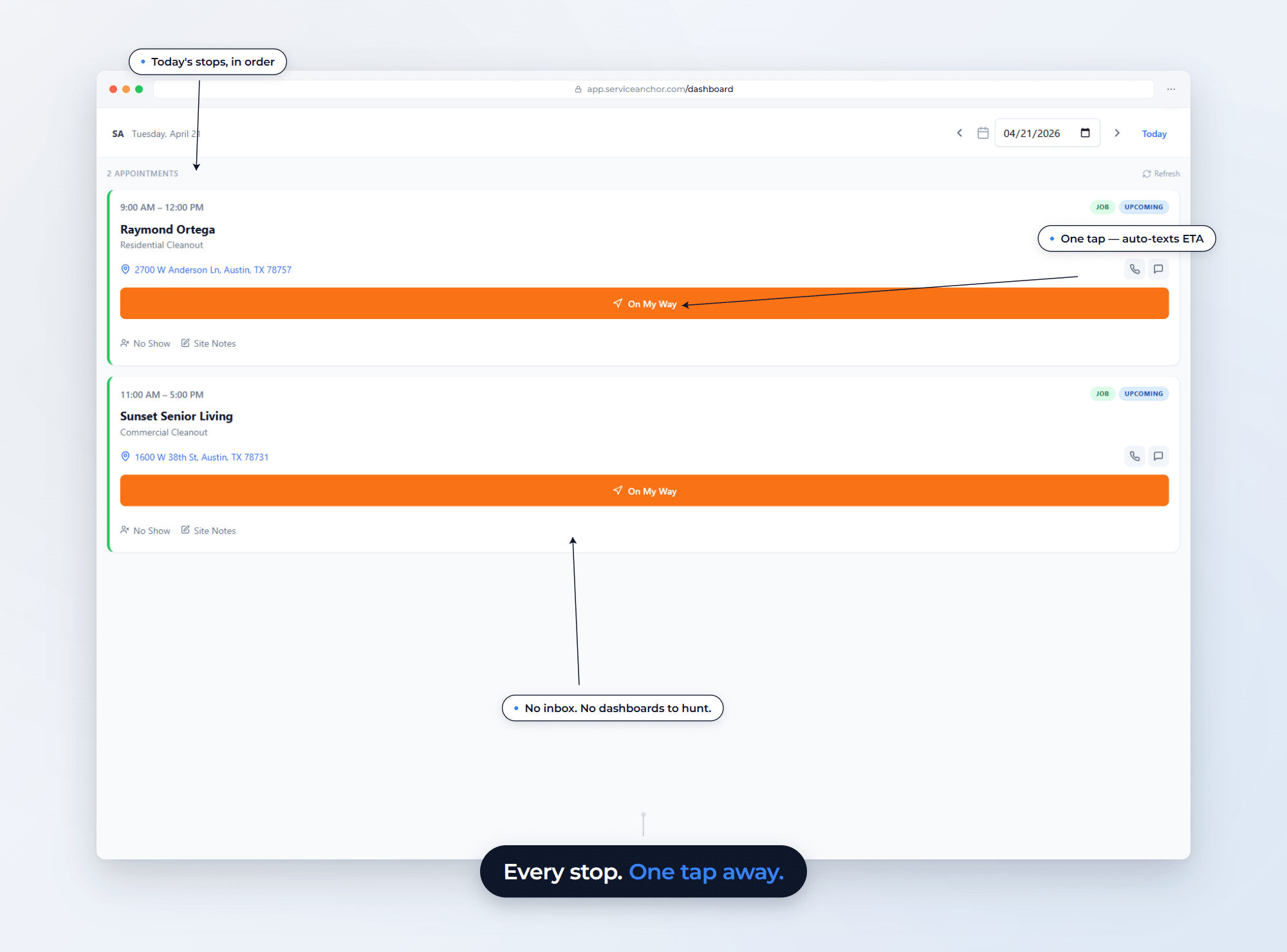
Service Anchor technician view for Marcus Rivera on Tuesday, April 21. Two appointments: Raymond Ortega Residential Cleanout 9 AM to 12 PM and Sunset Senior Living Commercial Cleanout 11 AM to 5 PM, each with a large orange On My Way button (auto-texts ETA) plus No Show and Site Notes. Annotations highlight the daily stops list, one-tap ETA, and single-focus layout. Hero callout: Every stop. One tap away.
On-Site Tools: Photos, notes, and add-on estimates from the driveway.
Smart Job Timers: Auto-pauses when the tech switches jobs for precise labor costs on every ticket.
Mandatory Checklists: Safety and quality checks required before a job can be marked complete.
Upsell Reminders: Suggested add-ons appear on the job ticket so techs capture extra revenue without memorizing the menu.
On-My-Way SMS: One tap sends ETA to the customer. No more "where's my tech?" calls.
Appointment Reminder SMS: Auto-fires on schedule. Reduces no-shows.
Job Management

The Job Board That Populates Itself

Stop wasting time manually moving data around. Service Anchor connects your sales pipeline directly to your operations. When a lead is won, the system automatically converts it into an active job for you. You do not need to click a button or copy text. All the line items, pricing, and customer details carry over instantly so you can focus on getting the work done.
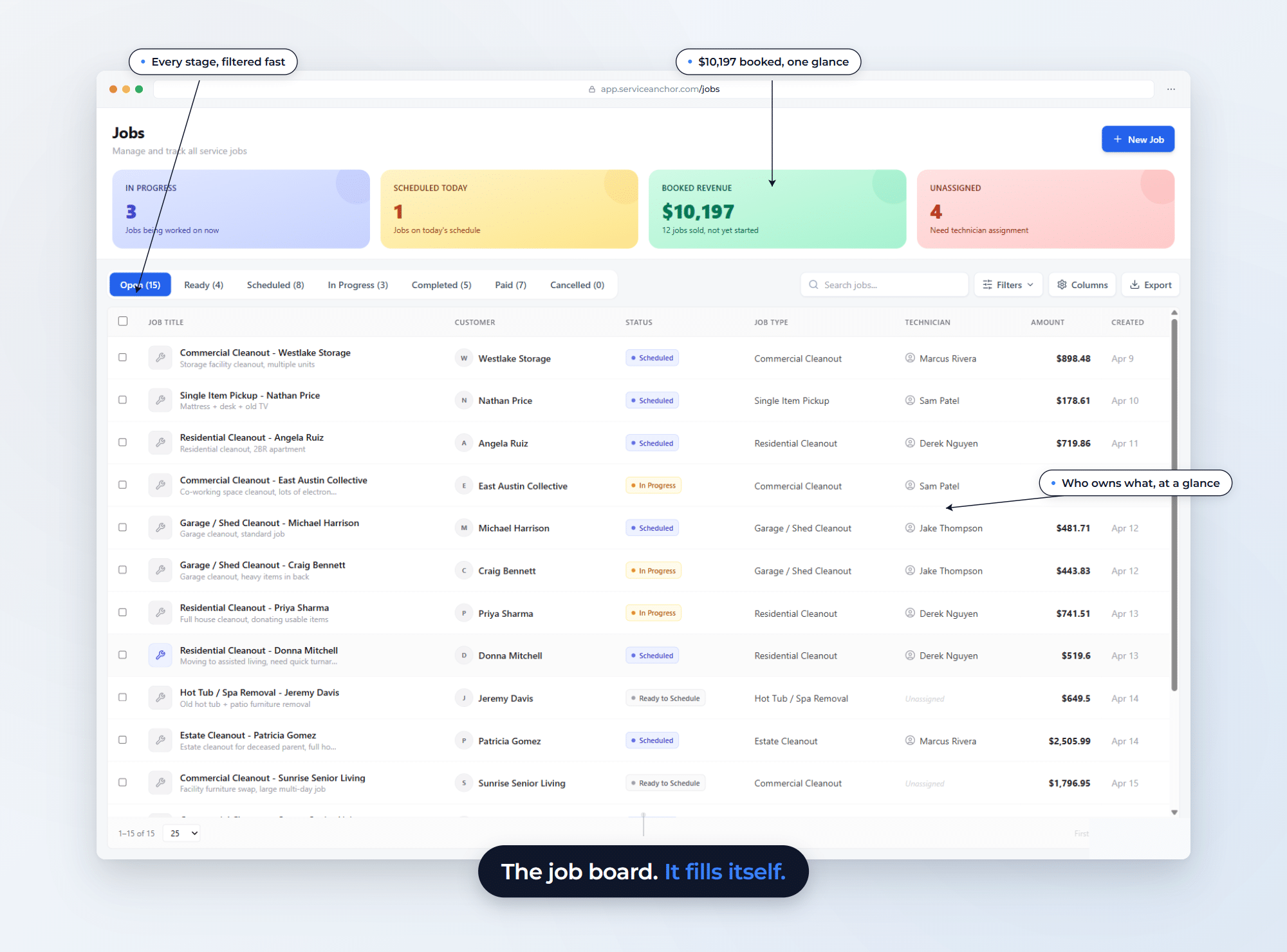
Service Anchor Jobs view with 12 real jobs across 4 technicians, $10,197 booked revenue, and 7 status tabs (Open 15, Ready 4, Scheduled 8, In Progress 3, Completed 5, Paid 7). Annotations highlight status filtering, booked revenue, and technician ownership. Hero callout: The job board. It fills itself.
Hands-Free Conversion: Leads automatically convert to active jobs when they reach the right stage.
Zero Data Entry: Pricing and line items transfer instantly from estimate to job to stop errors.
Live Job Counts: Instantly see totals for new, active, and completed jobs to gauge your team's workload.
Total Visibility: See customer, tech, and revenue details for every job, all in one list.
Smart Sorting: Filter by status, technician, or revenue to focus on what matters.
Pipeline Tracking: Monitor exactly where every job sits to catch stalling projects.
Customer Tracking

Turn One-Time Jobs Into Repeat Clients

Your customer list should not be a messy junk drawer of random phone numbers. Service Anchor keeps your data clean by letting you decide exactly when a lead becomes a permanent client. Once they are in the system, you can organize them your way. You can mark them as a homeowner or a contractor and add custom tags to keep important details front and center. You can instantly see past jobs, track multiple locations, and identify your top spenders, all without digging through old files.
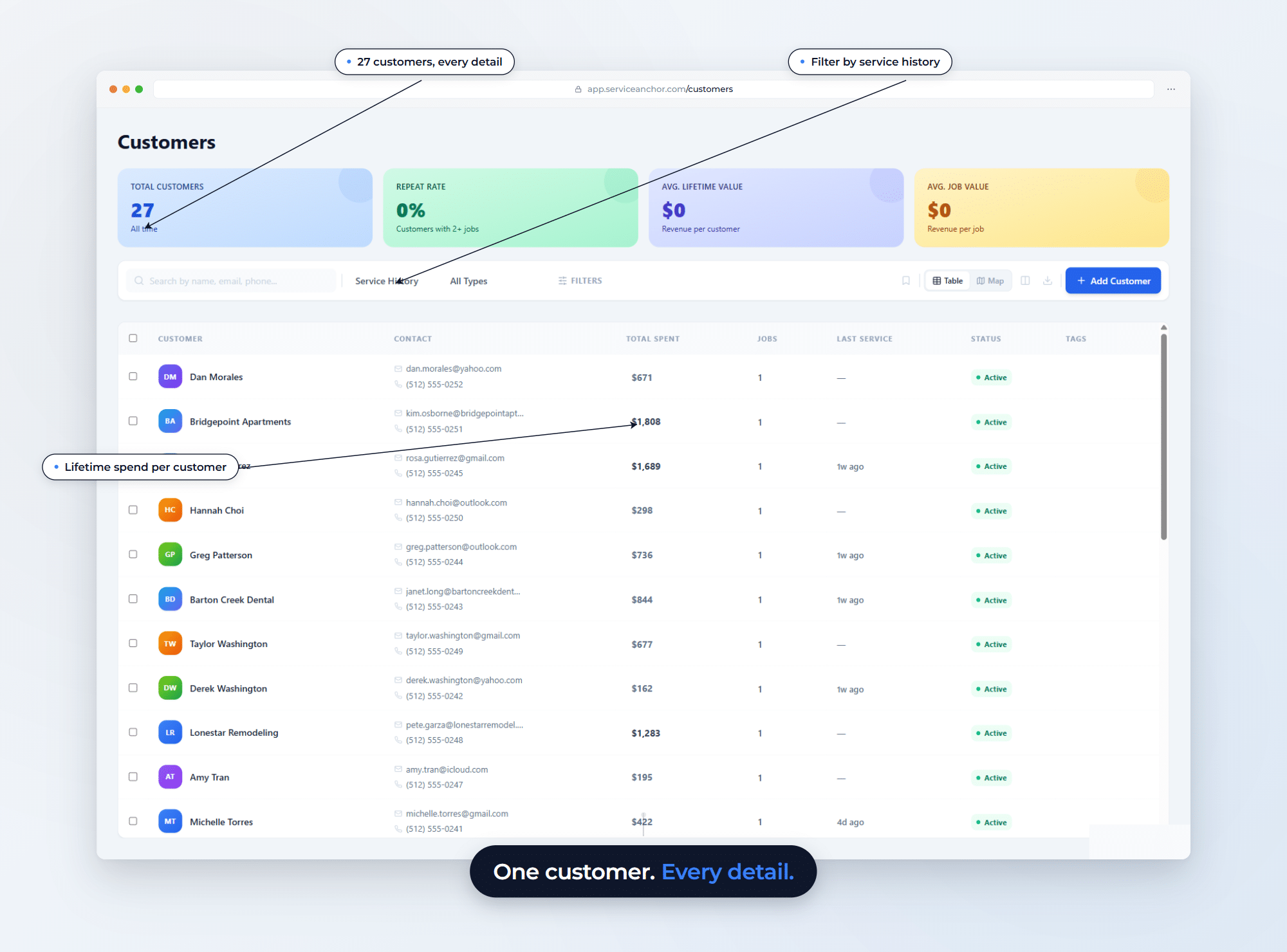
Service Anchor customer list with 27 customers, lifetime spend per row, service history filter, and four metric cards. Annotations land on the 27 total customers number, the Service History filter, and Bridgepoint 1808 dollar spend. Hero callout: One customer. Every detail.
Custom Categories: Define customer types like homeowners or commercial accounts to fit your business.
Smart Tagging: Add custom labels like gate codes or VIP status to track specific client details.
Clutter Control: Set rules for when leads convert to clients to keep your database clean.
Complete History: View a full record of every past job and invoice so you always know the client's history.
Property Management: Manage clients with multiple properties or addresses under a single profile.
Top Spenders: Instantly identify your highest-paying customers to know where your revenue comes from.
Built on infrastructure your customers already trust
Stripe
Cards + ACH
Twilio
A2P SMS
AWS
Encrypted hosting
OpenRouteService
Route optimization
Clerk
Enterprise auth
Resend
Email delivery
The honest comparison

How Service Anchor stacks up

Apples-to-apples on the things small home service shops actually care about. April 2026 pricing.

Service AnchorJobberHousecall ProWorkiz
Starting price$29/mo for life$49/mo$79/moDemo required
Unified sales + job pipelineIncludedSeparate modulesSeparate modulesSeparate modules
Trade-specific setup in 90 secondsPre-builtYou build itLimitedPartial
A2P SMS auto-registered for youAutomatedSelf-serveSelf-serveSelf-serve
Card payments built inPass-throughPass-throughTheir processorPass-through
No per-user fees, everIncludedUpper tiers onlySeat-pricedTier-limited
Have Questions

Questions, answered straight.

Can't find the answer you're looking for? Talk to a real human about your specific setup.

Chat With Our Team
Billing & Pricing
What does it cost, and when does billing start?

One flat price per company. The founding ladder: the first 25 businesses pay $29 a month for life, the next 50 pay $49 for life, the next 100 pay $59 locked for 12 months, and list price is $79 (Solo: every feature, up to 5 users).

Billing starts the day you finish onboarding (setup wizard complete and your first job on the board). There is no free period: at these prices, the first month is the trial, and your first 30 days are money-back, no questions asked. Applying costs nothing, and there is no card at the application step.

What is included in the price?

Everything. Every feature we ship, up to 5 users (your price never changes when you hire), your business phone number, the carrier registration paperwork and fees, and your texting and calling: up to 1,500 texts and 500 voice minutes a month. No per-user fees, no add-on tiers, no usage bills.

If you regularly send more than that, we reach out and figure it out together. The price does not change behind your back.

What happens when the 25 founding spots fill?

The rate steps up to the next rung: 50 spots at $49 a month for life, then 100 at $59 locked for 12 months, then the $79 list price. Each wave locks its own rate. The ladder only goes up, and a filled wave never reopens.

What does "for life" actually mean?

"For life" means as long as your subscription stays active without a 30-day payment lapse, and as long as Service Anchor continues to operate the platform. If you cancel for more than 30 days and come back later, you rejoin at whatever rung the ladder is on then.

We cannot promise the company exists forever. We can promise that for as long as Service Anchor exists and you keep your subscription active, your founding rate is locked. The legal language lives in our Terms of Service under the Founding Member Program section.

Do you process payments from my customers? What does it cost?

Yes. Your customers pay you through Stripe, and the money lands in your own connected account. Card processing is 3.5% + $0.30 per transaction. That covers Stripe's processing and our 0.6%, and that 0.6% is part of how the subscription stays under $80. We would rather tell you where the margin is than hide it in add-ons.

Product
Is the software stable enough to run my business?

Absolutely. "Beta" does not mean "broken." It means we are still actively adding features and refining the design based on user feedback. The core functions (scheduling, invoicing, customer management, texting, calling) are fully operational and secure.

Can I control what my technicians see in the app?

Yes. Service Anchor has distinct user roles and permissions. Field technicians see exactly what they need to do the job (schedules, job notes, addresses), and you can restrict them from seeing sensitive business data like total revenue, pricing, or admin settings.

Service Anchor needs my EIN or SSN to set up texting. Where does it go?

Mobile carriers require a business Tax Identifier (EIN, or SSN for sole proprietors) for A2P 10DLC business registration before your texts can be delivered. There is no path around this at the carrier level, but we built the data flow to keep your Tax ID out of our systems.

You enter it once during texting setup. We forward it directly to the carrier registry and do not write it to our databases. Only the last four digits stay on your account so you can recognize which Tax ID is on file. The registration fees are on us. The full description is in our Privacy Policy under "Information you provide directly" and "Data retention."

Do you have a mobile app?

Not yet. A dedicated mobile app is currently in development. In the meantime, the platform is fully mobile-responsive and installable as a web app on iOS or Android home screens. Your technicians can log in via their phone or tablet browser to access schedules, update job statuses, and view customer details without downloading anything.

Beta Program
What if I need a feature that you do not have yet?

We want to build it. The roadmap during beta is driven by you. Submit feature requests directly through the dashboard, and we prioritize updates based on what real operators actually need.

Last call before the 25 spots close

Lock the founding rate before it's gone for good.

The first 25 businesses to finish onboarding keep $29 a month for life, everything included: every feature, your business line, texting and calling. The next wave pays $49, the one after $59, and list is $79. The ladder only goes up.

Everything included. 90-second setup. 30-day money-back.