Skip to content
Free for 14 days·$59/mo for life·Wave 2 closes Nov 11·Start free trial →$59/mo for life →
EVERYTHING INCLUDED·BUILT FOR THE TRADES

Every lead.
Every job.
Every invoice.
One board.

The home service CRM that replaces four tools with one pipeline. Every lead flows to a quote, every quote to a job, every job to a paid invoice, automatically.

90-second setup. Everything included, $59/mo for life for trials started by Nov 11.
Every feature in the one planEverything included
Wave 2$59/mo for life
No per-user fees, everUp to 5 users
Texting and calling included1,500 texts + 500 min
Built Differently

Features look the same. Under the hood, we're not.

Three things Service Anchor ships that Jobber, Housecall Pro, and Workiz would need a ground-up rebuild to copy.

The Build

One pipeline, not four tools.

Every competitor stitches leads, quotes, jobs, and invoices into separate modules you navigate between. Service Anchor is a single state machine. Move a lead, and the quote is already there. Accept the quote, and the job exists. Complete the job, and the invoice is pre-formed. You never leave the pipeline.

No competitor can add this without starting over.

Setup

90 seconds from signup to first booking.

Pick your trade from a dropdown: junk removal, moving, dumpster, hauling, cleanout, plus three more. Your pipeline stages, price book items, lead sources, and lost reasons load from a template built specifically for that trade. Book your first job before the coffee finishes brewing.

Jobber, Housecall Pro, and Workiz make you build the price book from scratch.

Messaging

Texts that actually get delivered.

Phone carriers now require every business to register before they will deliver texts to customers. Miss the paperwork, and your on-my-way message gets silently dropped. Competitors hand you the form. Service Anchor handles the registration in the background, so your first message lands the first time.

We do the carrier registration for you, before your first text, not after it bounces.

How It Works

The hands-off way to scale from one truck to a fleet.

Service Anchor handles the heavy lifting of managing your leads, your team, and your growth. Three systems, one pipeline.

01Growth Engine

Capture every lead. Close more deals.

The second your phone rings, the system hooks the lead and starts the job lifecycle. No more sticky notes. No more guessing who to call next.

  • Every lead captured and flagged the moment it arrivesNo manual entry, no missed follow-ups
  • The Sales Compass tells reps the next best move to win the jobRanked by value, urgency, and stage
Explore Growth Engine
+29 leads this week
app.serviceanchor.com/pipeline
Service Anchor pipeline board with 29 lead cards across 11 stages
02Operations & Dispatch

Run your crew without the chaos.

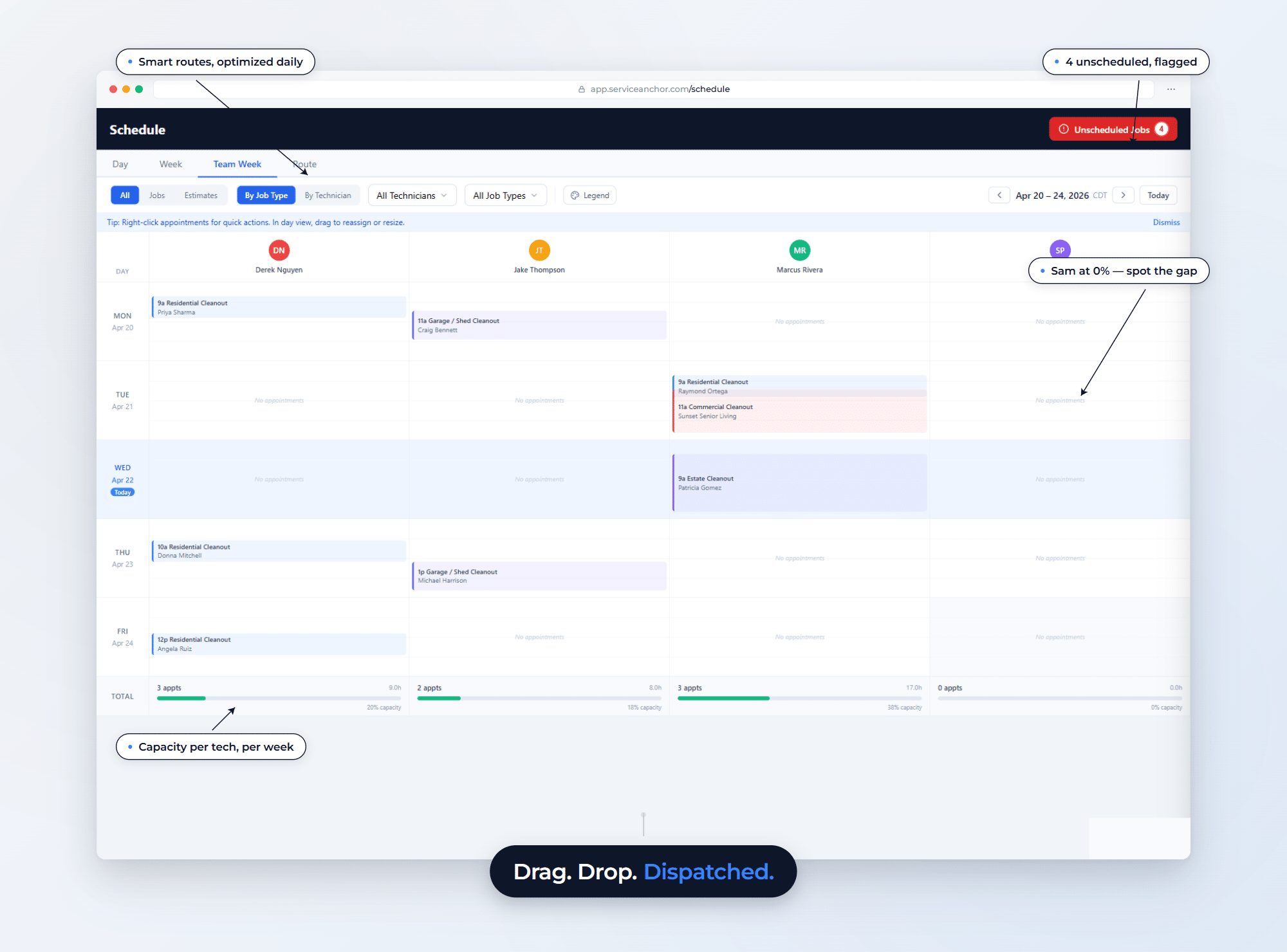
Every job on one board. Every tech on the same page. Stop playing phone tag and let the dispatch board run itself.

  • See every job across every tech on a single drag-and-drop boardOver-booked crews flagged in red, capacity gaps in plain sight
  • Techs get their own view with one-tap customer ETA textsNo apps to explain, no inbox to monitor
Explore Operations
4 crews on the road
app.serviceanchor.com/schedule
Dispatch board showing 4 technicians across 5 days with color-coded jobs
03Estimates & Finance

Quote fast. Get paid faster.

Professional estimates in seconds. Invoices that send themselves. The system handles every follow-up, so cash stops waiting on your inbox.

  • Send branded estimates and invoices in under a minuteStripe-powered, paid straight to you, no chasing
  • See cash flow from lead to payday on one screenOutstanding balances flagged, paid invoices settled automatically
Explore Estimates & Finance
1.2 days average to paid
app.serviceanchor.com/invoices
Service Anchor invoices dashboard showing 3,853 outstanding and 1.2 day average time to paid
What the customer sees

Four things your customers notice first.

The booking page, the proposal, the deposit ask, and the text back. All on from day one, all included.

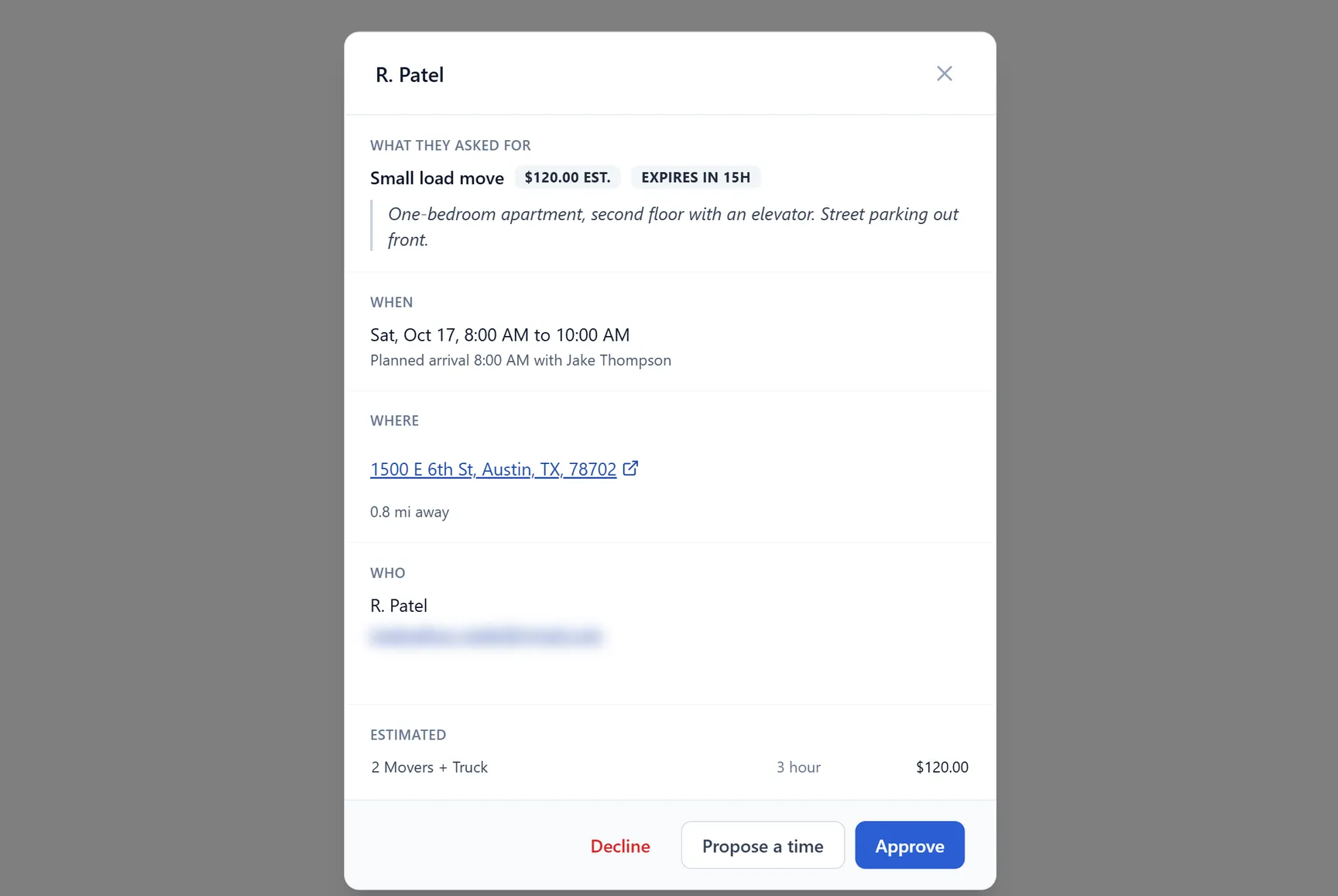
  1. Online booking, on your own website

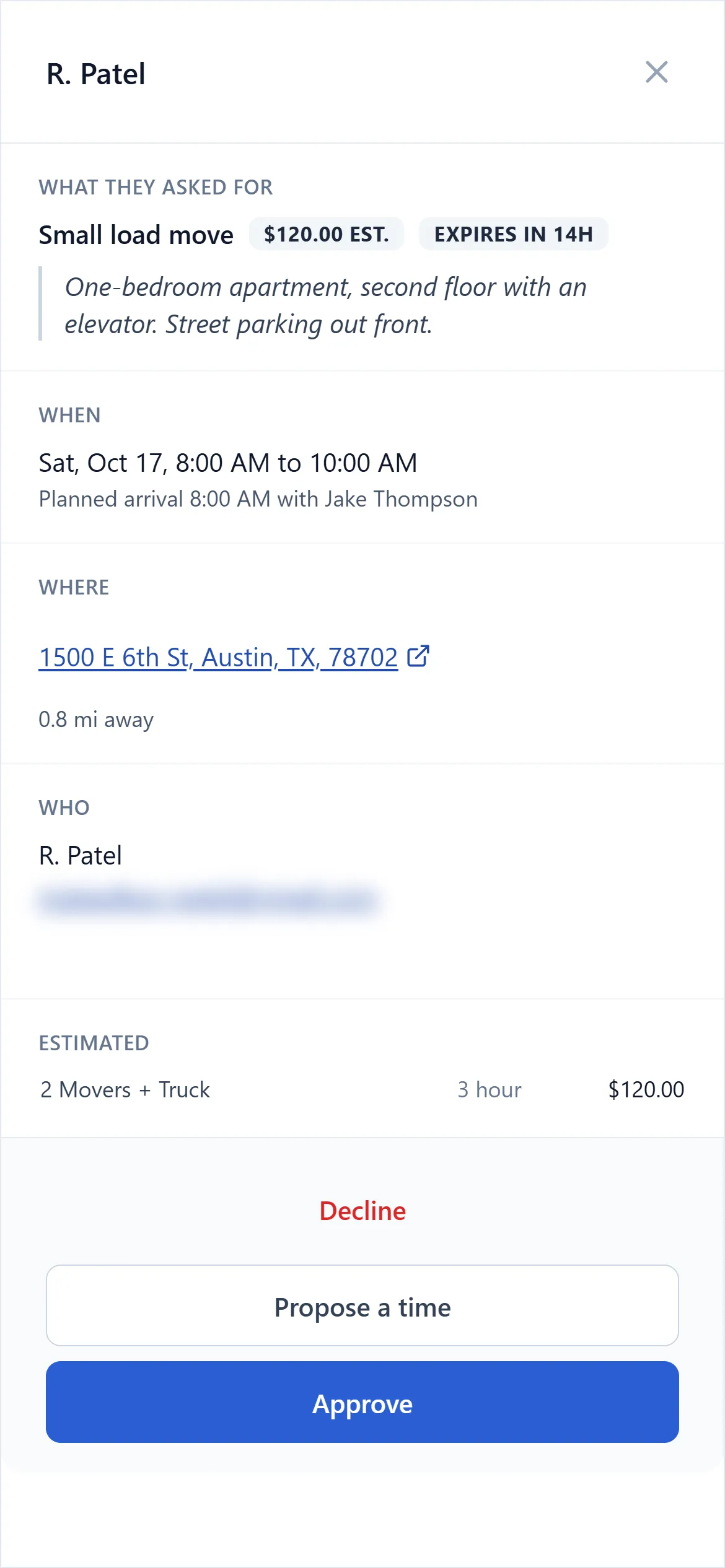
    Customers request a time. You approve it.

    Your booking page shows real openings from your schedule. A request lands on your phone, you tap approve, and the slot is held. No double bookings.

    Booking request from R. Patel waiting for approval, phone view
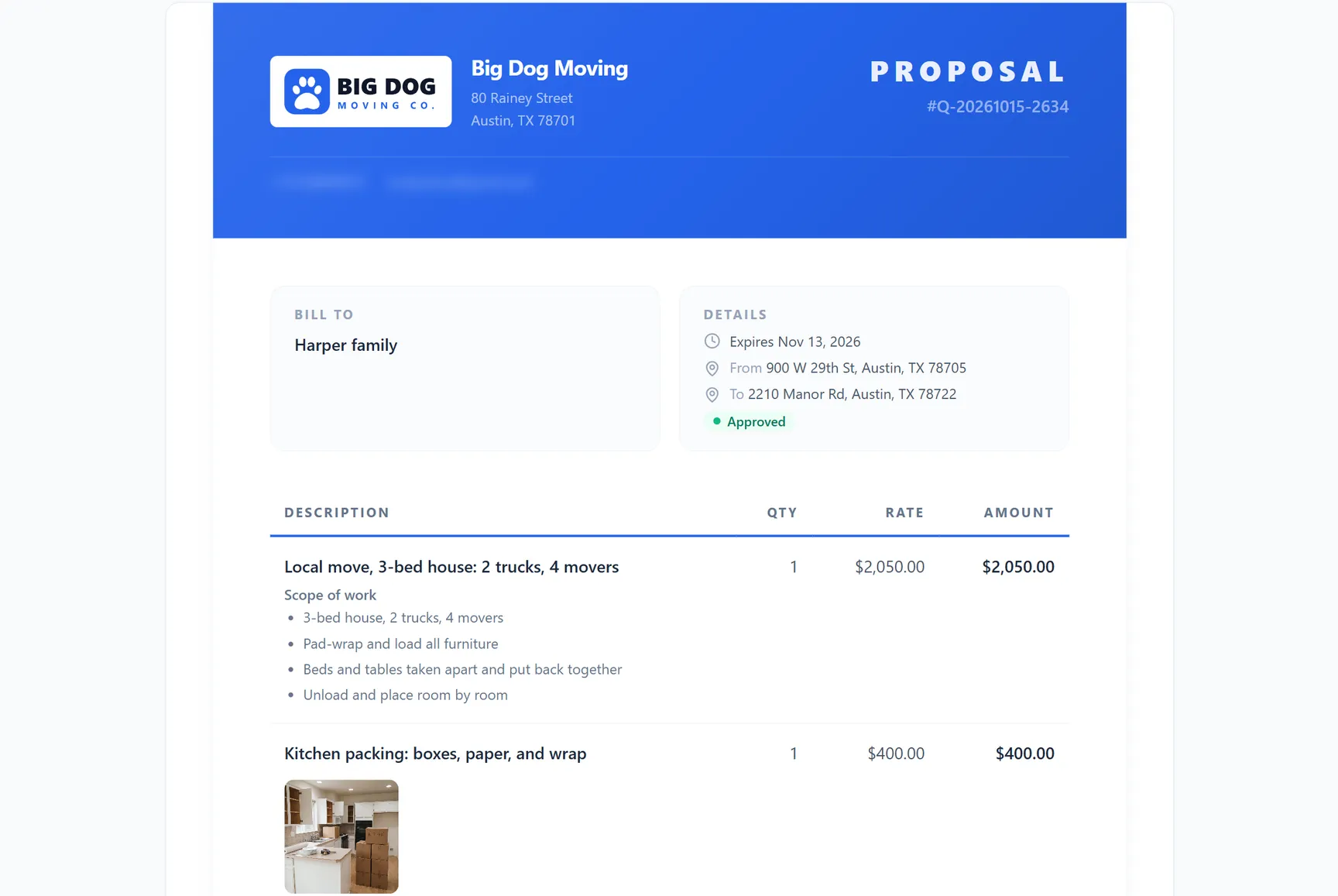
  2. Estimates

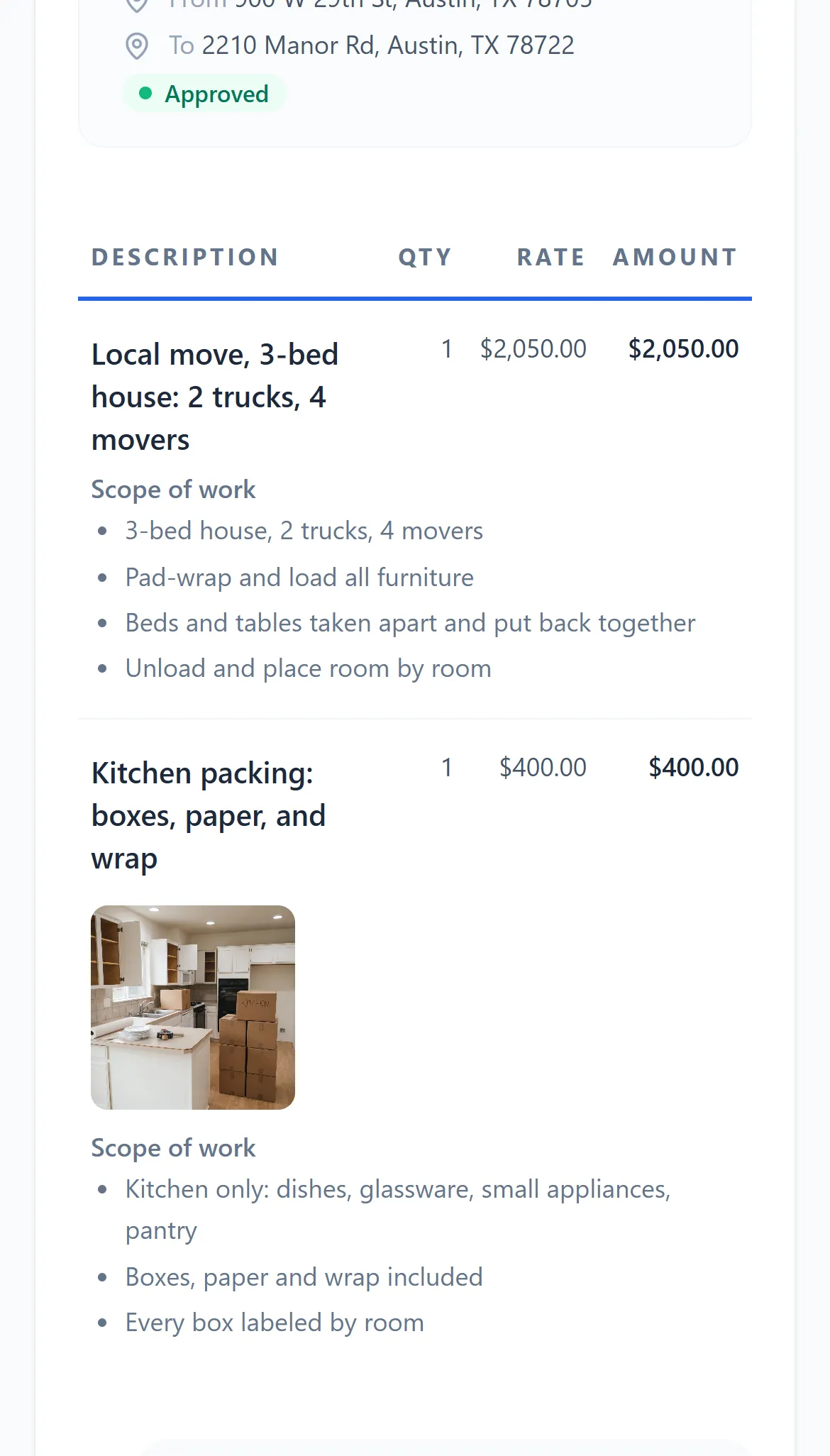
    Proposals that look like the bigger company.

    Scope of work, warranty, your license number, and a photo on any line. The customer signs on their phone and gets a copy.

    Proposal line items for the Harper family move with scope of work and a kitchen photo, phone view
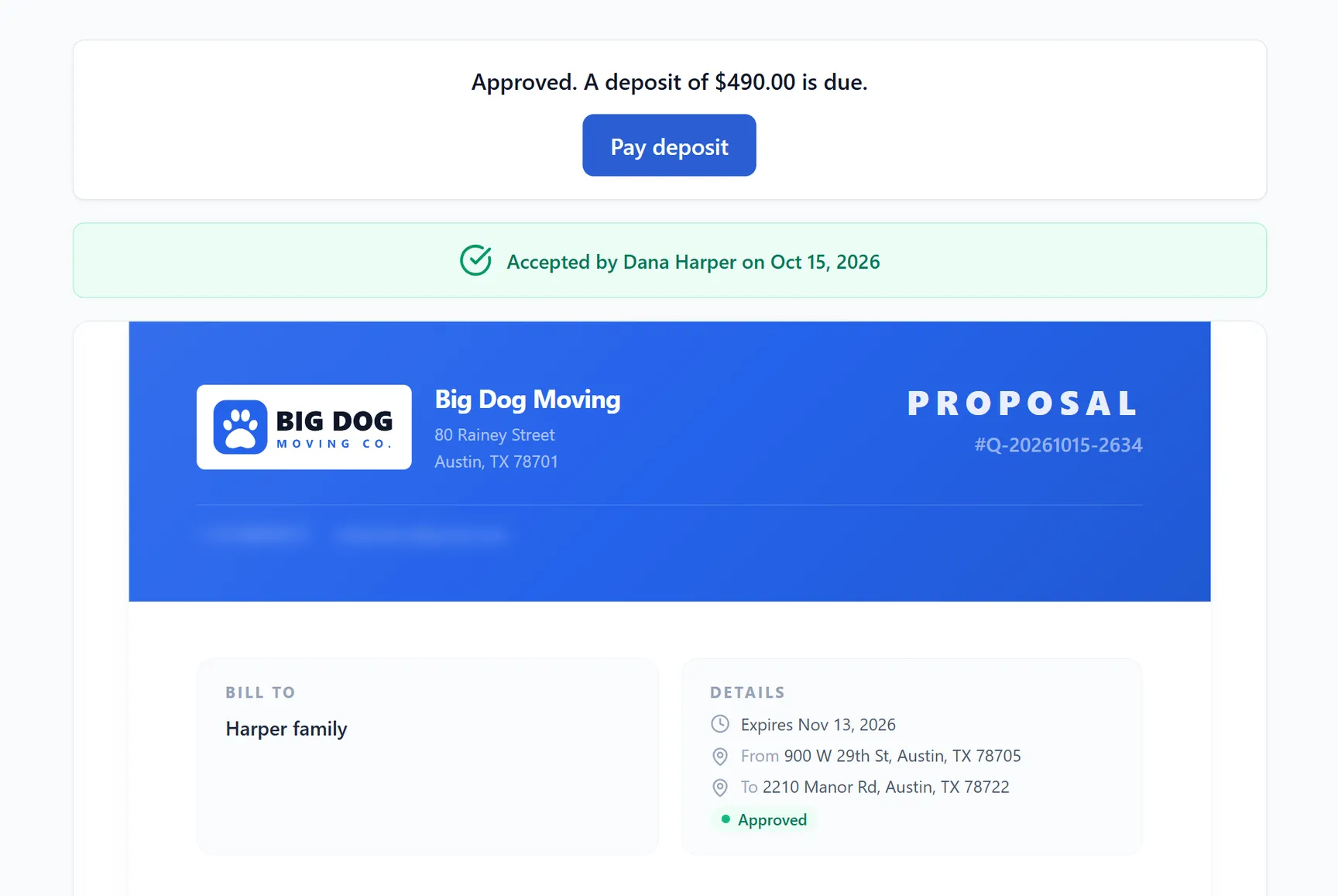
  3. Proposal, after signing

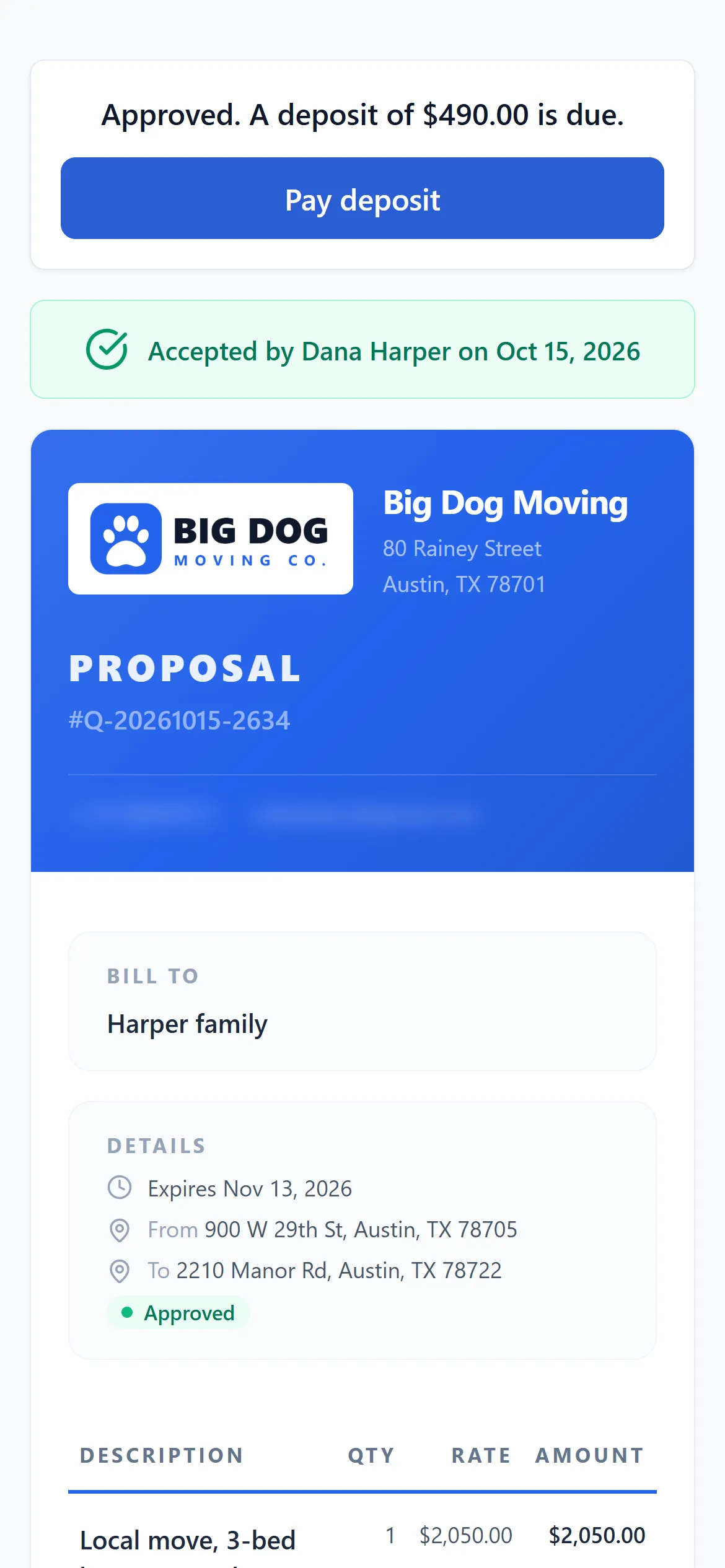
    Deposit rules on from day one.

    Turn deposits on in Admin and every estimate asks for one: a percent you set, pre-filled and editable on the estimate. Reminder texts go out day 1 and day 3 and stop the moment it is paid. Shows as a credit on the final invoice.

    Approved proposal on the customer's phone with a $490 deposit due and a Pay deposit button
  4. Communication Hub

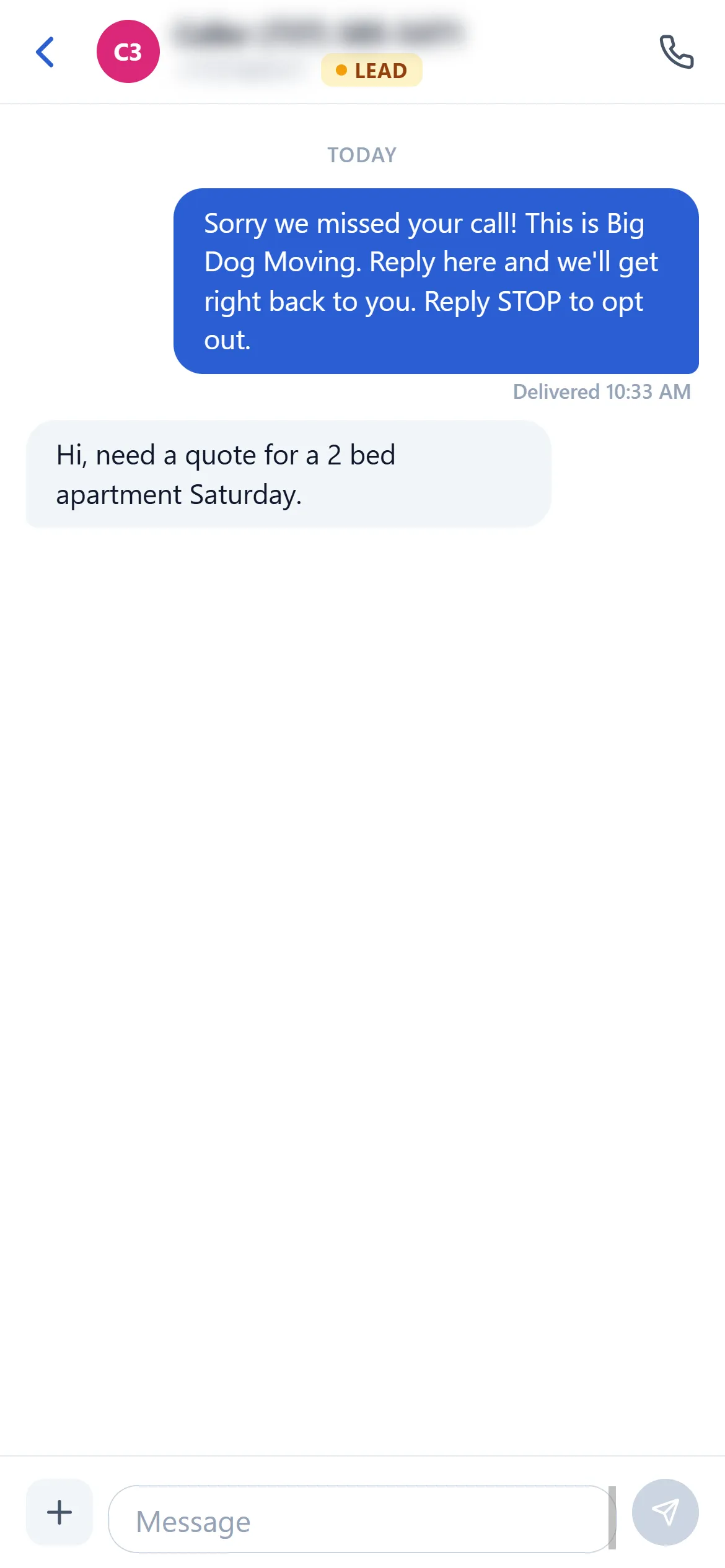
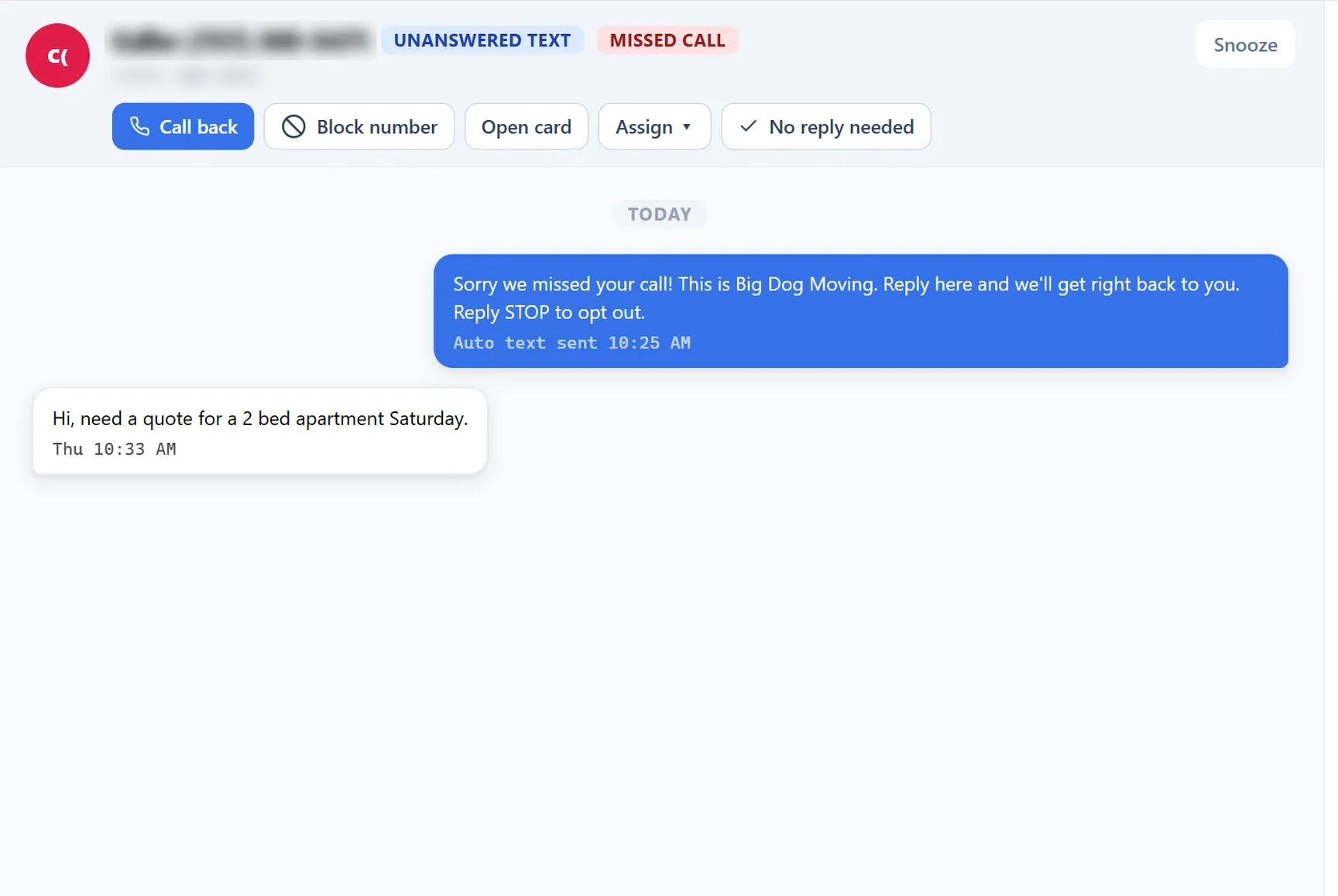
    A missed call from a new number gets a text back.

    The text goes out while you are still on the ladder. Real inquiries become leads on the board. Spam stays off it.

    Missed-call text-back thread with a reply asking for a quote, phone view
1 / 4
Booking request from R. Patel for Saturday 8 to 10 AM with Decline, Propose a time, and Approve buttons
Founding Wave 2

$59 a month. For life.

Everything included: every feature, texting and calling, up to five users. Start a trial by November 11 and $59 is your price for as long as you stay. After that, the list price.

Start your free trialFree for 14 days. Nothing charged today.
  1. Wave 1$29/ moClosed September 16, on schedule.
  2. Wave 2, open now$59/ moLocked for life for every trial started by November 11.
  3. List price$79/ moFrom November 12. No lock.

The ladder only goes up. Cancel anytime, export your data whenever.

Getting Started

Most operators go live by lunch.

Here is what Service Anchor does not ask you to deal with before your first paid job.

What you won't need
  • An IT team
  • A consultant
  • A demo call just to look around
  • Weeks of data migration
  • Training videos to understand it
  • Contracts to sign
What you will need
  • Your morning coffee
  • 90 seconds of attention
  • Your trade name

Sign up. Pick your trade. Book your first job the same day.

Built For Home Service

Home services. All of them.
Even yours.

If your business runs on field crews, job-based billing, and a lead pipeline, Service Anchor fits. Whatever the specific trade.

Don't see yours? Tell us on signup. We'll build the template with you.

Have Questions

Questions, answered straight.

Can't find the answer you're looking for? Talk to a real human about your specific setup.

Chat With Our Team
Billing & Pricing
What does it cost, and when does billing start?

One flat price per company. The founding ladder: Wave 1 ($29 a month for life) closed on Sept 16, 2026. Wave 2 is $59 a month for life for every trial started by Nov 11, 2026, and after that the list price is $79 (Solo: every feature, up to 5 users).

Your first 14 days are free. You put a card on file at signup, and nothing is charged until day 14. Cancel before then in one click and nothing is charged. After your first charge, your first 30 days are money-back, no questions asked.

What happens at the end of the 14-day trial?

Your card is charged $59 on day 14 and your Wave 2 rate locks for life. Not for you? Cancel before day 14 in one click and nothing is charged. Change your mind after? Your first 30 paid days are money-back.

Need more time? Every trial can be extended once, by 7 days. And nothing is a surprise: we email you on day 11, and the app shows your exact charge date. Cancel is one click in settings, no call required.

What is included in the price?

Everything. Every feature we ship, up to 5 users (your price never changes when you hire), your business phone number, the carrier registration paperwork and fees, and your texting and calling: up to 1,500 texts and 500 voice minutes a month. No per-user fees, no add-on tiers, no usage bills.

If you regularly send more than that, we reach out and figure it out together. The price does not change behind your back.

What happens when Wave 2 closes?

On Nov 11, 2026 the ladder reaches its $79 list price, no lock. Each wave locks its own rate, the ladder only goes up, and a closed wave never reopens. Wave 1 ($29 for life) closed on Sept 16, 2026, on schedule.

Starting a trial before the close locks the Wave 2 rate: it is held through your trial and confirmed by your first charge. If you cancel or your account pauses before that, the rate is not locked.

What does "for life" actually mean?

"For life" means as long as your subscription stays active without a 30-day payment lapse, and as long as Service Anchor continues to operate the platform. If you cancel for more than 30 days and come back later, you rejoin at whatever rung the ladder is on then.

We cannot promise the company exists forever. We can promise that for as long as Service Anchor exists and you keep your subscription active, your founding rate is locked. The legal language lives in our Terms of Service under the Founding Member Program section.

Do you process payments from my customers? What does it cost?

Yes. Your customers pay you through Stripe, and the money lands in your own connected account. Card processing is a flat 3.5% + $0.30 per transaction: every card type, one rate, no monthly minimums, no surcharges.

Product
Is the app finished?

Yes. The pipeline, scheduling, estimates and proposals, invoicing, payments, booking requests, deposits, and texting and calling all run today for paying customers. The roadmap still moves fast, and founding members steer it: feature requests go straight to the founder.

Can my customers book online?

They can request a time. Your booking page shows real openings from your schedule, the request lands on your phone, and you approve it. Nothing is booked until you say so, so there are no double bookings.

Do you do proposals?

Yes. Turn on proposals and every estimate carries scope of work, warranty, terms, and your license number, with a photo on any line. Pick a layout and your accent color once and every estimate and invoice matches. The customer signs on their phone and gets a copy by email.

Can I take a deposit?

Yes. Turn deposits on in Admin (Feature Toggles, then Deposits) and every estimate asks for one: a percent of the estimate you set once, pre-filled and editable on every quote. The customer signs, then pays the deposit from their own phone. Reminder texts go out on day 1 and day 3 and stop the moment it is paid, and the deposit shows as a credit on the final invoice.

Who is Service Anchor built for?

Home-service operators running 1 to 5 trucks: junk removal, moving, pressure washing, and 5 more trades with pre-configured setups. If you are quoting jobs, dispatching a small crew, and chasing invoices from your phone, this was built for you.

It replaces the spreadsheet-plus-texts-plus-paper system, or a bigger CRM that charges for every tech you add. It is not built for franchises or 20-truck enterprises, and we would rather tell you that now.

How is Service Anchor different from other CRMs?

Two ways. First, one board runs the whole job: lead, quote, schedule, invoice, paid. When a quote is accepted the job is created. When the job is done the invoice exists. When it is paid, the review request goes out. You never drag a card or re-type a thing.

Second, the price is flat. Everything is in the one plan: texting, calling, the follow-up suite, every user up to 5. No add-ons, no per-tech fees, one number.

Can I control what my technicians see in the app?

Yes. Service Anchor has distinct user roles and permissions. Field technicians see exactly what they need to do the job (schedules, job notes, addresses), and you can restrict them from seeing sensitive business data like total revenue, pricing, or admin settings.

Service Anchor needs my EIN or SSN to set up texting. Where does it go?

Mobile carriers require a business Tax Identifier (EIN, or SSN for sole proprietors) for A2P 10DLC business registration before your texts can be delivered. There is no path around this at the carrier level, but we built the data flow to keep your Tax ID out of our systems.

You enter it once during texting setup. We forward it directly to the carrier registry and do not write it to our databases. Only the last four digits stay on your account so you can recognize which Tax ID is on file. The registration fees are on us. The full description is in our Privacy Policy under "Information you provide directly" and "Data retention."

Do you have a mobile app?

Not a native app from an app store, and we are not going to promise you a date for one. What you have today installs to an iOS or Android home screen like an app, so your crew logs in from a phone or tablet browser to see schedules, update job statuses, and pull customer details with nothing to download.

Setup itself belongs on a computer. A tablet or computer is the office, where you set things up and run the operation, and your phone is the field.

Can I set up on my phone?

Sign up from your phone, sure. Then set it up from your computer. Service Anchor works like your business does: a tablet or computer is the office, where you set up and run the operation, and your phone is the field, for calls, texts, and today's jobs. Give it about 10 minutes to start.

Founding members
What if I need a feature that you do not have yet?

We want to build it. The roadmap is driven by the people running on it. Tell us what you are missing and it goes straight to the founder, and we prioritize what real operators actually ask for.

Wave 2 closes Nov 11

Lock $59 for life before Nov 11.

Free for 14 days. Then $59 a month, locked for life, everything included: every feature, your business line, texting and calling. The $29 wave closed Sept 16, on schedule. After Wave 2, list is $79. The ladder only goes up.

Everything included. 90-second setup. 30-day money-back.