Skip to content
Free for 14 days·$59/mo for life·Wave 2 closes Nov 11·Start free trial →$59/mo for life →
EVERYTHING INCLUDED·WAVE 1 CLOSED SEPT 16·$59/MO FOR LIFE

Your pipeline.
Running itself.

One board from first call to paid invoice. Every stage advances itself when the work is done. Built for 1-to-5-truck home service shops.
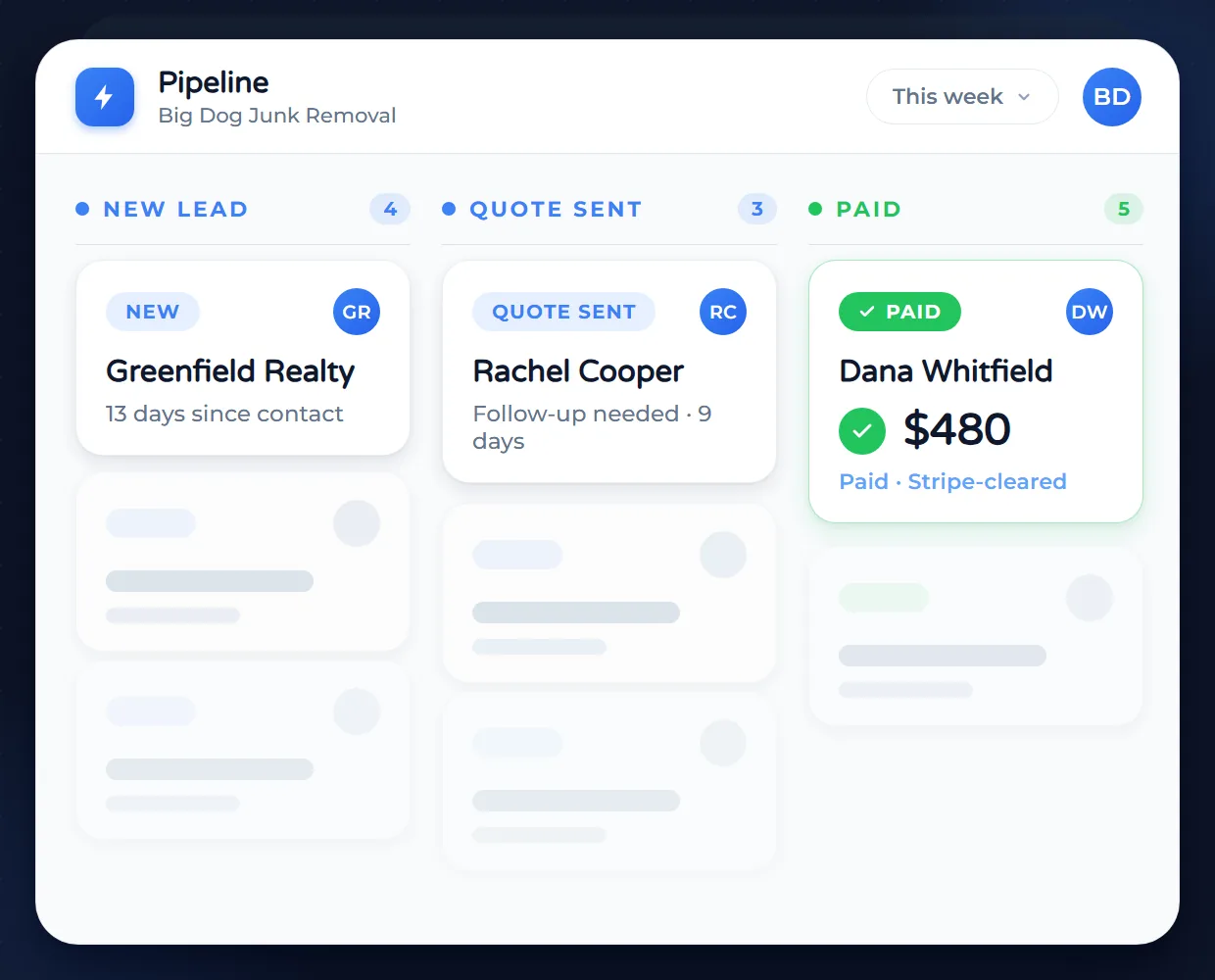
Quote accepted makes the job. Job complete makes the invoice. Invoice paid closes the loop.
Pipeline board with all 3 stages resolved: Greenfield Realty in New Lead, Rachel Cooper in Quote Sent, and Dana Whitfield marked Paid with a green check and $480
The Growth Problem

You can't scale a home service business on sticky notes.

If you are tracking leads in your head or on a whiteboard, you are losing money every single day.

Missed follow-ups

You call a lead once, they don't answer, and you get busy. That lead is gone forever, and so is the revenue.

Quotes go to die

You sent the estimate 3 days ago. Did they open it? Did they hate the price? You have no idea, so you don't call.

Zero visibility

You don't know if you have $5k or $50k in the pipeline for next week. You are hiring and spending based on guesses.

Founding Member Offer

Everything included.
$59/month for life in Wave 2.

The $29 wave closed Sept 16, on schedule. Wave 2 locks $59/month for life, everything included, for every trial started by Nov 11. After that, the list price is $79.

No contracts. Cancel anytime.

Our Signature Pipeline View

The Simple Way to Track Every Dollar in Your Business

You don’t need to be a sales expert to use this. Service Anchor turns your messy list of leads into a clean, simple board that shows every customer from the first phone call to the final payment. The best part? The board does the work for you. Cards move automatically as you complete tasks, and the system sends text updates to your customers so you never have to worry about dropping the ball.

Animated pipeline board showing a card moving through all 11 stages from New Lead captured to Paid Closed, illustrating Service Anchor auto-promoting work through the sales and job lifecycle.
  • Auto-Updating Board: Cards move automatically based on actions so no manual dragging is required.
  • Stage-Based Automation: Emails and texts trigger automatically when leads hit specific stages.
  • Track Every Dollar: See exactly how much potential revenue is sitting in every stage.
  • See The Next Step: Know exactly what action to take next to close every single deal.
  • Track Pipeline Growth: Monitor lead volume, value, and conversion rates to measure success.
  • Loss Analysis: See why deals failed so you can fix your sales process.

The Sales Compass

Never let a lead go cold again

Your list of leads is dozens long. Only five of them matter this hour. The Sales Compass ranks every lead by win likelihood, deal value, and how long it has been sitting, so you work the top of the list instead of the whole thing.
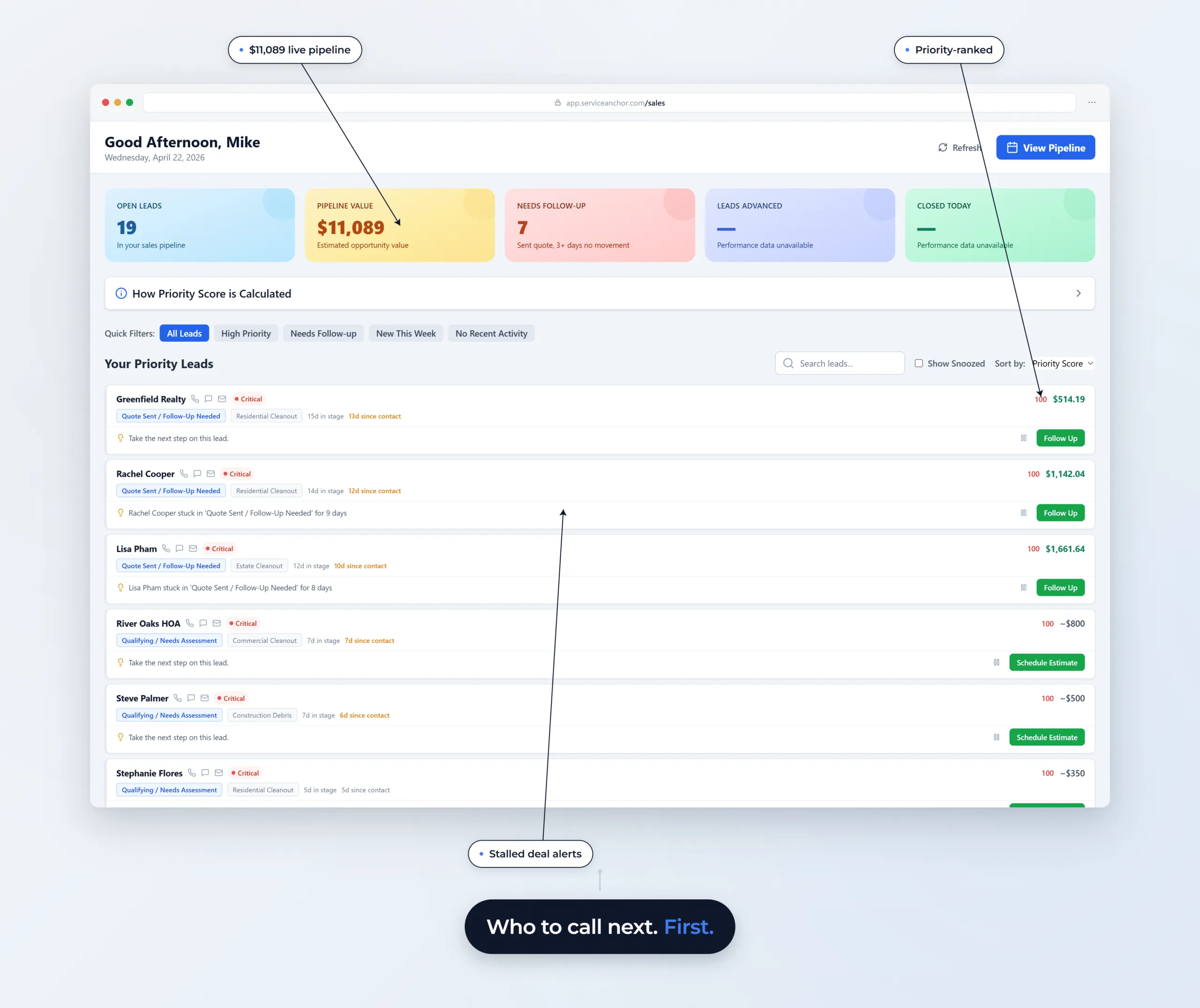
Service Anchor Sales Compass view: priority-ranked leads with live pipeline value, stage-specific actions, and stalled-deal alerts. Greenfield Realty at priority 100 with 13 days since contact; Rachel Cooper stuck in Quote Sent / Follow-Up Needed for 9 days.
  • Priority-scored in real time: Every lead ranked by win likelihood, deal value, stage age, and activity recency. Recomputed hourly, no manual refresh.
  • Daily action plan, auto-built: A ranked follow-up list generated for you each morning. No more staring at the pipeline wondering who to call first.
  • Full conversation history: Every call logged, every note time-stamped. Walk into the next conversation knowing exactly where you left off.
  • My Performance dashboard: Per-rep KPIs, deals closed, revenue generated, personal streaks.
  • Team leaderboard: Friendly competition that surfaces who is closing and who is stalling.
  • Rule-based, not AI: Scoring is transparent. You can see exactly why a lead ranks where it does.

The Executive Dashboard

The Command Center for Your Entire Operation

Every morning you want to know four things: how much came in, what's owed, who's working today, and what needs your attention. The Executive Dashboard puts all of it on one page, with every dollar tagged to an action you can take.
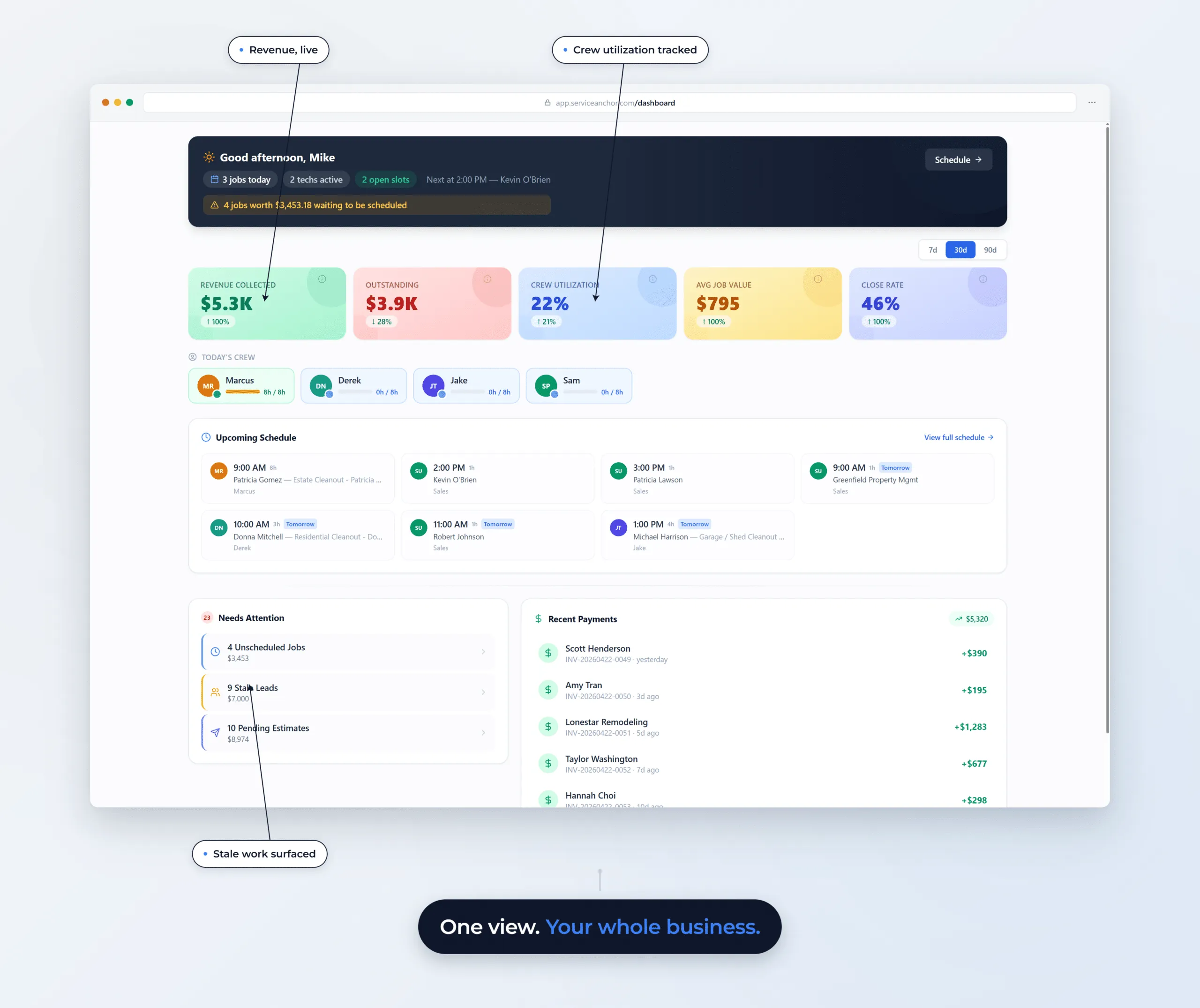
Service Anchor executive dashboard showing revenue, outstanding, crew utilization, KPIs, team capacity, upcoming schedule, and a Needs Attention panel flagging stale leads and unscheduled jobs.
  • Revenue collected, by period: Toggle across 7, 30, or 90 days. Watch the trend arrow, not the snapshot.
  • Outstanding balance with delta: Total receivables and whether you are collecting faster or slower than last period.
  • Recent payments feed: Every invoice that just settled. Customer, amount, how long ago. No refresh.
  • Today's crew, one panel: Every tech's booked hours vs. available hours. Spot idle capacity before the day starts.
  • Needs Attention with dollars attached: Unscheduled jobs, stale leads, pending estimates. Each shows the revenue on the table if ignored.
  • Close rate and avg job value: Conversion metrics with the same period toggle. See whether this week was a fluke or a pattern.

Lead Management

From New Lead to Paid Customer, We Track It All

Every lead has a source, a service type, a pipeline stage, and a history of every call, text, and estimate. Service Anchor keeps all of it in one place. Open any lead and see the full story in five seconds.
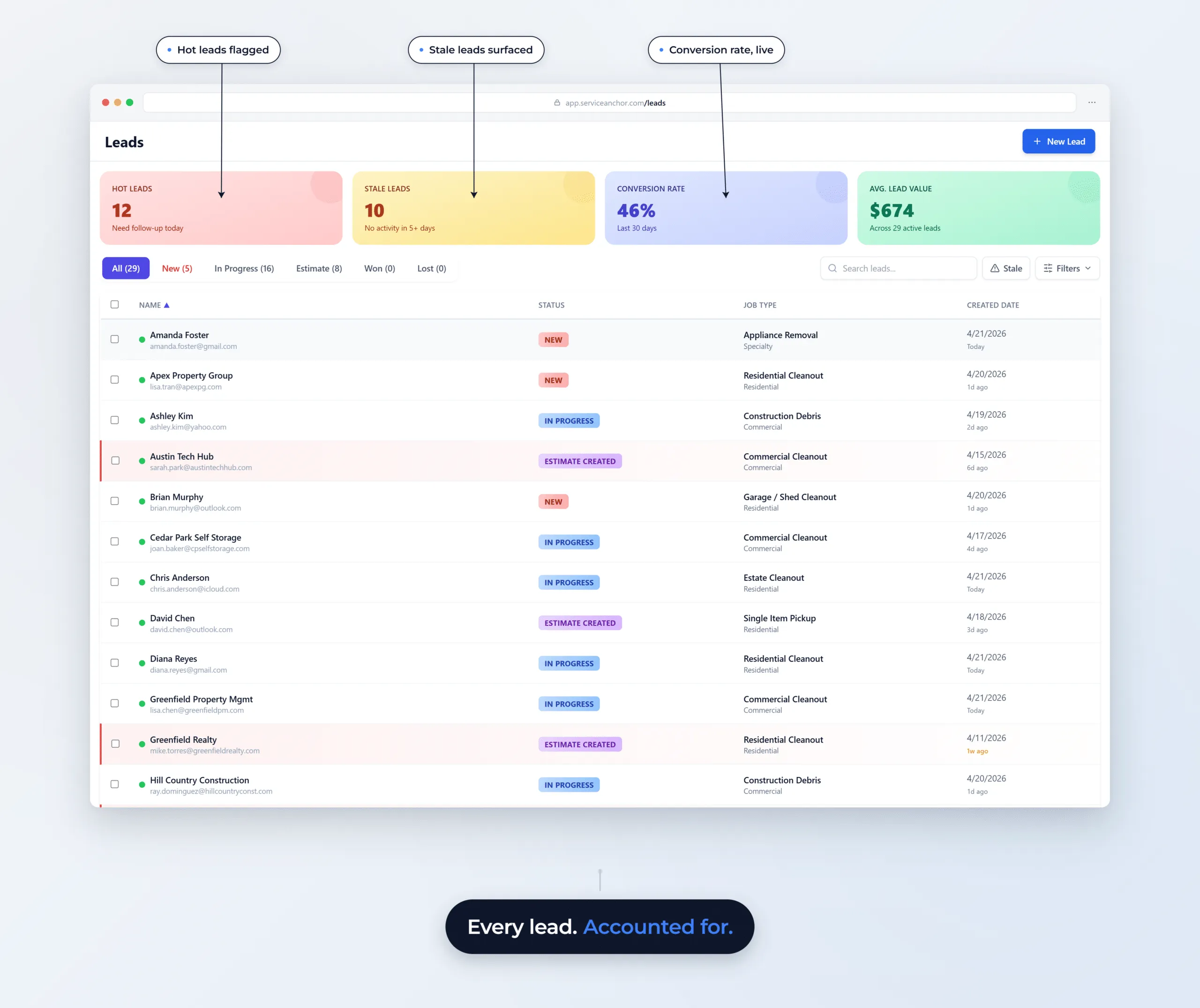
Service Anchor lead management view showing 29 active leads with KPIs for Hot Leads, Stale Leads, Conversion Rate, and Average Lead Value; filterable by status (New / In Progress / Estimate / Won / Lost) with job-type column and stale-lead surfaced highlight rows.
  • Source attribution: SEO, ads, referrals, phone, walk-in. Tag the source at intake, know which channel actually closes.
  • Trade-tuned categorization: Pre-built service types and lead sources load per trade. Ten trades, 90 seconds to first useful state.
  • One-click to estimate: Book an on-site estimate or send a quote directly from the lead record.
  • Call history + click-to-call: Every inbound and outbound call logged on the lead record. Click the number to dial from your browser.
  • Pipeline status at a glance: See exactly which stage every lead is in, how long it has been there, and what the next action should be.
  • Customer profile on win: When a lead converts, a customer profile is created with the full lead history attached. No re-entry.

Missed-call text-back

A Missed Call From a New Number Gets a Text Back

You are on the ladder, the phone rings, it stops. The text goes out before you climb down. Calls, voicemails, and texts from unknown numbers are read and sorted: real inquiries become leads on the board with the job type and urgency filled in, spam stays off it.
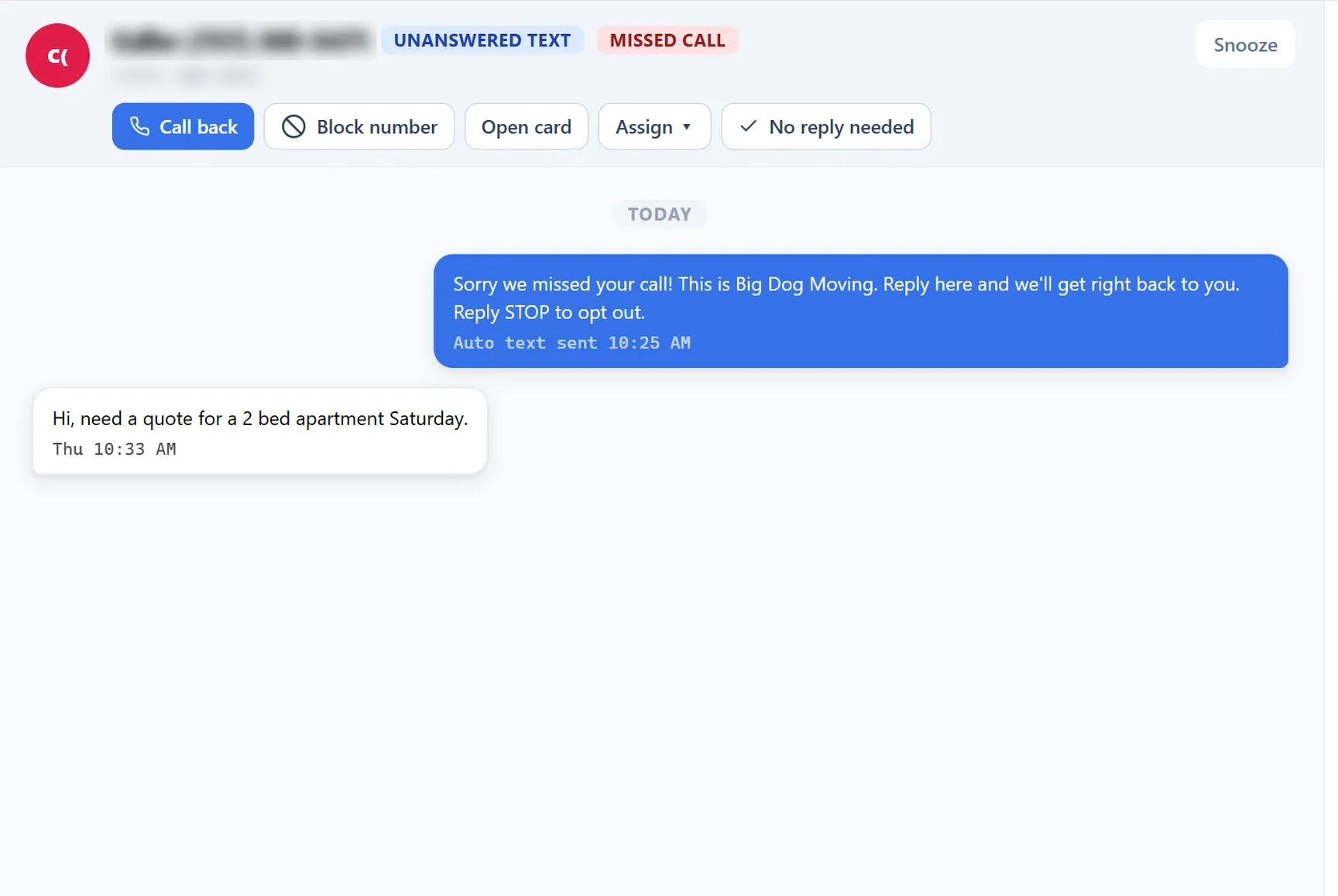
Service Anchor Communication Hub thread for a missed call from a new number: the automatic text-back bubble and the caller's reply asking for a quote for a 2 bed apartment Saturday
  • Fires on new numbers: Unknown callers get the text. Known customers reach you the usual way.
  • Lead on the board: The reply creates a lead with name, job type, and urgency pulled from the message.
  • Works on trial: On from day one of the trial, before your own number is registered.
  • Spam stays off: Spam and wrong numbers are kept out of the pipeline.
  • Unsure goes to triage: Anything the sorter cannot place waits for you, nothing is dropped.
  • Follow-ups on a timer: A quoted lead that goes quiet gets the next text on schedule.
Built on infrastructure your customers already trust
Stripe
Cards + ACH
Twilio
A2P SMS
AWS
Encrypted hosting
OpenRouteService
Route optimization
Clerk
Enterprise auth
Resend
Email delivery
The honest comparison

How Service Anchor stacks up

Apples-to-apples on the things small home service shops actually care about. April 2026 pricing.

Service AnchorJobberHousecall ProWorkiz
Starting price$59/mo for life$49/mo$79/moDemo required
Unified sales + job pipelineIncludedSeparate modulesSeparate modulesSeparate modules
Trade-specific setup in 90 secondsPre-builtYou build itLimitedPartial
A2P SMS auto-registered for youAutomatedSelf-serveSelf-serveSelf-serve
Card payments built inPass-throughPass-throughTheir processorPass-through
No per-user fees, everIncludedUpper tiers onlySeat-pricedTier-limited
Have Questions

Questions, answered straight.

Can't find the answer you're looking for? Talk to a real human about your specific setup.

Chat With Our Team
Billing & Pricing
What does it cost, and when does billing start?

One flat price per company. The founding ladder: Wave 1 ($29 a month for life) closed on Sept 16, 2026. Wave 2 is $59 a month for life for every trial started by Nov 11, 2026, and after that the list price is $79 (Solo: every feature, up to 5 users).

Your first 14 days are free. You put a card on file at signup, and nothing is charged until day 14. Cancel before then in one click and nothing is charged. After your first charge, your first 30 days are money-back, no questions asked.

What happens at the end of the 14-day trial?

Your card is charged $59 on day 14 and your Wave 2 rate locks for life. Not for you? Cancel before day 14 in one click and nothing is charged. Change your mind after? Your first 30 paid days are money-back.

Need more time? Every trial can be extended once, by 7 days. And nothing is a surprise: we email you on day 11, and the app shows your exact charge date. Cancel is one click in settings, no call required.

What is included in the price?

Everything. Every feature we ship, up to 5 users (your price never changes when you hire), your business phone number, the carrier registration paperwork and fees, and your texting and calling: up to 1,500 texts and 500 voice minutes a month. No per-user fees, no add-on tiers, no usage bills.

If you regularly send more than that, we reach out and figure it out together. The price does not change behind your back.

What happens when Wave 2 closes?

On Nov 11, 2026 the ladder reaches its $79 list price, no lock. Each wave locks its own rate, the ladder only goes up, and a closed wave never reopens. Wave 1 ($29 for life) closed on Sept 16, 2026, on schedule.

Starting a trial before the close locks the Wave 2 rate: it is held through your trial and confirmed by your first charge. If you cancel or your account pauses before that, the rate is not locked.

What does "for life" actually mean?

"For life" means as long as your subscription stays active without a 30-day payment lapse, and as long as Service Anchor continues to operate the platform. If you cancel for more than 30 days and come back later, you rejoin at whatever rung the ladder is on then.

We cannot promise the company exists forever. We can promise that for as long as Service Anchor exists and you keep your subscription active, your founding rate is locked. The legal language lives in our Terms of Service under the Founding Member Program section.

Do you process payments from my customers? What does it cost?

Yes. Your customers pay you through Stripe, and the money lands in your own connected account. Card processing is a flat 3.5% + $0.30 per transaction: every card type, one rate, no monthly minimums, no surcharges.

Product
Is the app finished?

Yes. The pipeline, scheduling, estimates and proposals, invoicing, payments, booking requests, deposits, and texting and calling all run today for paying customers. The roadmap still moves fast, and founding members steer it: feature requests go straight to the founder.

Can my customers book online?

They can request a time. Your booking page shows real openings from your schedule, the request lands on your phone, and you approve it. Nothing is booked until you say so, so there are no double bookings.

Do you do proposals?

Yes. Turn on proposals and every estimate carries scope of work, warranty, terms, and your license number, with a photo on any line. Pick a layout and your accent color once and every estimate and invoice matches. The customer signs on their phone and gets a copy by email.

Can I take a deposit?

Yes. Turn deposits on in Admin (Feature Toggles, then Deposits) and every estimate asks for one: a percent of the estimate you set once, pre-filled and editable on every quote. The customer signs, then pays the deposit from their own phone. Reminder texts go out on day 1 and day 3 and stop the moment it is paid, and the deposit shows as a credit on the final invoice.

Who is Service Anchor built for?

Home-service operators running 1 to 5 trucks: junk removal, moving, pressure washing, and 5 more trades with pre-configured setups. If you are quoting jobs, dispatching a small crew, and chasing invoices from your phone, this was built for you.

It replaces the spreadsheet-plus-texts-plus-paper system, or a bigger CRM that charges for every tech you add. It is not built for franchises or 20-truck enterprises, and we would rather tell you that now.

How is Service Anchor different from other CRMs?

Two ways. First, one board runs the whole job: lead, quote, schedule, invoice, paid. When a quote is accepted the job is created. When the job is done the invoice exists. When it is paid, the review request goes out. You never drag a card or re-type a thing.

Second, the price is flat. Everything is in the one plan: texting, calling, the follow-up suite, every user up to 5. No add-ons, no per-tech fees, one number.

Can I control what my technicians see in the app?

Yes. Service Anchor has distinct user roles and permissions. Field technicians see exactly what they need to do the job (schedules, job notes, addresses), and you can restrict them from seeing sensitive business data like total revenue, pricing, or admin settings.

Service Anchor needs my EIN or SSN to set up texting. Where does it go?

Mobile carriers require a business Tax Identifier (EIN, or SSN for sole proprietors) for A2P 10DLC business registration before your texts can be delivered. There is no path around this at the carrier level, but we built the data flow to keep your Tax ID out of our systems.

You enter it once during texting setup. We forward it directly to the carrier registry and do not write it to our databases. Only the last four digits stay on your account so you can recognize which Tax ID is on file. The registration fees are on us. The full description is in our Privacy Policy under "Information you provide directly" and "Data retention."

Do you have a mobile app?

Not a native app from an app store, and we are not going to promise you a date for one. What you have today installs to an iOS or Android home screen like an app, so your crew logs in from a phone or tablet browser to see schedules, update job statuses, and pull customer details with nothing to download.

Setup itself belongs on a computer. A tablet or computer is the office, where you set things up and run the operation, and your phone is the field.

Can I set up on my phone?

Sign up from your phone, sure. Then set it up from your computer. Service Anchor works like your business does: a tablet or computer is the office, where you set up and run the operation, and your phone is the field, for calls, texts, and today's jobs. Give it about 10 minutes to start.

Founding members
What if I need a feature that you do not have yet?

We want to build it. The roadmap is driven by the people running on it. Tell us what you are missing and it goes straight to the founder, and we prioritize what real operators actually ask for.

Wave 2 closes Nov 11

Lock $59 for life before Nov 11.

Free for 14 days. Then $59 a month, locked for life, everything included: every feature, your business line, texting and calling. The $29 wave closed Sept 16, on schedule. After Wave 2, list is $79. The ladder only goes up.

Everything included. 90-second setup. 30-day money-back.