You have watched a Jobber demo, you have started a Housecall Pro trial, and you want one person who is not selling you either of them to tell you the truth. That is what this post is. We build Service Anchor, a newer CRM in the same category, so we have a dog in this fight. We will name where each of these two wins, where each one loses, and at the end we will tell you honestly when we think the answer is neither of them.
If you run a junk removal, dumpster rental, or moving business with one to five trucks, this post will save you a few hours. If you run a 10-truck HVAC operation with five locations and three service agreements per customer, close this tab. Jobber or Housecall Pro will almost certainly be your answer, and the rest of this comparison will not change that. (If you want a wider field compared specifically against Jobber, see our Jobber alternatives for junk removal breakdown.)
- Jobber is the broader product. Housecall Pro is the deeper one for trades with recurring service contracts and missed-call risk.
- For pure junk removal, dumpster rental, and moving, both products are good enough and neither is built for you. Specifically for moving operators, our moving company software comparison covers the trade-specific options (Movegistics, MoverBase) alongside Jobber and Housecall Pro.
- Jobber’s SMS-capable tier (Connect) advertises at $139 a month billed annually, $199 billed monthly. Housecall Pro’s SMS-capable tier (Essentials) is $149 billed annually, $189 billed monthly. The sticker price is not where the difference lives.
- Both vendors ship AI receptionists in 2026. Housecall Pro’s CSR AI is the more mature product and available before you reach the top tier. Jobber’s AI Receptionist now ships too, but only inside its new Plus tier at $699 a month. If you lose more than a few thousand a month to missed calls, both options are real; the question is packaging.
- Jobber added a fourth tier (Plus, $699 a month, includes 15 users and the AI Receptionist) that did not exist a year ago. Housecall Pro still tops out at MAX.
- We will update this post as both vendors ship new features. Last verified against each vendor’s public pricing page on April 30, 2026.
Who this post is for
Mike runs a three-truck junk removal shop, quotes from his phone, and is one dropped follow-up away from losing a Saturday cleanout that pays his truck note. He needs a CRM that does four things: get the quote out fast, keep the crew on schedule, bill the customer, and ask for the review before the customer forgets his name. He does not need 50 integrations or a “business intelligence” dashboard. He needs the software to stop making him retype addresses.
If that is your shop (or you are somewhere between solo and five trucks in junk removal, dumpster rental, or moving), this post is for you. We are not going to talk about enterprise workflows, multi-location dispatch, or recurring maintenance contracts.
The ten dimensions we rate
No comparison survives first contact with reality if it leans on a feature count. We score both products across the ten dimensions that actually move the needle for an operator at this size.
- Pricing transparency
- Setup time to first real job on the board
- Pipeline and workflow model
- Trade-specific features (junk, dumpster, moving)
- Mobile tech app quality
- SMS and customer communication
- Invoicing and payments
- Review generation
- Customer support quality
- Total cost of ownership over three years
We score each dimension on a 1 to 5 scale, with a one-paragraph explanation per row. The scorecard is at the bottom.
Round-by-round scoring
1. Pricing transparency
Jobber now publishes four tiers on one page: Core at $49 a month, Connect at $139, Grow at $199, and Plus at $699, all billed annually with a “limited time” promo currently visible at the top of the page. Billed monthly the same tiers are $49, $199, $399, and $699. Each tier ships with a fixed user count (Core 1, Connect 5, Grow 10, Plus 15), and additional users are $29 each across the line. Housecall Pro publishes three tiers: Basic at $59 a month, Essentials at $149, MAX at $299, all billed annually ($79, $189, $329 monthly). The headline numbers are clean on both pricing pages.
Where Housecall Pro gets murkier is SMS. Housecall Pro passes SMS costs through from Twilio and those line items do not appear on the pricing page. Operators on the Housecall Pro Reddit and Capterra regularly mention post-invoice surprise at per-message charges. Jobber’s SMS usage is included on Connect, Grow, and Plus. Neither publishes overage math the way a software company selling to technical buyers would. Jobber wins this round on predictability: 4 vs 3. (For a side-by-side of how Service Anchor approaches the same operator at the same trade size, see our pricing page.)
2. Setup time to first real job on the board
Both products ship with an empty price book. Both expect you to configure your pipeline stages, invoice template, email templates, and SMS templates before you can quote a real customer. Community threads on both platforms consistently report two to three hours of setup before a new operator is confidently running live jobs.
Neither tool ships with a pre-loaded junk removal, dumpster, or moving price book. You are building the dump fee line item, the half-truck rate, the minimum service call, and the disposal surcharge from scratch. Both score 3. The bigger wedge against both of them is that a software company could just ship the price book pre-loaded. Neither does. (For reference, the rate card we ship pre-loaded covers volume haul tiers, disposal pass-through, and hazardous-item add-ons out of the box.)
3. Pipeline and workflow model
This is the biggest architectural difference between the two, and also the biggest difference between both of them and any tool built around a single pipeline. In Jobber, a lead lives in the CRM, the quote lives in the Quotes module, the job lives in Jobs, and the invoice lives in Invoicing. You promote items between modules manually. Housecall Pro works the same way with different module names.
For a junk removal owner whose day is “lead comes in at 7:15, quote at 8:00, crew on site at 10:00, paid at 12:30, review request at 1:00,” that module-silo design adds two to four manual promotions per job. Neither tool auto-advances the next step when you do the actual work. Both score 3. This is not a bug in either product. It is just the design assumption behind software built in 2011 and 2013.
4. Trade-specific features for junk, dumpster, and moving
Jobber supports 50-plus trades. Housecall Pro’s marketing focus is HVAC and plumbing. Neither of them ships junk-removal, dumpster-rental, or moving-native features out of the box.
For junk removal, that means no volume-tiered price book (1/4, 1/2, 3/4, full truck), no disposal fee pass-through template, no hazardous-item surcharge taxonomy. For dumpster rental, no two-trip drop-off and pickup workflow, no overage billing at pickup, no per-day rate logic; for the dumpster-specific picture see our software comparison ranking the dumpster-native and generalist options by box volume. For moving, no origin-destination address pair on the job, no in-transit status. You can build these yourself in both tools. Nobody ships them for you. Jobber 2, Housecall Pro 2.
5. Mobile tech app quality
Both ship real, polished mobile apps. Jobber’s is older, more feature-complete, and considered best-in-class across home service software. Housecall Pro’s is tight, especially for techs running the full day from their phone. Both handle photos, signatures, line items, and status updates in the field. Jobber 5, Housecall Pro 4.
6. SMS and customer communication
Both support two-way SMS. Both require the operator to register their own A2P 10DLC brand and campaign with The Campaign Registry, which is a compliance process that can take one to three weeks and requires navigating Twilio or the vendor’s portal. Solo operators stall here for weeks on both platforms. Jobber bundles SMS usage into its Connect, Grow, and Plus tiers. Housecall Pro passes carrier costs through without publishing the rate. Call it a draw on capability: both 4. (Whichever you pick, you will need actual templates to send: our on my way text templates post is CRM-agnostic and lifts straight into either tool.)
7. Invoicing and payments
Housecall Pro’s payment processor is tight, tap-to-pay works well, and the integration into jobs is mature. Jobber’s is also mature, with stronger QuickBooks Online sync. Both support saved cards, auto-invoice on job complete, and payment reminders. For a junk removal shop collecting on-site after the truck is loaded, both work fine. Housecall Pro 5, Jobber 5. Neither publishes a per-trade invoice template, so the line items you build manually in the price book (see how we think about junk removal pricing) are what show up on the customer’s invoice.
8. Review generation
Both platforms have automated review request workflows that fire after a job is marked paid. Housecall Pro’s implementation is slightly cleaner and more configurable. Jobber’s is reliable. Neither is best-in-class against a dedicated review tool like NiceJob, but both are good enough for most operators. Jobber 4, Housecall Pro 4.
9. Customer support quality
Housecall Pro publishes its support phone number on the homepage and staffs US-based support. Operators report fast response times. Jobber’s support is email and chat first, with phone on higher tiers. Both have strong help docs. For a solo operator troubleshooting Twilio registration at 9 p.m. on a Sunday, Housecall Pro’s phone line is a real difference. Housecall Pro 5, Jobber 4.
10. Total cost of ownership over three years
This is where the sticker-price framing falls apart. For a 5-truck shop (one owner, one dispatcher, three techs, two helpers, call it seven users), Jobber Core gives you 1 user at $49 plus 6 more at $29 each, landing at $223 a month, but Core does not include two-way SMS. Connect at $139 annual includes 5 users, so two extra at $29 lands at $197 a month. Grow at $199 annual includes 10 users, so seven users sits at the $199 base. Plus at $699 includes 15 users and only starts to make sense once headcount climbs well past seven (or you specifically want the AI Receptionist that comes bundled).
Housecall Pro’s per-seat pricing is less public. Reports from operators on Essentials with seven users land near $250 to $310 a month at the current annual rate. MAX with seven users lands near $400. Over three years, that is roughly $7,000 to $14,000 in software cost on either platform at SMS-capable tiers using current advertised annual pricing, before SMS usage fees on Housecall Pro, QuickBooks add-ons on Jobber, or either vendor’s promo expiring. Jobber 3, Housecall Pro 3. For a one-truck solo shop on Core, Jobber is materially cheaper. The moment SMS enters the picture the delta shrinks.
The head-to-head scorecard
| Dimension | Jobber | Housecall Pro | Notes |
|---|---|---|---|
| Pricing transparency | 4 | 3 | HCP’s SMS pass-through is not on the pricing page |
| Setup time | 3 | 3 | Both ship empty price books |
| Pipeline model | 3 | 3 | Both are module-silo designs |
| Junk / dumpster / moving fit | 2 | 2 | Neither ships trade-specific |
| Mobile tech app | 5 | 4 | Jobber’s app is best in class |
| SMS and communication | 4 | 4 | Both require operator self-registration for A2P |
| Invoicing and payments | 5 | 5 | Both mature and reliable |
| Review generation | 4 | 4 | Both fire automated requests |
| Customer support | 4 | 5 | HCP publishes a phone number; Jobber is email and chat first |
| 3-year cost (7 users) | 3 | 3 | Roughly $7K to $14K at current advertised annual rates |
| Total | 37 / 50 | 36 / 50 | Functionally tied |
If you add up the scores, Jobber edges Housecall Pro by one point. That is a rounding error. For the ICP this post is about, you are choosing between two very similar tools with different personalities: Jobber is broader, older, and has just added a Plus tier that bundles its own AI Receptionist. Housecall Pro is deeper for HVAC-style trades and has the more accessible AI receptionist (CSR AI) at lower tiers.
Where both fall short for junk, dumpster, and moving
Three things show up on every single sales call we take from operators who have used both products.
The price book is empty. Nobody selling software that claims to be “built for home service” in 2026 has any excuse for making a junk removal owner build a half-truck line item from scratch. It takes an engineer one afternoon to ship a pre-loaded price book per trade. Neither has done it.
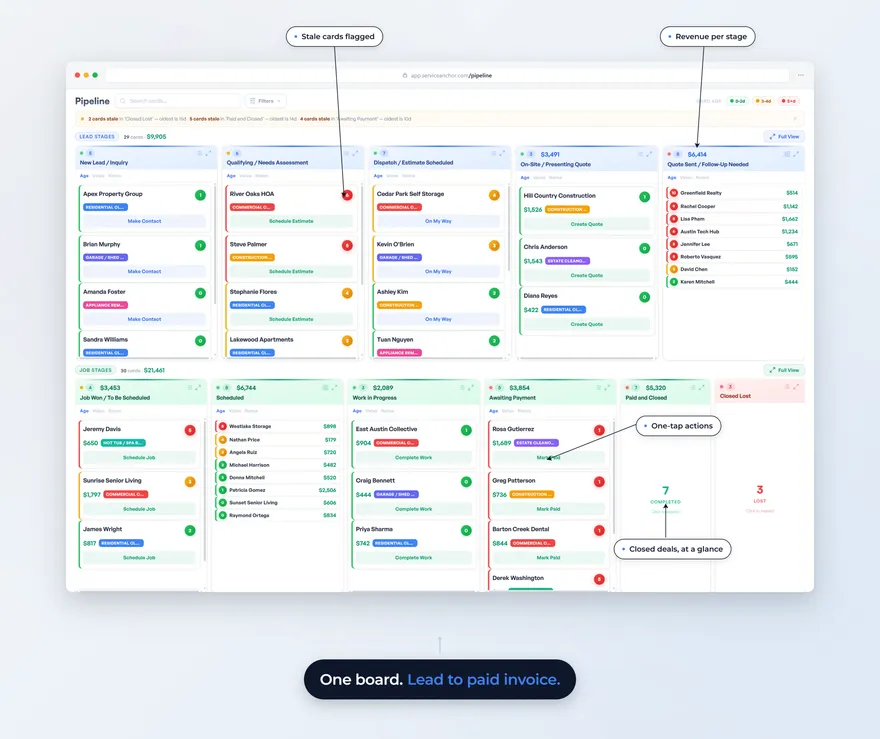
The modules force you to manage the software. Quotes module, Jobs module, Invoicing module, CRM module. In real life, a junk removal job is one thing: a lead that becomes a quote that becomes a job that becomes an invoice that becomes a review request. A pipeline-first design would collapse those four screens into one board and auto-advance the card when you do the actual work. Both platforms force the operator to promote cards manually, which is where leaks happen.
The price is designed for a different operator. Core or Basic get you started. The tiers that include two-way SMS (the feature every home service operator actually uses in 2026) sit at $139 or $149 a month annual, $199 or $189 monthly, with per-user seat add-ons on top once you exceed the included count. A two-truck junk removal shop is typically paying $200 to $400 a month for a tool whose marketing is aimed at HVAC companies with three times the revenue.
A third option worth looking at
We build Service Anchor. It is a CRM and FSM (field service management) combined into one pipeline, built specifically for 1-to-5-truck operators in junk removal, dumpster rental, moving, pressure washing, gutter cleaning, tree service, and HVAC. It is $29 a month for the first 25 founders, locked for life, with every feature included, and every account starts with a free 14-day trial: card on file, nothing charged until day 14. Start your free trial and run a real job through it. If you would rather see the product working first, you can still book a demo.
Three things we do that Jobber and Housecall Pro do not. First, pre-configured price books per trade. Pick junk removal at signup and the half-truck rate, dump fee line item, and disposal surcharge load automatically. Second, a unified pipeline: lead, quote, job, invoice, review all live on one board, and the board advances itself when you do the work. When a quote is accepted the job is created. When a job completes the invoice auto-generates. When an invoice is paid the review request fires. Third, we register A2P 10DLC automatically for both EIN-holding businesses and sole proprietors, which removes the one-to-three-week Twilio setup stall that both Jobber and Housecall Pro customers hit.
Honest gaps. We are new, our brand is small, and we do not yet ship an AI receptionist (Housecall Pro has CSR AI; Jobber added one in its Plus tier). Our integration surface is five services (Stripe, Twilio, AWS SES, OpenRouteService, Clerk) versus Jobber’s 40-plus. Our mobile tech app has roughly 60 percent of the desktop depth today; it is growing weekly, but Jobber’s is a mature product and ours is not. If you need QuickBooks Online sync, Zapier flows, or a deeply integrated review tool, both Jobber and Housecall Pro are better choices right now. We are going to keep updating this post as we ship and as both of them ship. Our only bias is that we want to be useful to you whether or not you pick us.
Final recommendation matrix
- You run 5 to 20 crews, multi-trade, complex workflows (HVAC, plumbing, recurring contracts). Jobber is still the right call. Stop shopping.
- You lose more than $3,000 a month to missed calls and an AI receptionist is attractive. Housecall Pro’s CSR AI is the more mature option and available without forcing you onto the top tier. Jobber’s AI Receptionist now ships too, but only inside the Plus bundle at $699 a month. Pick by packaging: HCP if you want the AI without changing tiers, Jobber Plus if you also want everything else Plus includes.
- You run 1 to 5 trucks in junk removal, dumpster rental, or moving and you want the pipeline pre-configured for your trade without a two-hour setup sprint. Evaluate us. We ship the price book, we ship the pipeline, we register your A2P 10DLC, and we are free while we prove it.
Frequently asked questions
Is Jobber or Housecall Pro better for junk removal specifically? Functionally, they tie. Neither ships junk-removal-native features. Jobber wins on mobile app quality; Housecall Pro wins on support response time and the more accessible AI receptionist.
What is Housecall Pro’s CSR AI and does Jobber have anything like it? Housecall Pro’s CSR AI (part of its AI Team product) is an AI receptionist that answers missed calls and books jobs around the clock. As of April 2026, Jobber ships its own AI Receptionist as well, bundled into the new Plus tier at $699 a month and labeled a $99 value inside that bundle. Both are real products. HCP’s is more accessible at lower tiers; Jobber’s is gated behind Plus.
Why is Jobber Connect priced at $139 instead of Core’s $49? Core does not include two-way SMS. Connect is the first tier that does. If you text customers from your CRM, Connect is the practical floor. ($139 is the current annual rate on Jobber’s pricing page; monthly billing is $199. A “limited time” promo banner is currently visible at the top of the page.)
Are there hidden fees on either platform? Jobber’s SMS usage is bundled on Connect, Grow, and Plus. Housecall Pro passes Twilio SMS costs through and does not publish the rate on the pricing page. Ask for a sample invoice before you sign on either. Both vendors quote per-user seat add-ons of $29 (Jobber) once you exceed the tier’s included user count.
Last updated: April 30, 2026. We will refresh this post quarterly or anytime either vendor materially changes pricing or ships a category-defining feature.