The best Housecall Pro alternative for a 1 to 5 truck junk removal or hauling shop is the one that ships a volume-tier price book and a text-back on missed calls without a rebuild, and for most shops that comes down to Service Anchor or Jobber. This is for operators already on Housecall Pro who just hit the second seat or the recurring-service assumptions, and are shopping at 10pm. As of October 2, 2026, Housecall Pro’s Essentials plan is $149 a month billed annually, or $189 month to month, for five users (Housecall Pro, pricing page, read October 2, 2026). Below: the five things a junk shop actually runs into on Housecall Pro, what to look for instead, the five alternatives ranked with verified prices and the switching cost for each, and the honest case for staying put.
- Housecall Pro is a good product built for recurring-service trades and larger crews. Junk removal is a one-trip, quote-at-the-curb trade, and the fit problems show up in the first week: a tier jump at the second user and per-seat pricing past eight, a price book that wants service plans, and a text-back you build yourself.
- Prices verified October 2, 2026: Housecall Pro runs $59 to $299 a month billed annually ($79 to $329 monthly), with $35 a month per extra user on MAX. Jobber runs $29 to $399 a month annually, plus $29 a month per extra user. Workiz and FieldPulse no longer publish prices at all.
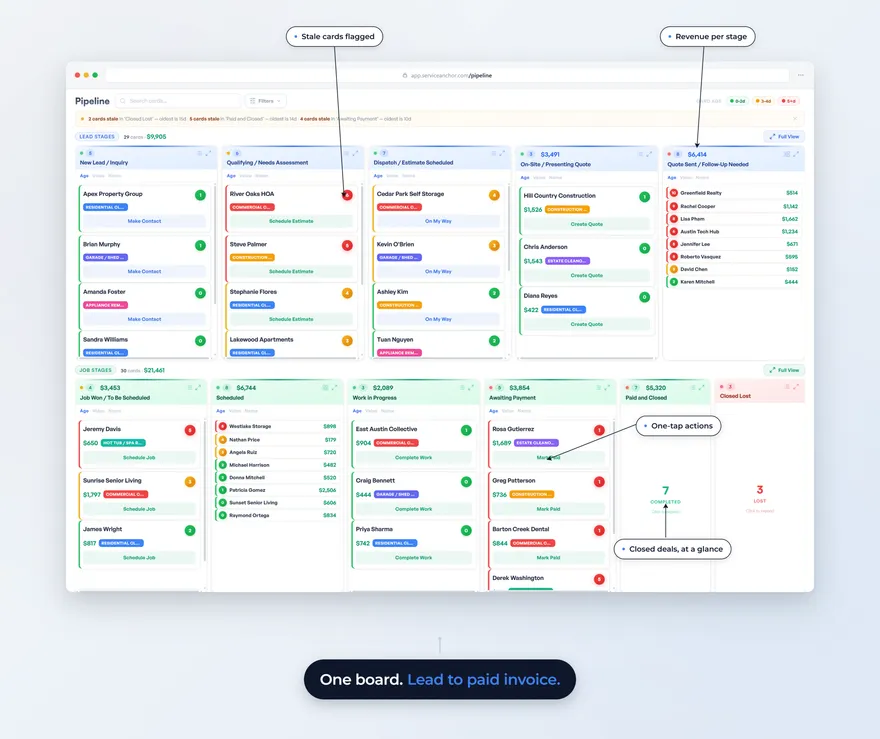
- Service Anchor is the trade-ready pick: the junk removal price book loads at signup, every lead sits on one board from first call to paid invoice, texting and calling come included, and Wave 2 members lock in $59 a month for life (trials started by November 11, 2026). It is also the newest company on the list.
- Three things Housecall Pro does better than anyone here: an AI that answers your missed calls and books the job, deep card processing with tap to pay, and recurring service plans. If any of them is why you bought it, read the “when to stay” section before you move.
- Switching costs are real but small: export customers and jobs, port the number, run both for two weeks. Housecall Pro lets you export your data and leave month to month.
What does a junk removal shop actually run into on Housecall Pro?
A junk removal shop runs into five specific things on Housecall Pro. Three are trade fit: the price of software built for recurring-service trades like HVAC and plumbing and for larger crews, where the customer comes back twice a year and the job is a service call, not a truckload. Two are things to know before you put a card down. Here is each one.
1. The second user costs more than the plan. Housecall Pro’s Basic plan is one user. Essentials includes five, MAX includes eight, and MAX charges $35 a month for each user past that (Housecall Pro, pricing page, read October 2, 2026). A two-truck shop that wants the crew lead logging jobs from the field is shopping for Essentials on day one. A second seat on Basic means Essentials, at $149 a month billed annually.
2. The price book wants service plans, not truck tiers. Junk removal prices by volume: a quarter truck, a half, three quarters, full. Single items price by what they are, and disposal is a pass-through. Housecall Pro’s catalog can hold those lines, but you build them, and operators report rebuilding their flow around assumptions that belong to other trades. A SoftwareAdvice reviewer running a 2 to 10 person company put the mismatch plainly in November 2022: Housecall Pro “calls ‘jobs’ invoices,” and they found it odd to receive an “invoice” before the job started.
3. The text-back is yours to build. The lead that does not get a text back inside a few minutes calls the next truck. Housecall Pro’s automations are configurable, which means the text that fires when a new number’s call goes to voicemail is something you build on a Sunday, not something that is on when you sign up. The paid route is its AI answering add-on, which is a different product decision.
4. Payment holds hit the trades where the deposit is the job. Owner reviews on SoftwareAdvice (June 2026) and the App Store (January 2026) describe Housecall Pro’s payments team holding a first transaction or a deposit while asking for documents, including photos of completed work and customer information. For a junk shop collecting on a cleanout, a held deposit means paying the dump fee out of pocket.
5. Plan the exit before you start it. Housecall Pro is month to month and lets you export your data when you leave, which operators credit it for. Better Business Bureau (BBB) complaints in May and June 2026 also describe owners cancelling more than once before the charges stopped. Both things are true. Keep the cancellation confirmation.
None of these makes Housecall Pro a bad product. The first three make it a product built for a different trade, which is the whole reason this page exists.
What should a junk removal CRM have out of the box?
A junk removal CRM should arrive with the trade’s price book already loaded, keep every lead on one board from the first call to the paid invoice, text back a missed call on its own, and charge one price that does not change when you hire. Those four tests sort the alternatives below faster than any feature list.
The price book is the trade. If the software does not ship volume tiers, per-item prices and a disposal pass-through, you will spend a Sunday typing them in. We publish the junk removal price book Service Anchor loads at signup as a free price sheet with 66 line items, and it is a decent test for any tool: can you paste that list in without fighting the data model?
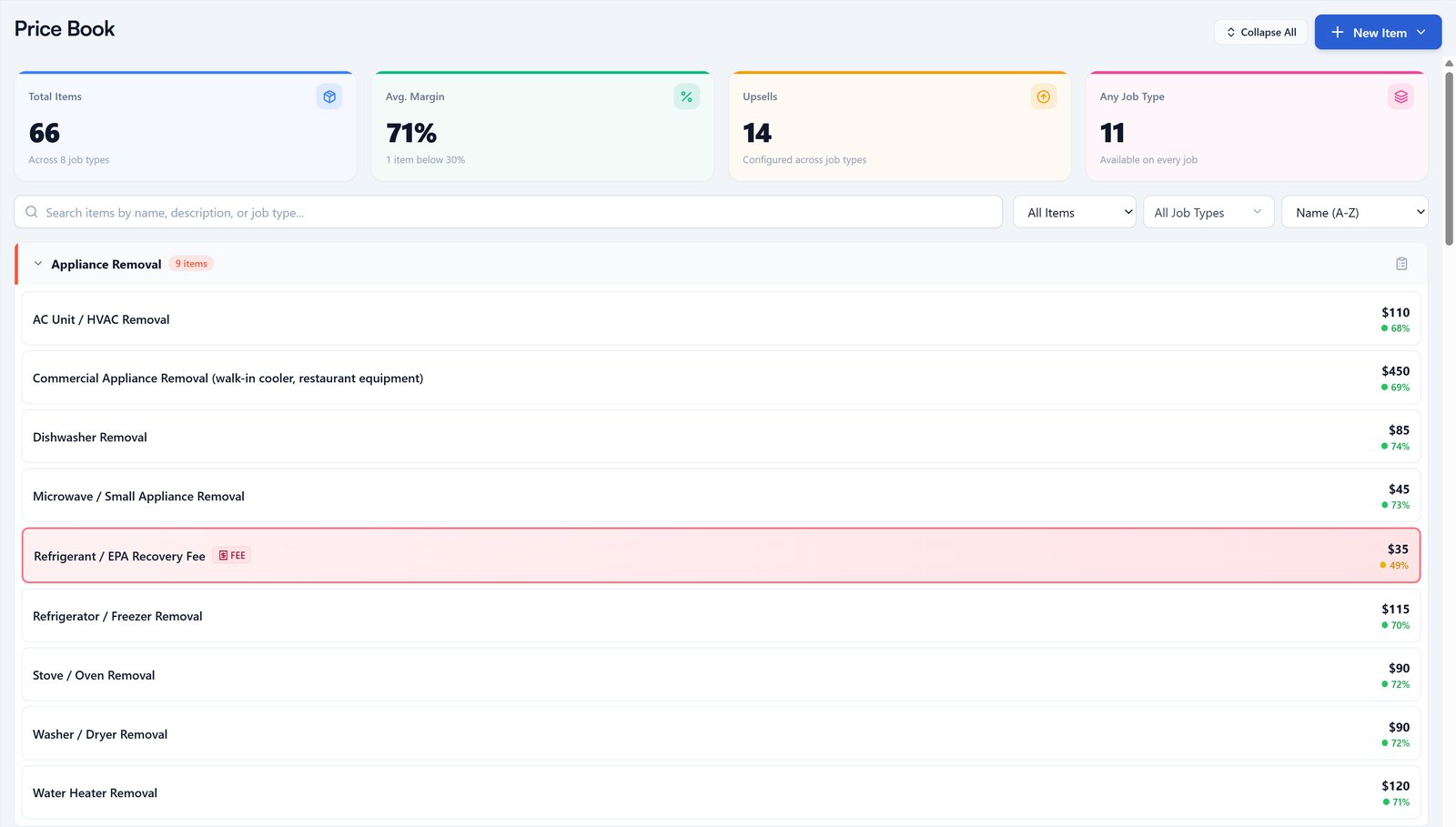
The junk removal price book Service Anchor loads at signup: 66 items across 8 job types, each with its price and margin. Demo account.
One board, lead to paid. The alternative to one board is four screens (leads, estimates, jobs, invoices) and a human moving things between them. On a one-trip trade, the status update should be the work itself: the quote gets accepted, the job exists; the job gets marked done, the invoice exists.
Text-back without a build. Speed to lead is the whole game in junk removal, because the homeowner called three companies. The on-my-way and follow-up text templates we publish are the copy; the software should fire them.
One price that survives hiring. Per-seat pricing punishes the exact moment a shop grows. The test: what does the plan cost at three users, and what will it cost at five?
Which Housecall Pro alternatives fit a junk removal shop, ranked?
The five real Housecall Pro alternatives for a 1 to 5 truck junk removal shop are Service Anchor, Jobber, Workiz, FieldPulse, and a plain invoicing tool like Square Invoices, in that order for most shops. The ranking is by how little rebuilding each one needs for this trade, not by feature count. Every CRM price below was read from the vendor’s own pricing page on October 2, 2026.
1. Service Anchor: the trade-ready pick
Service Anchor is a CRM built for 1 to 5 truck home service shops, and junk removal is its first trade. Pick junk removal at signup and the price book loads: volume tiers from minimum through full truck, single-item removal prices, the stairs, long-carry and after-hours surcharges, and disposal as a pass-through. Every lead sits on one board from first call to paid invoice, and a quote the customer accepts becomes the job on its own. A missed call from a new number gets a text back. Texting and calling run on your own business number and come included in the plan, with monthly caps.
Pricing: Wave 2 members lock in $59 a month for life, for trials started by November 11, 2026; after that the list price is $79 a month. Up to five users, and the price does not change when you hire. The trial is free for 14 days with a card at signup.
The gap: Service Anchor is the newest and smallest company on this list, with a shorter track record and fewer integrations than Jobber or Housecall Pro. There is no AI that answers the phone. If you want the full field, our ranking of junk removal software is written to be fair to the others.
Switching cost: low. We port your business number so customers keep calling the number they know, and for founding members (the trials that lock in the for-life rate) we move your data over for you.
Who it is for: a 1 to 5 truck junk or hauling shop that wants the setup done on day one and a price that holds.
2. Jobber: the mature generalist
Jobber is the broadest platform on the list and the safest choice if “most mature” is the deciding factor. The pipeline is not trade-specific, so you will build the junk price book yourself, but the quoting, scheduling and invoicing are polished and the mobile app is strong.
Pricing: Core is $49 a month, or $29 a month billed annually, for one user. Connect is $139 monthly or $99 annually. Grow is $199 monthly or $149 annually. Plus is $499 monthly or $399 annually and includes five users. Every plan charges $29 a month for each additional user (Jobber, pricing page, read October 2, 2026). Core includes one user, so three users on Core is $29 plus two seats at $29: $87 a month billed annually.
Switching cost: moderate. Customer and job imports are supported; the price book is manual.
Who it is for: a shop that wants the biggest ecosystem and is fine building its own trade setup. We wrote the full Jobber alternatives comparison for junk removal and the head-to-head on Housecall Pro vs Jobber if you are weighing those two.
3. Workiz: strong phone tools, quote-only pricing
Workiz has leaned into junk removal as a named vertical and its phone and dispatch tools are a real strength: call tracking, a built-in phone system, and dispatch that handles multiple crews well.
Pricing: Workiz no longer publishes prices. As of October 2, 2026, its pricing page lists three plans (Standard, Pro, Ultimate) and every one reads “Request pricing” (Workiz, pricing page, read October 2, 2026). Third-party sites publish estimates; we are not repeating them, because the only number that counts is the one on your quote.
Switching cost: moderate, and it includes a sales call before you see a price.
Who it is for: a 3 to 5 truck shop whose biggest problem is the phone, and that is willing to negotiate.
4. FieldPulse: for the shop that is about to outgrow this list
FieldPulse markets to teams that need more than Jobber or Housecall Pro, with deeper job costing and team management. It is seat-based.
Pricing: FieldPulse does not publish prices either. Its pricing page says pricing “is seat-based and built around what your team needs” and asks for a conversation (FieldPulse, pricing page, read October 2, 2026).
Switching cost: moderate to high; the configuration depth that makes it powerful is also what takes time.
Who it is for: a five-truck shop heading to ten, with an office manager who will own the setup.
5. Square Invoices: the “you may not need a CRM yet” option
A solo operator running a few jobs a week needs to send an estimate, send an invoice, and get paid. A free invoicing tool does that. Square Invoices has a free plan; you pay a processing fee on each card payment, so check the current rate on Square’s fees page before you count on it.
Switching cost: none, which is the point.
Who it is for: a one-truck operation that has not yet lost a job to a slow follow-up. The day that happens is the day a pipeline earns its price.
How do the Housecall Pro alternatives compare side by side?
| Trade-ready for junk removal | Price (verified October 2, 2026) | Users | Texting and calling | Switching cost | |
|---|---|---|---|---|---|
| Service Anchor | Yes, price book loads at signup | $59/mo for life (Wave 2, trials by Nov 11, 2026); $79/mo list after | Up to 5, no per-seat charge | Included, own number, monthly caps | Low: number ported; data moved for founding members |
| Jobber | No, build it | $29 to $399/mo annual ($49 to $499 monthly); $29/mo per extra user | 1 on Core, 5 on Plus | Varies by plan | Moderate |
| Workiz | Partly, junk is a named vertical | Not published; quote only | By quote | Built-in phone system | Moderate, plus a sales call |
| FieldPulse | No, build it | Not published; seat-based quote | By quote | Varies | Moderate to high |
| Square Invoices | No, invoicing only | Free plan; per-payment processing fee | 1 | None | None |
| Housecall Pro (for reference) | No, build it | $59 to $299/mo annual ($79 to $329 monthly); $35/mo per extra user on MAX | 1, 5 or 8 by plan | Included; AI call answering is an add-on | n/a |
When should you stay on Housecall Pro?
You should stay on Housecall Pro if its AI call answering is booking jobs for you, if its card processing is doing work you would otherwise hire for, or if your shop runs recurring service plans alongside junk removal. Those are the three places it is better than everything above, and pretending otherwise would make this page a pitch instead of a comparison.
Its AI answers missed calls and books jobs around the clock. Service Anchor’s AI reads and sorts the calls and texts that come in from unknown numbers, so junk stays off your board and real inquiries become leads, but it never speaks to a caller. If a robot picking up the phone is the feature you are paying for, Housecall Pro has it and we do not.
Its payment processing is deep and mature, with tap to pay in the field. The holds operators complain about are the flip side of that same risk department.
And if you also run gutter cleaning on a plan, or any recurring work, Housecall Pro’s service-plan model stops being a mismatch and starts being the point.
How do you move off Housecall Pro without losing a month?
You move off Housecall Pro in three steps that overlap: export your customers and job history, port your business number, and run both systems for two weeks while the new one proves itself. Operators who do it in that order rarely lose a job in the gap.
- Export first. Housecall Pro lets you take your customer list and job history with you. Pull the export before you cancel anything.
- Port the number, do not replace it. Your customers and your Google Business Profile know one number. Service Anchor ports it over for you: one US local or mobile number per request, and your current service stays live until the port completes.
- Run both for two weeks. New leads go into the new system; jobs already booked finish in the old one. Cancel Housecall Pro only after the last booked job is paid, and keep the cancellation confirmation.
- Load the price book on day one. On Service Anchor it is already there when you pick junk removal. On anything else, use the junk removal price sheet from the second section as the paste-in list so the quoting never stalls.
For founding members, we move the data over for you; the rest of the list is yours either way.
What to do next
- Run the four tests from the second section against whatever you are considering: price book loaded, one board, text-back without a build, one price at five users.
- Add up the real monthly number at your user count, not the plan’s headline price.
- If the trade-ready setup is the shape you want, see how Service Anchor sets up for junk removal. If maturity or AI call answering wins for your shop, start with Jobber or stay where you are. Shops comparing across trades can read our wider field service software ranking.
FAQ
What is the best alternative to Housecall Pro for a small company? For a 1 to 5 truck junk removal or hauling shop, Service Anchor is the alternative that needs the least rebuilding: the trade’s price book loads at signup, leads sit on one board, and the price is $59 a month for life for Wave 2 trials started by November 11, 2026. Jobber is the strongest generalist if a longer track record matters more.
Is there a cheaper alternative to Housecall Pro? Yes. As of October 2, 2026, Jobber’s Core plan is $29 a month billed annually for one user, and Service Anchor’s Wave 2 rate is $59 a month for life with up to five users included. Housecall Pro starts at $59 a month annually for one user and reaches $299 a month on MAX, plus $35 for each extra user.
What is the difference between Housecall Pro and Jobber? Both are mature generalist platforms built around recurring-service trades. Jobber publishes cleaner per-user pricing ($29 a month per extra user on every plan) and has the broader app ecosystem; Housecall Pro sells an AI call-answering add-on and bundles more users on its higher tiers. Our Housecall Pro vs Jobber comparison for junk removal (linked in the Jobber entry above) runs the full head-to-head.
Does Housecall Pro charge per user? Partly. Basic includes one user, Essentials five, and MAX eight; MAX charges $35 a month for each user past eight (Housecall Pro, pricing page, read October 2, 2026). A shop that wants a second person on Basic is moving to Essentials, at $149 a month billed annually.
Can I move my customers out of Housecall Pro? Yes. Housecall Pro is month to month and lets you export your customer and job data. Export before you cancel, port your business number rather than replacing it, and run the old and new systems in parallel for two weeks.
Last updated: October 2026. First publish. Prices read live from the Housecall Pro, Jobber, Workiz and FieldPulse pricing pages on October 2, 2026 (Workiz and FieldPulse published none that day); Service Anchor pricing reflects the Wave 2 offer live at publication; operator quotes are from App Store, SoftwareAdvice and Better Business Bureau reviews dated November 2022 to June 2026, each dated inline.