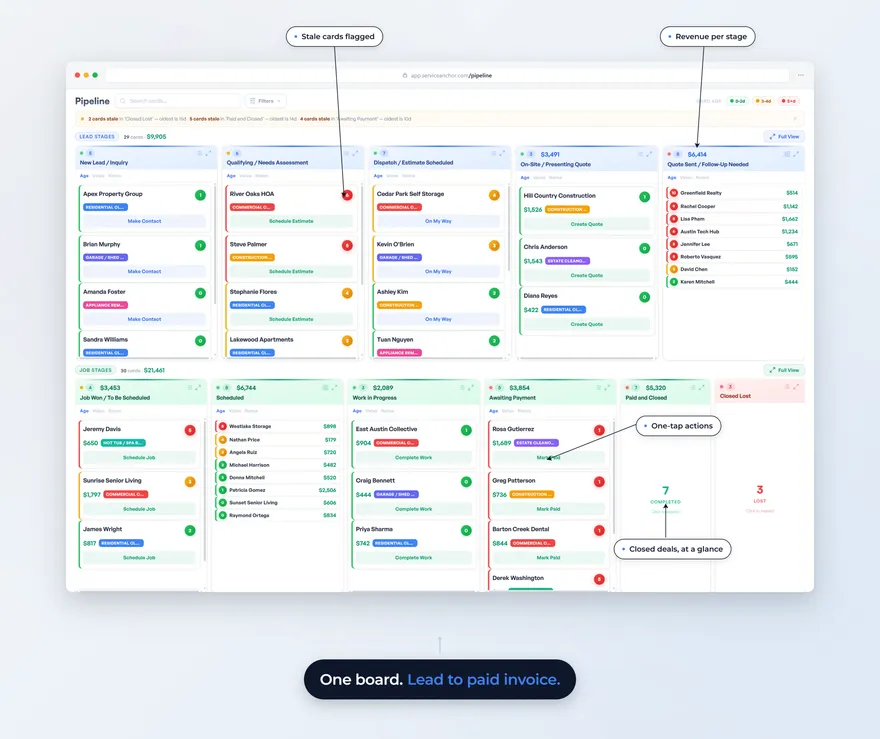
The best junk removal software for a 1-to-5-truck shop in 2026 is whichever one arrives already set up for junk removal and keeps texting, calling, quoting, and getting paid on one screen instead of five. For most small operators that comes down to three: Jobber if you want the most mature generalist, Housecall Pro if 24/7 call answering is the thing you cannot live without, and Service Anchor if you want a junk-ready pipeline at the lowest fixed cost. We build Service Anchor, so we have a dog in this fight. We say below, plainly, which junk shops should pick someone else.
- The real field is small. For a 1-to-5-truck junk removal shop, the options that matter are Jobber, Housecall Pro, Workiz, and Service Anchor. Everything else is either an enterprise platform you will not grow into for years or an affiliate listicle ranking tools nobody on the page has run a job with.
- Judge them on four things: does the pipeline arrive preloaded for junk removal, what do texting and calling actually cost on top, what happens on a same-day add-on when the load doubles in the driveway, and how short is the path from finished job to money in your account.
- Prices, verified against each vendor’s live page on July 24, 2026: Jobber runs $49/mo (Core) to $199/mo (Grow, annual $149); Housecall Pro runs $59/mo (Basic) to $299/mo (Max, 8 users). Service Anchor founding pricing is $29/mo locked for life for the first 25 operators, everything included.
- The honest gap: Jobber and Housecall Pro both sell an AI call-answering add-on. Service Anchor does not. If a robot answering every missed call at 9pm is the feature you are buying for, that points you at them, not us.
- Year one on one truck? You may not need software at all yet. We say so below.
What should junk removal software actually do?
Before any product gets named, here is the test. A junk removal shop is not a plumbing shop or a dumpster yard, and most “field service software” is built for a scheduled-appointment trade where the price is known before the truck rolls. Junk work is not like that. The quote changes on the driveway. The second load appears after the first one is on the truck. The customer wants to pay from their phone before you leave.
So the four questions that actually decide it:
- Does the pipeline arrive set up for junk removal, or is it a blank CRM you build on a Sunday? A generic platform makes you create job types, price tiers, and lead stages from scratch. A trade-ready one loads them for you.
- What do texting and calling cost once they are on the bill? This is where the sticker price lies. Customer communication is the core of junk work, and on some platforms a dedicated phone line, call handling, or high-volume texting is a separate charge.
- What happens on a same-day add-on? When a quarter-load becomes a half-load, can you change the price and re-send the total from your phone without redoing the job, or does the software fight you?
- How short is the path from finished to paid? The best case is: mark the job complete, the invoice generates itself, the customer taps a link and pays, the money lands in your account. Count the steps.
Hold each tool below against those four. The junk removal pricing framework covers the pricing side of this in depth; here we are ranking the software that has to hold it.
What is the best junk removal software in 2026?
For a 1-to-5-truck shop, ranked by fit for that specific operator:
| Tool | Starting price (verified 2026-07-24) | Preloaded junk pipeline | Texting + calling | Contract |
|---|---|---|---|---|
| Service Anchor | $29/mo founding, locked for life | Yes, junk removal price book loads at setup | Both included on your own number | Month to month |
| Jobber | $49/mo Core, $199/mo Grow | No, generalist you configure | Two-way text included; AI Receptionist is a paid add-on | Month to month or annual |
| Housecall Pro | $59/mo Basic, $299/mo Max | No, generalist you configure | Texting included; Voice and CSR AI are paid add-ons | Month to month or annual |
| Workiz | See workiz.com (not verified at draft time) | Has a junk-removal-specific setup | Included, higher tiers add more | Month to month or annual |
Service Anchor: best for the shop that wants a junk-ready pipeline at the lowest fixed cost. The 11-stage pipeline runs lead to paid on one board, and the junk removal price book loads at onboarding so you are not building job types on a Sunday. SMS and voice run on your own dedicated number, included, not metered as a separate line. Payments run through Stripe at a flat 3.5% plus 30 cents per transaction, and the money goes straight to your account. Founding pricing is $29/mo locked for life for the first 25 operators, everything included, free for 14 days, 30-day money back after your first charge. The honest limit: we are a younger product than the two below, and we do not sell an AI receptionist.
Jobber: best if you want the most mature generalist. Jobber is the most established tool here, and it is genuinely good software. It is not junk-specific, so you will spend setup time shaping it to junk work, and the lower tiers cap features you may want. It is a safe, deep choice if you value maturity over trade-specific setup. We wrote a fuller Jobber alternatives for junk removal breakdown if you are weighing it directly.
Housecall Pro: best if 24/7 call answering is the priority. Housecall Pro is the other mature generalist, and its standout for a junk shop is CSR AI, which answers calls day and night. If missed calls after hours are the hole in your business, that is a real reason to pick it. Note that Voice and CSR AI are paid add-ons on top of the plan. We compare the two head to head in Housecall Pro vs Jobber for junk removal.
Workiz: worth a look for its junk-specific setup. Workiz publishes a junk-removal-specific configuration, which most generalists do not, and it is a mature platform. We are not printing a price here because we could not verify it against their live page at the time this was written. Check their current pricing directly before you decide.
If junk removal is one of several trades you run, two related rankings widen the view: the best field service software for small crews takes the multi-trade angle, and if you also rent roll-offs, the best dumpster rental software covers that trade on its own terms.
What does junk removal software cost?
Real numbers, read off each vendor’s own pricing page on July 24, 2026:
- Jobber: Core $49/mo, Connect $139/mo ($99/mo billed annually), Grow $199/mo ($149/mo billed annually). The AI Receptionist is a separate paid add-on on top of the plan.
- Housecall Pro: Basic $59/mo (annual), Essentials $149/mo for 5 users, Max $299/mo for 8 users with additional users at $35/mo each. CSR AI and Voice are add-ons.
- Service Anchor: $29/mo, locked for life for the first 25 founding members, everything included. Free for 14 days; card on file, nothing charged until day 14.
But the sticker price is only half the cost. For a junk shop, the real spend hides in customer communication, because texting and calling are not a nice-to-have here, they are the job. When you compare, add up the plan price plus whatever a dedicated phone line, call handling, or an answering add-on costs on top. A platform that looks cheaper on the plan line can cost more once you turn on the parts a junk shop actually runs on. Service Anchor includes SMS and voice on your own number inside the plan, which is the number to check the others against. For where these numbers land against your revenue, the junk removal cost guide has the operator math.
Who should not use Service Anchor?
We would rather you find this out here than a month in. Pick something else if you are:
- An enterprise or multi-location operator. We are built for independent 1-to-5-truck shops. If you are running many yards or a large fleet, you will outgrow us.
- A franchisee of a national chain. If corporate mandates a specific platform or rollup reporting, that is a different category of software than what we build.
- Someone who wants a blank-slate CRM to build yourself. Our whole point is that the junk pipeline arrives already set up. If you want to architect every stage from zero, a generalist gives you more raw configurability.
- A shop whose top priority is an AI receptionist. We do not have one. Jobber and Housecall Pro both sell call-answering add-ons. If a robot catching every after-hours call is the feature you are buying for, buy it from them.
Do you need software at all in year one?
Honest answer for the solo operator still on a phone, a notes app, and a spreadsheet: maybe not yet. If you are running a few jobs a week and nothing is falling through the cracks, software is a cost you can defer. The moment to switch is when the cracks start showing: a quote you forgot to send, a customer you meant to text back, an invoice that sat unpaid because you were on a truck. That is when a pipeline pays for itself, because it does the remembering. If you are booking enough that you are dropping balls, it is time. If you are not there yet, keep your money and revisit in a quarter.
What to do next
- Score your own shop against the four questions at the top of this post. Preloaded pipeline, real texting-and-calling cost, same-day add-on handling, finished-to-paid steps.
- Add up total cost, not plan cost. Plan price plus the communication add-ons each tool needs to do junk work.
- Try the one that fits. If a junk-ready pipeline at a fixed founding price is the shape you want, see how Service Anchor sets up for junk removal. If maturity or AI call answering matters more, start with Jobber or Housecall Pro.
FAQ
What is the best software for a small junk removal business? For a 1-to-5-truck shop, the real options are Jobber, Housecall Pro, Workiz, and Service Anchor. Jobber and Housecall Pro are the mature generalists, Workiz and Service Anchor come closer to junk-specific setup, and the right pick depends on whether you value maturity, AI call answering, or a trade-ready pipeline at the lowest fixed cost.
Is there junk removal software with texting and calling built in? Yes. Service Anchor includes SMS and voice on your own dedicated number inside the plan. On the generalist platforms, texting is typically included but a dedicated phone line, call handling, or an AI receptionist is often a paid add-on, so compare total cost, not just the plan price.
How much does junk removal software cost? As of July 2026, Jobber runs from $49/mo, Housecall Pro from $59/mo, and Service Anchor founding pricing is $29/mo locked for life for the first 25 operators. Add any communication add-ons to the plan price to get your true monthly cost.
Do I need software to run a junk removal business? Not on day one. A solo operator running a few jobs a week can manage on a phone and a spreadsheet. Software earns its cost once you are booking enough that quotes, follow-ups, or invoices start slipping.
Does Service Anchor have an AI receptionist? No. Service Anchor does not have an AI call-answering feature. Jobber and Housecall Pro both sell one as an add-on. If automated 24/7 call answering is a priority for your shop, that is a reason to choose one of them.
Prices in this post were verified against each vendor’s live pricing page on July 24, 2026. We update this post as vendors change their tiers. Service Anchor pricing reflects the founding-member offer live at publication.