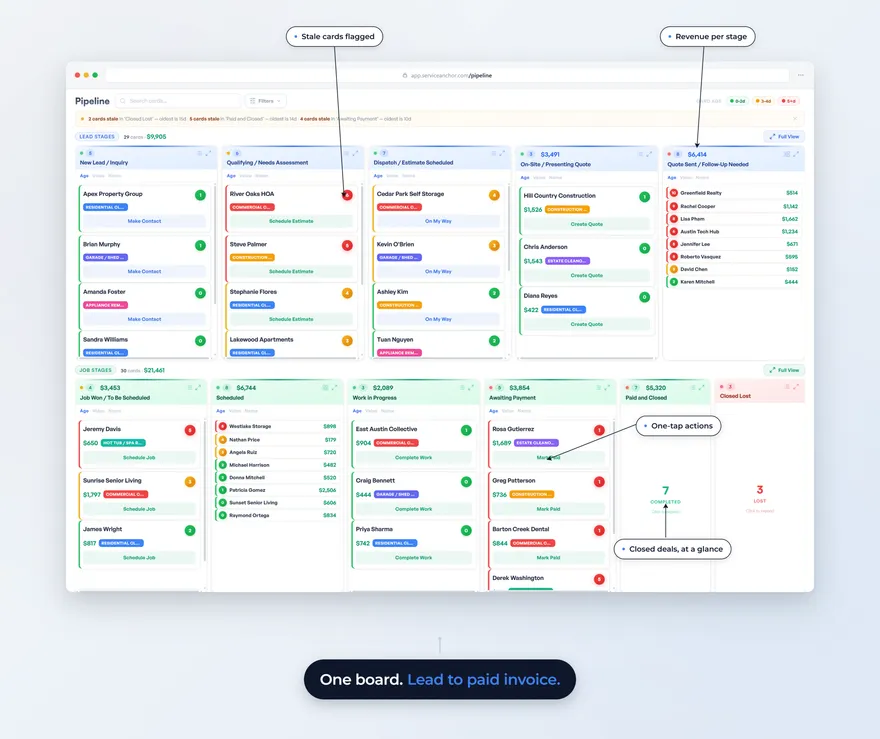
Price book software holds every service, fee and upsell you sell, each with its price, so every quote comes out the same no matter who writes it. If you run a junk removal, moving or pressure washing company, it also has to price the way your trade does: by truck volume or by the item, by crew-hour, or by surface and size. The best-known flat-rate price books were built for HVAC, plumbing and electrical shops. ServiceTitan describes its Pricebook Pro as “built for plumbing, HVAC, and electrical contractors” (ServiceTitan). A hauler’s book looks different: the junk removal book we load at setup has 66 lines (52 services, 10 fees, 4 upsells).
- A price book is your menu with prices: services, the fees that stack on top, and the upsells a customer can say no to.
- Junk removal prices by truck volume or by the item, moving by crew-hour plus extras, and pressure washing by surface and size. A flat-rate repair catalog fits none of them.
- Good price book software prices the way your trade does, keeps fees and upsells separate, and puts the scope and warranty on the estimate the customer approves.
- Tools differ most in what you start with: an empty list you type or import, a catalog built for repair trades, or a book loaded for your trade.
- If you run a plumbing or electrical shop, or an HVAC shop that lives on parts-heavy repair work, a dedicated flat-rate tool will serve you better.
What is a price book, and why is a hauler’s different from a plumber’s?
A price book is the list of everything you sell with a set price on each line, so the number on a quote comes from the book instead of from memory. For a plumber, that book is a flat-rate catalog of repair tasks: replace a wax ring, swap a water heater, each with parts and labor rolled into one price. That model is what FieldPulse means by “Flat Rate Pricing” and what Profit Rhino sells as a prebuilt book for residential trades.
A hauler doesn’t sell tasks. A junk removal owner sells space on a truck, or a price for one specific item (a couch, a hot tub, a fridge), plus the charges that stack: a mattress recycling fee, stairs, a same-day surcharge. A mover sells crew-hours with a truck. A washer sells square footage by surface. Put those in a catalog designed for repair tasks and you end up with “Half truck” filed next to “Replace thermostat,” with fees mixed into the same list as services and nothing telling the quote that the stairs fee goes on top of the load.
How do junk removal, moving and pressure washing price a job?
Each of the three trades prices around a different unit, and each comes with its own stack of fees. Here is what the price books we load at setup contain, counted from the setup files on October 20, 2026:
| Trade | How the job is priced | Lines in the book | Services / fees / upsells | Free download |
|---|---|---|---|---|
| Junk removal | Truck-volume tiers for mixed loads, a set price per item for single pieces | 66 | 52 / 10 / 4 | Junk removal price sheet |
| Moving | Crew rate per hour with a truck, flat rates for long-distance moves, extras per address | 54 | 30 / 14 / 10 | Moving estimate template |
| Pressure washing | Surface and size tiers (house wash by square footage, concrete by area, roofs, decks, fences) | 57 | 36 / 15 / 6 | Pressure washing estimate template |
Here is what a few of those junk removal lines look like, at the national starting prices the book loads with:
| Line | Kind | Starting price |
|---|---|---|
| Minimum charge | Service | $125 |
| 1/2 truck load | Service | $375 |
| Full truck load | Service | $650 |
| Sofa, sectional or loveseat | Service | $160 |
| Stairs fee (per flight beyond the first) | Fee | $35 |
| Same-day or rush surcharge | Fee | $75 |
| Extra labor (per crew hour over base) | Upsell | $65 |
Put together, a same-day half-truck garage cleanout up two flights of stairs quotes as $375 + $35 + $75 = $485, and it quotes that way whoever answers the phone.
The fee lines are where a hauler’s book differs most from a repair catalog. Pressure washing carries more fees than upsells because access, height and condition change the price of the same square footage. Moving carries the most upsells because full-value protection, furniture disassembly, an extra mover and storage are real add-ons a customer can turn down. If you want the reasoning behind junk removal tiers before you set yours, our junk removal pricing framework walks through it.
How do you create a price book?
You create a price book by starting from a complete one for your trade, adjusting it to your market, and then changing only the lines you know better. Building one line by line from a blank screen tends to produce a short list that’s missing a lot of what you sell.
- Start from a full book. Use the downloads above, or the book your software loads. A full book reminds you of the items you forgot you sell, like the hot tub or the second-story gutter.
- Adjust for your market. The junk removal book loads with national starting prices, and high-cost metros usually run higher while rural markets usually run lower. Start with your five or ten most common lines, because those set most of your revenue, and leave the rare ones for later.
- Edit where you know better. If your dump charges $65 a ton and the book assumes less, fix that fee. Leave the lines you have no strong opinion on.
- Run a cost-plus check. For your five most common jobs, add up labor, fuel and disposal, and make sure the price clears them with margin to spare. The spreadsheet behind our local moving price book includes a cost-plus worksheet you can reuse for any trade.
Put the finished book where your quotes are written. A price sheet in a notes app still gets typed into the quote by hand, and the hand-typing is where the half-truck job ends up quoted at three different prices.
What should price book software do for these trades?
Price book software for volume, surface and crew-hour trades has to price the way those trades do; everything else on the feature list comes after that. Use this as a checklist when you compare tools:
- It prices the way your trade does. Truck tiers and item prices side by side for junk removal, hourly crew rates for moving, size tiers for washing.
- Fees are their own lines. A stairs fee or a recycling fee should be a separate line the customer sees, not buried inside a service price.
- Upsells are listed separately, so the customer can see what’s optional, like the deck seal, instead of finding it baked into the job price.
- Some lines go on every job. A minimum charge or a trip fee shouldn’t need copying under every service.
- Scope and warranty print on the estimate. The customer should see what is included before they approve, not after the job.
- The customer approves from a link. A quote that has to be printed, signed and scanned can sit for days.
- A price change takes a minute. If the dump raises its rate on Tuesday, the book should be right by Tuesday afternoon.
- It starts loaded, or it takes your sheet. An empty book costs you an evening of typing before the first quote. If you already have 200 clean lines in a spreadsheet, an import matters more than a loaded book.
What do you start with in each tool?
What you start with is where these tools differ most. Some start empty and expect an import, some offer a catalog built for repair trades, and some load a book for your trade. We read each vendor’s own pages on October 20, 2026:
| Tool | What a new account starts with | Getting your prices in |
|---|---|---|
| Housecall Pro | A built-in price book in every account; starting contents not covered on the feature page we read | CSV or Excel upload, QuickBooks or Profit Rhino import, and an AI import (feature page) |
| Workiz | Not covered for the standard price book on the pages we read; Price Book Pro, its preloaded catalog, is “built and maintained by HVAC, plumbing, and electrical pros” (Price Book Pro) | Bulk changes to prices and categories (feature page); spreadsheet import goes through their support team, usually at onboarding (help center) |
| Jobber | A Products & Services list you fill in | CSV import from a sample file (help center) |
| FieldPulse | A pricebook with flat-rate pricing and margin protection (feature page) | A self-serve item list import from their spreadsheet template (help center) |
| Service Anchor | A book loaded for your trade at setup, for 10 trades including junk removal, moving and pressure washing | No spreadsheet import: you edit the loaded book line by line |
We make one of these tools, so weigh this section knowing that. And if you already have a clean price sheet with 200 lines, a tool that imports it may save you more time than a loaded book you’d have to edit down. For the wider comparison beyond price books, see our field service software comparison.
How does Service Anchor’s price book work?
Service Anchor loads a price book for your trade when you pick it at signup, so your trade’s services, fees and upsells are in place in about 90 seconds. Every line is a starting point you edit. The book keeps three kinds of lines (services, fees and upsells), and some lines, like a minimum charge, are available on every job type. It costs $79 a month list price, every feature, up to 5 users; the founding rate and trial terms are on our pricing page.
What it does on a quote:
- Fees attach for you. Link a fee to a service and it’s added when that service goes on the quote, so the stairs fee doesn’t depend on someone remembering it.
- Estimates are line items from the book, with an approve link the customer opens on their phone.
- Scope of work, warranty, terms and your license number print on the estimate when you fill them in.
- Photos can go on any line, and documents like a warranty or a policy page go out as links.
- Each item shows its margin from the price and cost you enter. It’s item margin, not job profit, and an item with no cost entered shows 100%.
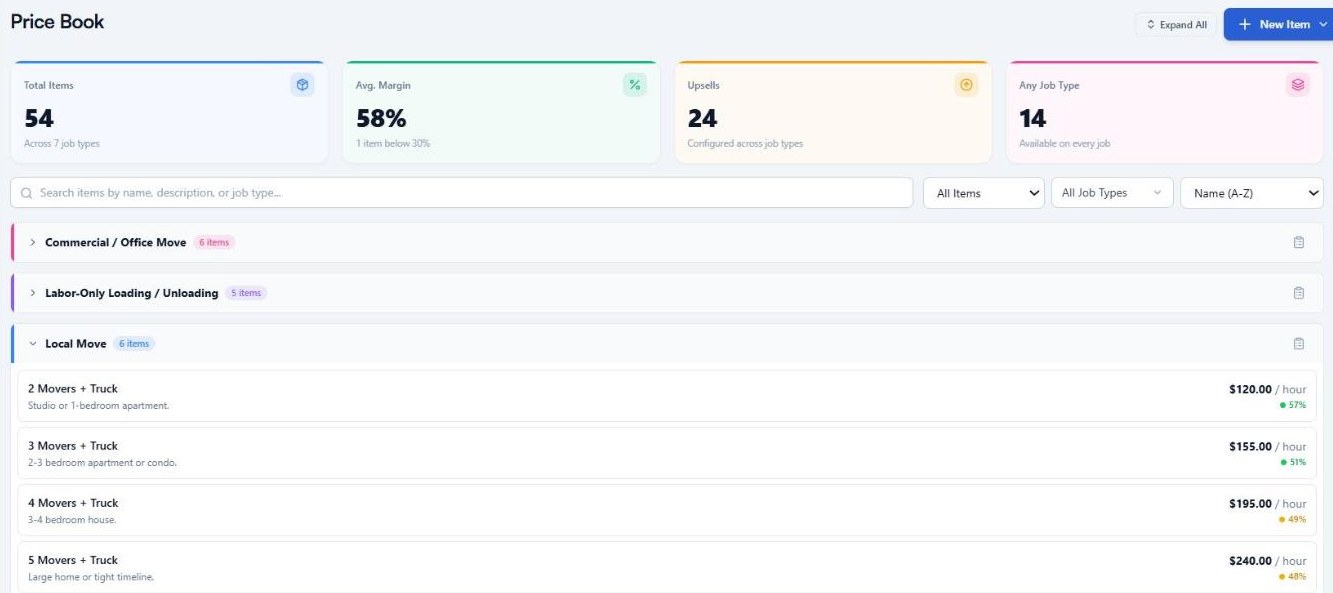
The moving price book as it loads at setup, with crew rates per hour under Local Move. Demo account.
What it doesn’t do: import a spreadsheet, update supplier part prices, track inventory, or ship a book for plumbing, electrical or roofing. For moving specifically, our moving estimate software guide compares the moving-only tools.
When should you buy a flat-rate tool instead?
You should buy a flat-rate price book tool if you run an HVAC, plumbing or electrical shop that sells repair tasks with parts inside the price. ServiceTitan’s Pricebook Pro, Workiz’s Price Book Pro and Profit Rhino are all built around those three trades. They carry parts catalogs and task libraries that a hauler rarely needs. Service Anchor does load an HVAC book at setup, with repairs, tune-ups and good, better and best system replacements at starting prices, but it has no parts catalog, supplier price updates or inventory. An HVAC shop whose work is mostly parts-heavy repairs will get more from one of those three.
If most of your lines are tasks with parts inside them, a flat-rate tool is the right home. If most of your lines are truckloads, square footage or crew-hours, it isn’t, and you’ll spend your evenings working around it.
What to do next
- Write down your five most common jobs and what you charged for each the last three times. If the numbers differ, that’s the problem a price book fixes.
- Download the book for your trade from the table above and mark the lines that don’t match your market.
- Put the book where your quotes get written. See how quoting from a loaded price book works in Service Anchor’s estimates.
FAQ
What is a price book in field service? A price book is the list of every service, fee and upsell a company sells, each with a set price. Quotes and invoices pull lines from it, so two people quoting the same job get the same number.
How do you create a price book for a service business? Start from a complete book for your trade instead of a blank screen, adjust your most common lines to your market, then edit only the other lines you know better. Check your five most common jobs against your real costs before you send a quote from it.
What is the difference between price book software and a price sheet? A price sheet is a document you read from; price book software puts the same lines inside the quote, so nobody retypes a price. The sheet is fine to start with, but every hand-typed quote is a chance to quote the same job differently.
Is there a price book app for small service businesses? Yes. Most field service tools include a price book, including Housecall Pro, Jobber, Workiz, FieldPulse and Service Anchor. They differ mainly in what you start with and whether the book fits how your trade prices.
Do junk removal companies use flat-rate pricing? Not in the plumber’s sense. Junk removal companies price mixed loads by how much of the truck they fill and single items by what the item is, then add fees for things like mattresses, stairs or same-day service.
Last updated: October 2026. First publish; vendor feature pages and help centers read October 20, 2026, and line counts read from the setup files on October 18 and rechecked October 20.