You ask for a Google review by texting each customer the direct review link from your Business Profile once the job is paid, with the same message to everyone and nothing offered in return. This is for owners running one to five trucks who know reviews help in the map pack and keep forgetting to ask. Recency matters as much as the count: BrightLocal’s 2026 survey found “74% seek reviews written in the last three months” (BrightLocal), so the ask has to be a habit, not a push you make once a year. Below: when to ask, how to get the link, the text itself for junk removal, moving and pressure washing, and what Google and the FTC don’t allow.
- Ask after the job is paid, by text, with the direct review link. Not in the driveway, and not with “find us on Google.”
- Get the link from your Business Profile: Read reviews, then Get more reviews, then Copy.
- Send the same text to every paying customer. Asking only the happy ones is against Google’s policy.
- Offer nothing for a review. Google bans incentives of any kind, which is stricter than the FTC rule.
- Answer the bad review within the week, calmly, and never threaten the customer.
When should you ask for a review?
The best time to ask for a Google review is after the customer has paid, usually the same day or the day after the job. By then the work is done, the money question is closed, and the customer isn’t standing in the driveway with your crew watching. Google’s own policy says merchants “should not require or pressure users to leave ratings or write reviews while on the premises” (Google), so asking on the spot carries a policy risk as well as an awkward one.
Tying the ask to payment also keeps it out of the wrong conversations. A customer who still has an open invoice, or a question about the final number, isn’t the person to ask yet. Once the invoice is paid, the job is over in the customer’s mind too, and a short text reads as a thank-you, not a sales move.
How long after? It’s a judgment call. Same day works when the customer was happy in person; the next morning gives them time to see the clean garage or the bright driveway in daylight.
How do you get your Google review link?
You get your Google review link from your Business Profile: select Read reviews, then Get more reviews, then Copy. Those are the steps on Google’s help page, and the same screen offers a QR code, which Google notes “can only be generated on a computer browser, not on mobile devices.” If you haven’t verified your profile yet, start there; our guide to verifying a Google Business Profile walks through it for service-area businesses.
Why the direct link matters: “Find us on Google and leave a review” sends the customer into a search, where they might land on a competitor with a similar name or give up after one tap. The direct link opens the review box with your business already selected. Save it in your phone’s text replacements or your software’s templates so nobody has to dig for it.
Should you ask by text or email?
Text is the better first ask for field service, because the customer just dealt with you by phone and text, and the ask lands in the same thread as the scheduling messages they already read. Most customers have been asked before (BrightLocal’s 2026 survey found “78% of consumers were asked to write a review in the last 12 months”, BrightLocal), so the ask that lands is the short one from the crew they just met.
Use email as the backup channel: for customers who gave you an email but no mobile number, or for commercial jobs where the person who pays isn’t the person who was on site. Keep the email as short as the text. One line of thanks, one line asking, one link.
What should the review request text say?
A review request text should thank the customer for one specific thing, ask once, and give the direct link. Keep it to two or three short sentences, and send the same words to everyone. Here are working versions for three trades; swap in your own details.
Junk removal:
Hi {first name}, it's {company}. Thanks for having us out. The garage is clear and everything's off to the dump and donation. If you have a minute, a Google review helps a small crew like ours more than you'd think: {review link}Moving:
Hi {first name}, it's {company}. Thanks for trusting us with the move. Hope the new place is starting to feel like home. If you have a minute, we'd appreciate a Google review: {review link}Pressure washing:
Hi {first name}, it's {company}. Thanks for having us out. That driveway looks like new concrete again. If you have a minute, a Google review would mean a lot: {review link}One follow-up, a few days later, only if you don’t see their review by then:
Hi {first name}, {company} here. Quick one: if you have a minute this week, the review link is here. No worries if not. {review link}Two things to keep out of every version: anything that sounds like a reward (“10% off your next job”) and anything that sorts customers (“if you were happy with us”). Both run into the rules below. For more post-job wording, Template 6 in our on-my-way text templates is a thank-you and review ask in one, and the footer of our contractor invoice template carries a review line on the invoice itself.
What are the rules on asking for reviews?
The rules on asking for reviews come from two places: Google’s content policy, which decides whether a review stays up, and the FTC’s rule on consumer reviews, which has been in effect since October 21, 2024 (FTC). They overlap, but Google is stricter on incentives.
| Practice | FTC rule (16 CFR Part 465) | |
|---|---|---|
| Offering a discount or gift for a review | Prohibited. “Offering incentives, like free or discounted goods or services, in exchange for customers to post reviews” counts as fake content (Google) | Prohibited if the reward is conditioned on a positive or negative sentiment (465.4); not barred when no sentiment is required, though the FTC warns an undisclosed incentive can still violate the FTC Act |
| Asking only happy customers (review gating) | Prohibited: “selectively solicit positive reviews from customers” | No specific ban, but the FTC says “this practice could violate the FTC Act” |
| Pressuring customers on site | Prohibited while on the premises | Not addressed directly |
| Telling staff to collect a number of reviews | Prohibited: “requesting that staff solicit a certain number of reviews” | Not addressed directly |
| Threatening a customer over a review | Not addressed on these pages | Prohibited: “an unfounded or groundless legal threat, a physical threat, intimidation, or a public false accusation” (465.7) |
The practical version: ask everyone, offer nothing, don’t push in person, don’t give your crew a review quota, and never threaten anyone over what they wrote. If you’ve seen advice to offer a discount for a review, skip it. Under Google’s policy that can get the reviews removed, whatever the FTC allows.
What do you do about a bad review?
You reply to a bad review within the week, calmly, in two or three sentences, and you move the details offline. BrightLocal found 89% of consumers expect a response to their reviews (BrightLocal), and the reply is written for the next customer reading it as much as for the one who left it.
A reply that works: thank them, acknowledge the specific complaint without arguing it, and give a direct way to reach you. “Thanks for the feedback, Dana. You’re right that we arrived after the window we gave you, and that’s on us. Call me at the office and we’ll make it right.”
Flag a review through your Business Profile only when it breaks Google’s policy, such as a review from someone who was never a customer or one with abusive language. A review you disagree with isn’t a policy violation. And never answer with a legal threat; the FTC rule bans using “an unfounded or groundless legal threat” to stop a review or get one taken down.
How does Service Anchor send review requests?
Service Anchor texts the review request on its own 24 hours after an invoice is marked paid, once per job. It uses your default review link (you can store several links, and each request carries the default), and if no link is set it skips the send instead of texting a broken ask. A Request Review button sends it right away when you’d rather not wait, and the automatic one is skipped if a request already went out for that job.
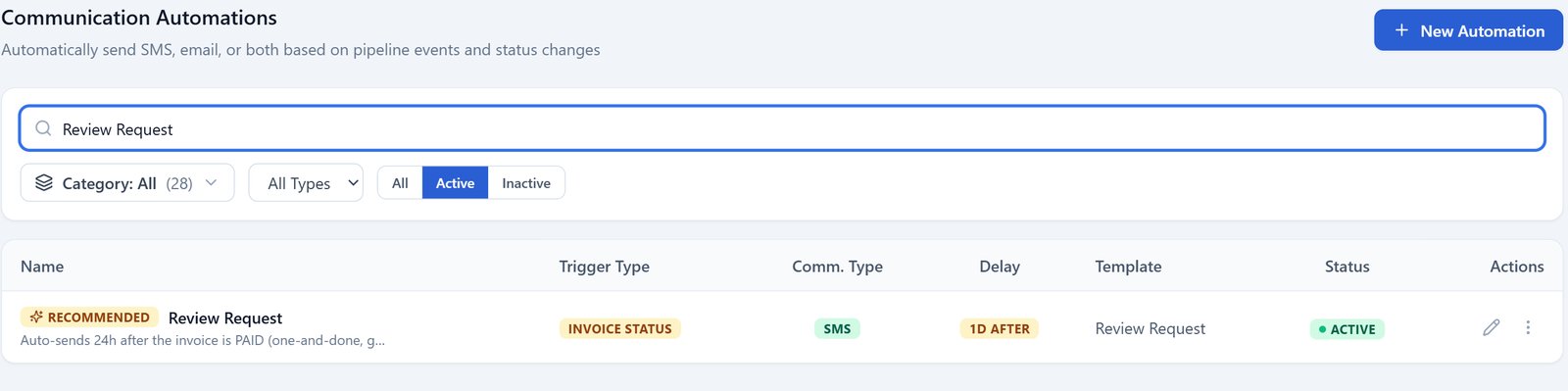
The review request automation: it fires on the invoice status, goes out by text a day later, and shows as active here. Demo account.
What it does and doesn’t do:
- It asks every paid customer. There’s no happy-customer filter, because that’s the gating Google prohibits.
- The wording is yours to edit. The default text reads: “Hi {customerFirstName}, thank you for choosing {companyName}! We’d love to hear about your experience. Please leave us a review: {reviewLink}”
- It goes by text by default, and you can change when it sends and how.
- Your own number needs a one-time carrier registration (A2P 10DLC) before texts go out from it, and Service Anchor files it for you. Texting and calling are included in the plan.
It doesn’t monitor your reviews, write replies, or make QR codes. Our junk removal marketing guide and moving company marketing guide cover where the review loop fits in the rest of your local marketing.
What to do next
- Get your review link today from your Business Profile and save it where you text from.
- Send it once to last month’s paid customers who never got an ask, using the template for your trade. Same words to all of them.
- Make the ask automatic so it doesn’t depend on someone remembering on a busy Friday. See how the automatic follow-ups in Service Anchor work, the review request included.
FAQ
How do I ask a customer for a Google review? Text them the direct review link from your Business Profile once the job is paid, with a one-line thank-you and one ask. Send the same message to every customer and offer nothing in return.
How do I get my Google review link? Open your Business Profile, select Read reviews, then Get more reviews, then Copy. The same screen offers a QR code, which Google says can only be generated from a computer browser.
What should a review request text say? Thank the customer for something specific about the job, ask once, and include the direct link. Keep it to two or three sentences, and leave out discounts and “if you were happy” wording.
When is the best time to ask for a review? After the customer has paid, usually the same day or the next morning. Google’s policy says merchants should not pressure customers to leave reviews while on the premises, and a driveway ask with the crew standing there can read as exactly that.
Can I offer a discount for a Google review? No. Google prohibits offering free or discounted goods or services in exchange for reviews. The FTC rule bans rewards tied to a particular sentiment, and the FTC says an undisclosed reward can still break the law. Google’s policy is the one that decides whether your reviews stay up.
How do I respond to a bad Google review? Reply within the week in two or three calm sentences: thank them, acknowledge the specific complaint, and give a direct way to reach you. Flag the review only if it breaks Google’s policy, and never answer with a legal threat.
Last updated: October 2026. First publish; Google help pages, FTC rule text and the BrightLocal 2026 survey read October 18, 2026.