The best small business CRM for a home service crew depends on one thing most roundups ignore: whether you sell deals or run jobs. HubSpot, Zoho, and Pipedrive are the strongest general-purpose sales CRMs; Jobber and Housecall Pro are the leading field-service platforms; and Service Anchor is built for 1-to-5-truck operators who want leads, quotes, jobs, and invoices on one board. This guide is for the owner of a home service shop (junk removal, moving, dumpster rental, pressure washing, and the like) who is trying to pick a CRM and keeps finding lists that rank software built for office sales teams. The distinction that decides your choice is CRM versus field service software, because a pure sales CRM leaves out scheduling, dispatch, and invoicing, and a crew that buys one still has to buy the other. Pricing below was re-verified live against each vendor’s own page on 2026-07-20. The post covers who each tool is really for, what it costs today, a side-by-side table, and a recommendation by shop type.
- The real split is not “which CRM,” it is CRM versus field service software. General CRMs track deals; field-service platforms run jobs. A home service crew needs the second kind, or it ends up paying for both.
- HubSpot has a real free tier (up to 2 users, not unlimited), Zoho starts at $14/user/mo, and Pipedrive at $14/seat/mo. All three are sales tools with no native scheduling, dispatch, or job invoicing.
- Jobber ($49/mo and up) and Housecall Pro ($79/mo and up) are the established field-service platforms. Both are strong and both scale into hundreds of dollars a month as you add users.
- Service Anchor is $29/mo locked for life for founding members, everything and all users included, built specifically for the 1-to-5-truck shop that wants the whole lead-to-paid flow on one board.
- Pricing shifts fast: Pipedrive reorganized its plans in 2026 and Jobber is running promotional annual rates, so always confirm the live number before you sign.
Do home service businesses need a CRM?
Home service businesses need a CRM, but usually not the kind that ranks first for “small business CRM.” A CRM (customer relationship management) tool tracks your leads, customers, and the deals in between, so nothing falls through the cracks between the first call and the sale. That much every business needs. The catch for a trade shop is that your work does not end at the sale. You still have to schedule the crew, dispatch them to the address, complete the job, and collect payment. A classic sales CRM handles the first half and hands you back to spreadsheets and a texts app for the second.
That is why the honest answer for a home service owner is “yes, but choose carefully.” A general-purpose CRM built for a software sales team or a real estate office will track your leads beautifully and do nothing for the truck. The tools that actually fit a crew fold the customer pipeline and the field work into one system, which is the distinction the next section unpacks.
What is the difference between a CRM and field service software?
The difference between a CRM and field service software is what happens after the sale: a CRM manages deals and contacts, while field service software (FSM) also schedules, dispatches, and invoices the jobs those deals become. HubSpot, Zoho, and Pipedrive are CRMs in the classic sense. They are excellent at moving a lead through a sales pipeline, logging emails, and reminding you to follow up. What they do not do natively is put a job on a calendar, send your tech an address, capture a signature on site, or generate the invoice when the work is done.
For a home service crew that gap is the whole game. If you buy a sales CRM, you still need a scheduling and invoicing tool on top of it, which means two subscriptions, two logins, and double data entry every time a lead becomes a job. Field service platforms (Jobber, Housecall Pro, and Service Anchor) collapse both into one board, so the lead you close is the job you schedule is the invoice you send, with no re-typing between systems. The same “one board instead of two tools” logic drives our dumpster rental software comparison, the moving company software guide, and our field service software ranking; it is the single biggest money-saver in the category for a small shop. So before you compare features, decide which category you are actually shopping in. For a crew that runs jobs, the general CRMs below are context, not the answer.
What are the best general-purpose small business CRMs?
The best general-purpose small business CRMs in 2026 are HubSpot, Zoho, and Pipedrive, and all three are sales tools rather than field tools. They belong in this guide because operators search for them, and because a shop that is purely selling (say, a commercial-cleaning outfit doing bid-heavy B2B work with little field dispatch) might legitimately pick one. Pricing verified 2026-07-20.
HubSpot has the most generous entry point. Its Sales Hub Free tier is genuinely free for up to two users (not unlimited, despite what some comparison posts claim), and it is a real product, not a crippled demo. Paid tiers run $20 per seat per month (Starter), $100 per seat per month (Professional), and $150 per seat per month (Enterprise), billed annually. The trap for a small shop is the onboarding fee: HubSpot requires a one-time $1,500 purchase to start on Professional and $3,500 on Enterprise, which is easy to miss until checkout. For a crew that just wants lead tracking, the Free or Starter tier is plenty, but you will still need a separate tool for scheduling and invoicing.
Zoho CRM is the value pick among the general CRMs. Its paid tiers are $14 (Standard), $23 (Professional), $40 (Enterprise), and $52 (Ultimate) per user per month billed annually, and Zoho offers a lighter sibling, Bigin, at $7 per user per month for very small teams. Zoho’s pricing is region-dependent on its own site, so confirm you are looking at USD before you compare. Zoho is deep and configurable, which is a strength for a sales team and a time sink for a two-truck owner who wants to be quoting, not configuring.
Pipedrive is a sales-pipeline CRM priced at $14 (Lite), $39 (Growth), $59 (Premium), and $79 (Ultimate) per seat per month billed annually, with paid add-ons (LeadBooster, Projects, Campaigns) stacked on top. Note that Pipedrive reorganized its plans in 2026, so any comparison still listing Essential, Advanced, Professional, Power, and Enterprise tiers is out of date. Pipedrive is clean and fast for pure sales pipelines, but like the others it has no native dispatch or field-job workflow.
The common thread: all three are good at the sales half and absent for the field half. A home service crew that picks one of them is signing up to buy a second tool.
What are the best field-service CRMs for home service?
The best field-service CRMs for home service crews are Jobber, Housecall Pro, and Service Anchor, because each one runs the whole job, not just the sale. These are the tools that put a lead, a quote, a scheduled job, and an invoice in the same system. Pricing verified 2026-07-20.
Jobber is the most widely used field-service platform in North American home service. Published monthly rates are $49 (Core, 1 user), $139 (Connect, 1 user), $199 (Grow, 1 user), and $499 (Plus, up to 15 users), with additional users at $29 per month and an AI Receptionist add-on at $29 per month. Jobber also advertises steep annual-billing promotions (as low as $21/mo on Core) that appear to be limited-time first-year rates, so confirm the current offer before you commit. Jobber’s strength is breadth and polish; the cost climbs as you add seats, and automation and two-way SMS sit on the higher tiers. Our Jobber alternatives for junk removal piece digs into where it fits and where it does not.
Housecall Pro is the other major field-service platform, especially strong on scheduling and dispatch. Monthly rates are $79 (Basic, 1 user), $189 (Essentials, up to 5 users), and $329 (MAX, up to 8 users, additional users $35 each), with card processing from 2.59%. HCP’s calendar-view dispatch and mobile experience are genuinely good, and its higher tiers add sales and marketing tooling. Like Jobber, it is a mature product priced for shops ready to spend a few hundred a month at scale. The Housecall Pro versus Jobber breakdown compares the two head to head.
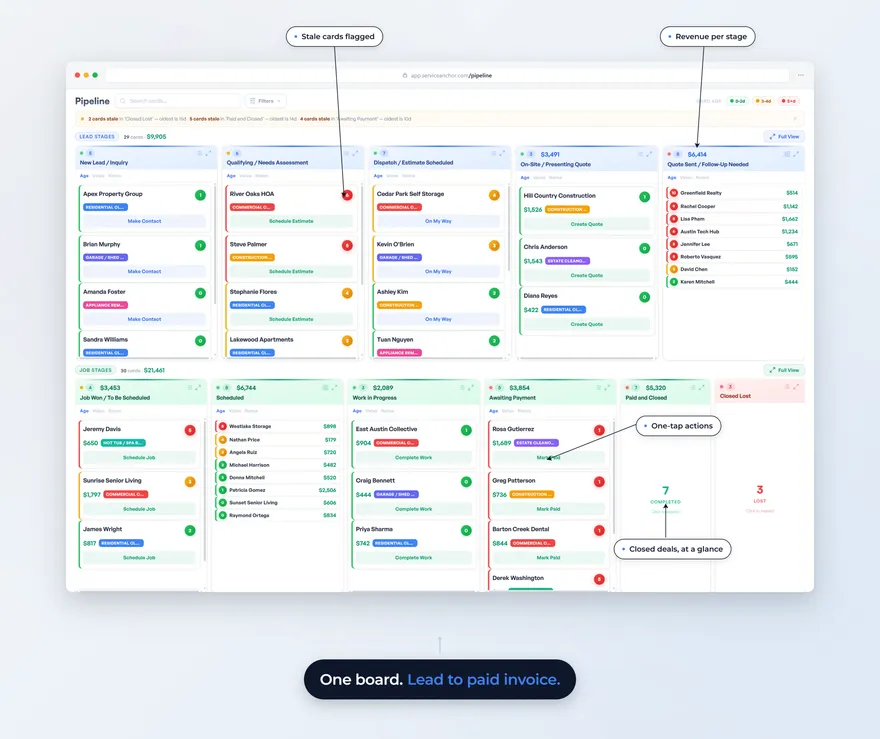
Service Anchor is built specifically for the 1-to-5-truck owner-operator. The product wedge is an eleven-stage pipeline driven by a state machine, so leads, quotes, jobs, and invoices live on one Kanban board and advance themselves: when a job completes the invoice auto-creates, when the invoice is paid the thank-you auto-sends, when a quote is accepted the lead becomes a customer. Jobber, Housecall Pro, and the general CRMs model those as separate screens you promote between by hand. Service Anchor’s Founding Member pricing is $29 per month locked for life for the first 25 founding operators, with every feature and all users included and a free 14-day trial before billing starts: card on file at signup, nothing charged until day 14. It ships with trade setup packs that preload the price book, job types, and pipeline overlays. Two-way SMS is included, Stripe payments are live, and the app installs to a phone home screen as a web app. The honest gaps: a QuickBooks integration is on the roadmap rather than shipped today, and Service Anchor is built for the 1-to-5-truck shop, not the enterprise operator with twenty trucks and multiple yards.
Comparison table
The rows below are the ones that decide the tool for a home service crew. “Deals” means the software tracks a sales pipeline; “Jobs” means it also schedules, dispatches, and invoices the work.
| Feature | HubSpot | Zoho | Pipedrive | Jobber | Housecall Pro | Service Anchor |
|---|---|---|---|---|---|---|
| Entry price/mo | $0 (2 users) or $20/seat | $14/user (Bigin $7) | $14/seat | $49 | $79 | $29 founding (life), $79 list |
| Top tier/mo | $150/seat + onboarding | $52/user | $79/seat | $499 (15 users) | $329 (8 users) | Flat $29 founding |
| Built for | Deals | Deals | Deals | Jobs | Jobs | Jobs (one board) |
| Scheduling + dispatch | No | No | No | Yes | Yes (strong) | Yes |
| Invoicing + payments | Add-on | Add-on | Add-on | Yes | Yes | Yes (Stripe live) |
| Two-way SMS | Paid add-on | Add-on | Add-on | Grow+ | Yes | Yes (included) |
| Field/job mobile app | General app | General app | General app | Yes | Yes (strong) | Installable web app |
| QuickBooks | Via integration | Via integration | Via integration | Yes | Yes | Roadmap |
| Free tier | Yes (2 users) | Yes (up to 3 users) | Trial only | Trial only | Trial only | Founding beta |
The pattern is clean: the general CRMs win on sales-pipeline depth and free entry, the field-service platforms win on actually running the job, and Service Anchor’s edge is flat all-in pricing plus the one-board auto-advance for the small shop.
Which small business CRM is right for your shop?
The right choice depends on how much of your work is field jobs versus office sales:
Mostly field jobs, 1 to 3 trucks. A field-service platform, not a sales CRM. Service Anchor at $29/mo founding pricing is the strongest fit if you want the whole lead-to-paid flow on one board at a flat all-in rate. Jobber Core or Connect works if you want the most widely-adopted option and do not mind the per-seat climb. Skip HubSpot, Zoho, and Pipedrive here, because you would still need a second tool for the truck.
Mostly field jobs, 4 to 5 trucks. Housecall Pro Essentials ($189/mo, 5 users) or Jobber Grow ($199/mo) for the polished, mature platform with room to grow. Service Anchor if you want to lock a flat founding rate that does not climb as you add crew. All three run the job end to end; the decision is price trajectory versus feature depth.
Mostly office sales, little dispatch (for example a bid-heavy commercial outfit). A general CRM makes sense. HubSpot Free or Starter for the easiest on-ramp, Zoho for value and configurability, Pipedrive for a clean sales-pipeline focus. Add a lightweight invoicing tool when you need it.
Just getting started, watching every dollar. HubSpot’s free tier for pure lead tracking, or Service Anchor’s founding cohort if you want the field side included from day one at a locked rate. Avoid stacking a free sales CRM and a paid FSM tool if a single field-service platform covers both.
The shop-size-by-tool-fit approach here is the same one we use trade by trade, including the junk removal industry page where the Service Anchor setup pack is spelled out.
What to do next
Start by deciding which category you are shopping in, because that one call saves you from the most common mistake: buying a sales CRM and then discovering you still need a scheduling and invoicing tool. If your work is field jobs, shortlist the field-service platforms and start a trial this week. Jobber, Housecall Pro, and Service Anchor all offer free trials with full features, and Service Anchor’s founding cohort is open at $29/mo locked for life. If your work is genuinely sales-first with little dispatch, the general CRMs are a fair pick and HubSpot’s free tier lets you test with no card.
Whatever you choose, the cost of staying on a spreadsheet and a personal phone is not the spreadsheet. It is the quote you sent slow, the follow-up you forgot, and the job that booked with the competitor who kept up. Most operators we talk to who finally switch land on the same read: the tool paid for itself the first month because the leads they used to drop now turn into paid invoices. See the junk removal industry page for the Service Anchor specifics, including the preloaded price book and the on-my-way SMS that ships out of the box.
FAQ
What is the best CRM for a small business?
The best CRM for a small business depends on the work: for an office sales team, HubSpot (best free tier), Zoho (best value), or Pipedrive (cleanest sales pipeline); for a home service crew that runs jobs, a field-service platform like Jobber, Housecall Pro, or Service Anchor, because those also handle scheduling, dispatch, and invoicing. Match the tool to whether your work ends at the sale or continues out to a truck. A field crew that buys a pure sales CRM ends up paying for a second tool to run the job.
Do I need a CRM or field service software?
You need field service software if your business schedules crews and completes jobs on site, and a plain CRM if your work ends at closing the sale. Field service software (Jobber, Housecall Pro, Service Anchor) includes the CRM pipeline plus the scheduling, dispatch, and invoicing that a general CRM leaves out. For a home service shop, field service software is almost always the right category, because it puts the lead and the job on one board instead of splitting them across two subscriptions.
How much does a small business CRM cost?
A small business CRM costs $0 (HubSpot Free, up to 2 users) to around $150 per seat per month (HubSpot Enterprise) for general sales CRMs, while field-service platforms run from $29/mo (Service Anchor founding) and $49/mo (Jobber Core) up to $329 to $499 per month at the top tiers of Housecall Pro and Jobber. Watch for extras: HubSpot charges one-time onboarding fees of $1,500 to $3,500 on its upper tiers, and most tools price additional users separately. All figures verified 2026-07-20.
Is there a free CRM for small business?
Yes, HubSpot offers a genuinely free CRM for up to two users, and Zoho has a free edition for up to three users plus a low-cost Bigin plan at $7 per user per month. The free sales CRMs are real and useful for lead tracking, but none of them schedule, dispatch, or invoice field jobs, so a home service crew on a free CRM still needs a separate tool for the work itself. Field-service platforms generally offer free trials rather than permanent free tiers.
Can I use HubSpot for a home service business?
You can use HubSpot to track leads and customers for a home service business, and its free tier is a fine place to start, but HubSpot does not schedule jobs, dispatch crews, capture on-site signatures, or invoice completed work. That means you would run HubSpot for the sales pipeline and a separate field-service tool for the job, with data crossing between them. Most home service owners are better served by a single field-service platform that includes the CRM pipeline and the job workflow together.
How much does Service Anchor cost?
Service Anchor’s Founding Member pricing is $29 per month locked for life for the first 25 founding operators. A spot is reserved when your free 14-day trial starts and confirmed at your first charge. Every feature and all users are included in the one plan, and billing starts only after the trial. List pricing is $79 per month. It is built for 1-to-5-truck home service operators who want leads, quotes, jobs, and invoices on one board.
HubSpot pricing page, verified 2026-07-20: source for Sales Hub Free (up to 2 users), Starter, Professional, and Enterprise per-seat rates and one-time onboarding fees. https://www.hubspot.com/pricing/sales
Jobber pricing page, verified 2026-07-20: source for Core, Connect, Grow, and Plus monthly rates, per-user add-on cost, and the AI Receptionist add-on. https://getjobber.com/pricing/
Housecall Pro pricing page, verified 2026-07-20: source for Basic, Essentials, and MAX rates, user caps, and card-processing fees. https://www.housecallpro.com/pricing/
Last updated: July 2026. First publication: a home-service-specific small business CRM comparison reframing the decision around field jobs versus office sales, with HubSpot, Zoho, Pipedrive, Jobber, Housecall Pro, and Service Anchor pricing verified live on 2026-07-20.